How I Got 100 Million Pinterest Impressions in 30 Days (Real Screenshots)
This post may contain affiliate links. If you buy through them, I may earn a small commission at no extra cost to you. Read our full affiliate disclosure
Earnings disclaimer: the earnings and traffic in this post are my personal results. Results vary, and there’s no guarantee you’ll earn the same. Read our earnings disclaimer
In August, my Pinterest account had about 7 million impressions for the whole month. I was happy with that. A few years earlier, I had lost an account and started again from almost nothing.
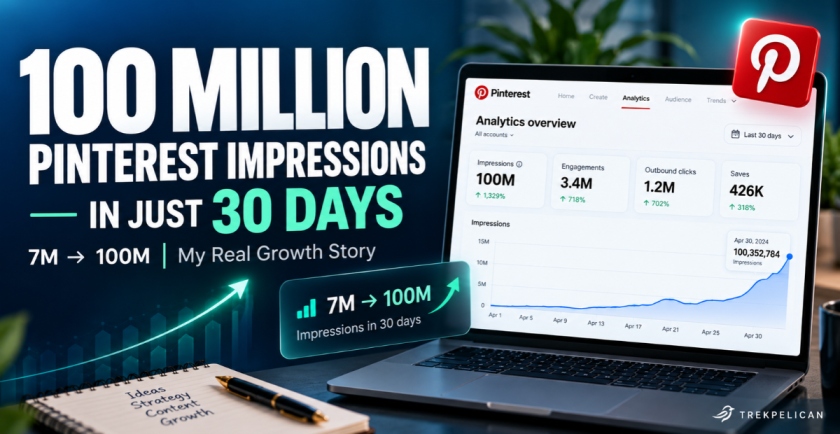
Two months later, I opened my analytics and saw a number I had been chasing for a long time: 100 million impressions in the last 30 days.
It didn’t happen overnight, and it didn’t happen by luck.
In this post, I’ll show you the real screenshots, the timeline from 7 million to 100 million, the kinds of ideas that went viral, what those impressions actually turned into in traffic and earnings, and the lessons you can use on your own account.
My Real Screenshots: 100 Million Impressions in 30 Days
Here’s the screenshot I’d been waiting for. These are the last 30 days, from September 27 to October 27, 2026.

Rounded, that’s:
• 100 million impressions, up 200%
• 5.2 million engagements
• About 187,000 outbound clicks to my website
• About 834,000 saves
• A total audience of about 23 million people
And this isn’t a one-day spike. Here’s a single day, from October 27 to 28:
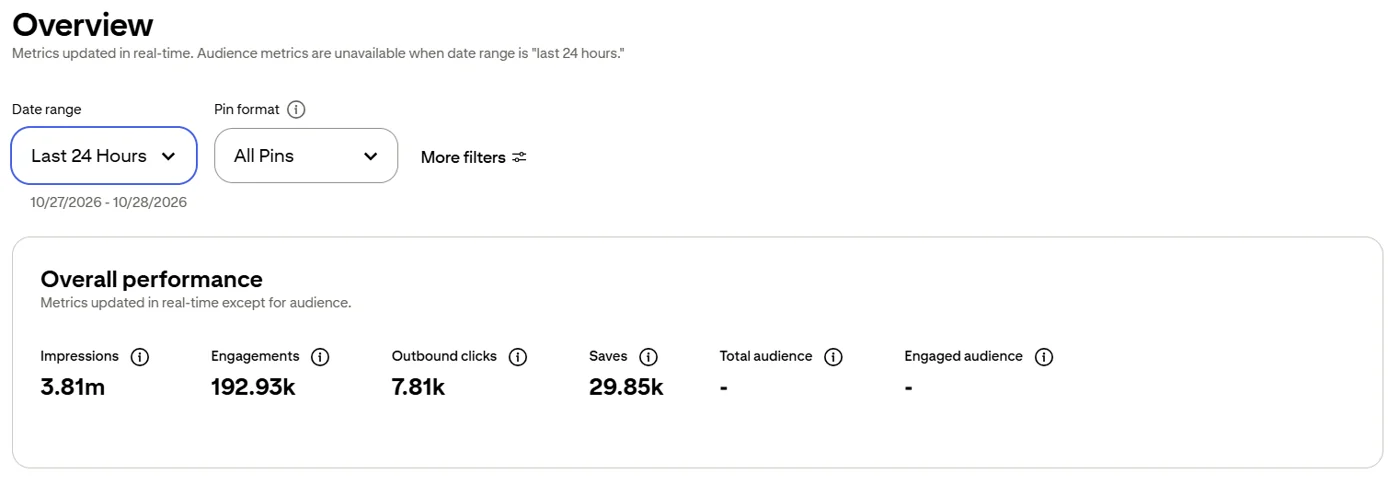
What these numbers mean
| Metric | What it means |
|---|---|
| Impressions | How many times my pins appeared on someone’s screen |
| Engagements | All actions on my pins, including saves, pin clicks and outbound clicks |
| Outbound clicks | Clicks that took people to my website |
| Saves | People saving my pins to their own boards |
| Total audience | How many people saw or engaged with my pins |
| Engaged audience | How many people engaged with my pins |
These definitions follow Pinterest’s own metrics glossary. Impressions are the headline number, but they’re not the number that pays the bills. I’ll come back to that.
Why I’m not showing my account name
All of these numbers come from one account: my main Pinterest account. But I’m keeping its name, profile and website private, and I want to be honest about why.
When an account grows this fast, copycats follow. People clone successful accounts, copy their pin designs and target the same keywords. Some even report accounts to knock out the competition. After losing an account once, I don’t take that risk. You’ll see real numbers in this post, just not where they come from.
Where I Started: The Years Before This Number
Before I show you the timeline, you should know this account wasn’t my first try.
I started blogging as a student, on free Blogspot. For years, Google sent me most of my traffic. Then, in late 2023, Google’s updates hit my site and my search traffic dropped to almost nothing. That’s when I started taking Pinterest seriously.
Before that, I had already lost a Pinterest account. It was getting millions of impressions a month when it was suspended overnight, and my appeal was rejected the next day. I share that whole story in Pinterest Account Suspended? Why It Happens and How to Avoid It.
So when I say 100 million impressions didn’t happen overnight, I mean it. It was built on lost traffic, a lost account, temporary blocks, mistakes and a lot of learning.
The Road to 100 Million: My Growth Timeline
From the outside, 100 million looks sudden. From the inside, it was a steady climb that sped up when the season arrived. Here’s the full timeline, using screenshots I took along the way:
| Period | Impressions | Outbound clicks |
|---|---|---|
| August 1–31 | 7.35M | 12K |
| October 1–13 | 33.99M | 56K |
| September 13 – October 13 (30 days) | 65.31M | 109K |
| September 21 – October 21 (30 days) | 84.5M | 149K |
| October 1–26 | 85.15M | 161K |
| September 27 – October 27 (30 days) | 100.05M | 187K |
August: 7 million impressions
August was my starting point. About 7 million impressions and 12,000 outbound clicks for the whole month. Good, but nothing dramatic.

Mid-October: 65 million
By mid-October, my 30-day impressions had jumped to 65 million. This is the point where I wrote my Pinterest growth strategy guide.

A week later: 84 million
Just eight days later, the 30-day number had reached 84.5 million. The growth was speeding up, not slowing down.

October alone: 85 million in 26 days
This is the screenshot that surprised me most. October 1 to 26 alone brought 85 million impressions, more than any full 30-day period before it.
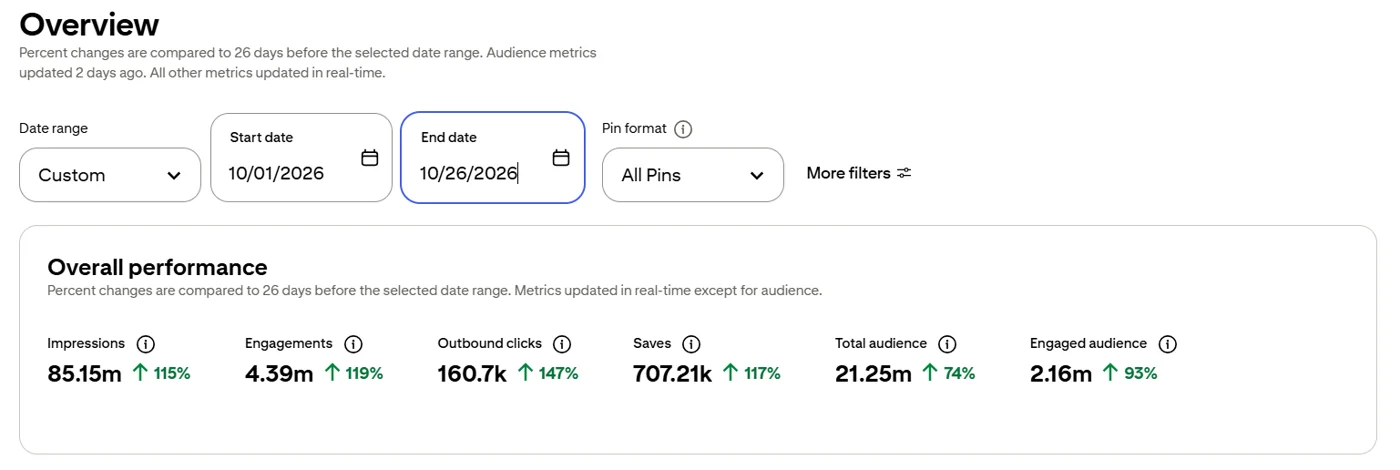
Then, on October 27, the 30-day total crossed 100 million. In about two months, my monthly impressions grew more than 13 times.
The Ideas That Went Viral
So what were people actually seeing? These are my top boards by impressions. I’ve blurred the pin images so the exact pins can’t be copied, but the board names and numbers tell the story.


| Board | Pins | Impressions |
|---|---|---|
| Craft Ideas | 61 | 5.51M |
| Decor Ideas | 296 | 3.49M |
| DIY Christmas | 389 | 2.09M |
| Christmas Recipe Ideas | 94 | 1.49M |
| Decoration Ideas | 351 | 1.12M |
| Christmas Decoration | 420 | 847K |
What these boards taught me
• Christmas started early. Three of my top six boards are Christmas boards, and this was September and October. Pinterest users plan holidays months ahead.
• More pins doesn’t mean more reach. My Craft Ideas board has only 61 pins, but it got more impressions than any other board. My Christmas Decoration board has 420 pins and got the fewest of these six. The right idea at the right time beats volume.
• Crafts, decor and recipes all worked. They share one thing: people save them to try later, so they keep getting shown.
• Seasonal and evergreen ideas worked together. Boho bedrooms, wedding backdrops and paper crafts kept growing alongside the Christmas content.
What Changed This Month
People always ask what “trick” caused a jump like this. There wasn’t one trick. It was several things lining up at the same time.
1. I planned for the season months ahead
Most of my Christmas and fall pins were planned and published well before the season. By October, Pinterest had already tested them, understood what they were about, and started showing them to people who were searching for holiday ideas.
If you start pinning Christmas content in December, you’re too late. My free Seasonal Pinning Calendar shows when to start each season.
2. My pins kept working after I stopped posting
This is the part I want every beginner to understand. I published these posts and pins until about the first week of October. After that, I moved my focus to other work.
And yet, impressions kept climbing for the rest of the month. The pins were already ranking in Pinterest search and being recommended in people’s feeds. That’s the power of Pinterest: a good pin can keep working for weeks or months after you publish it.
3. I chose the right niche for the time of year
Home decor, crafts and holiday recipes peak in the fall. My account was already built around these topics, so when demand rose, my pins were ready.
4. My account had history
An older account with a record of pins that people engage with seems to get distributed faster, and it can rank for bigger keywords. I explain this more in my Pinterest growth guide.
5. Fresh pins with clear text
Every post had fresh pin designs with a clear headline on the image, so people knew exactly what they’d get when they clicked.
6. I focused on ideas people want to try
Craft projects, decor makeovers and holiday recipes are things people save today and come back to later. That’s why they kept getting shown. Purely aesthetic pins can collect saves, but ideas people want to actually make or try tend to bring both saves and clicks.
Pinterest growth depends on three things: planning ahead, choosing the right niche, and posting at the right time. Get those right, and your pins keep working even when you step away.
My 100 Million Month, Broken Down
Big numbers are hard to picture, so here’s what my month looks like per day and per million impressions. These are rough averages from my screenshots:
| Measure | Approximate figure |
|---|---|
| Impressions per day (30-day average) | About 3.3 million |
| Outbound clicks per day (30-day average) | About 6,200 |
| Saves per day (30-day average) | About 28,000 |
| Outbound clicks per million impressions | About 1,900 |
| Ad earnings per million impressions (October 1–26) | About $29 |
That last line is the one I find most useful. In October, every million Pinterest impressions brought me roughly $29 in ad earnings. That’s why I never judge an account by impressions alone. A smaller account with a better click-through rate and a well-monetized website can earn more than a bigger account with weak clicks.
Your numbers will be different. They depend on your niche, your audience’s country, your pin designs, your website and your ad network. But doing this simple math on your own account tells you where to focus: more impressions, a better click-through rate, or better earnings per visit.
What 100 Million Impressions Really Means
Here’s the honest part that most “100 million views” posts leave out.
100 million impressions brought about 187,000 outbound clicks. That’s a click-through rate of about 0.19%. In other words, roughly 2 out of every 1,000 impressions became a click to my website.
You might think that sounds low. Before you decide, think about it once more.
Yes, some bloggers get a higher click-through rate
It’s true that some bloggers get 100,000 outbound clicks from far fewer impressions. With a click-through rate of 0.3% to 0.5%, 100,000 clicks can come from about 20 to 30 million impressions, and some accounts do even better.
But a high rate isn’t the norm. One analysis of 20 Pinterest accounts by Fat Stacks found an average click-through rate of 0.28% and a median of 0.18%, with a few sites close to 1%. So 0.19% on an account showing pins to over 20 million people is quite normal, especially now that Pinterest is full of AI-made pins competing for the same clicks.
The part most people miss: how long it took
Here’s what I noticed while reading blog posts, watching videos and following Quora and Reddit threads from other bloggers. When they shared their journey to 100,000 monthly outbound clicks, it often took them 3 months, 6 months or even 9 months of consistent posting.
My account went from about 12,000 outbound clicks in August to over 100,000 in a 30-day period by mid-October. That’s about two and a half months.
And I believe you can do this too, even as a beginner, if you plan the right ideas at the right time. I’ve shared my full method for free in How to Grow on Pinterest Fast, with step-by-step guides on finding trends before they peak and Pinterest keyword research.
Saves vs clicks
Saves were much higher than clicks: about 834,000 saves compared with 187,000 clicks. When Pinterest shows your pins to millions of new people, many of them save ideas to try later rather than clicking straight away.
This account and website follow the strategy I’m sharing in this post, which focuses on reach. On another of my websites, I use a different strategy, and its click-through rate is much higher. I’ll share that strategy, with proof, in a future post.
Saves still matter, because they tell Pinterest your pin is useful, and saved pins can bring clicks later. But if you want more traffic, you need to turn more of those impressions into clicks. I explain exactly how I work on that in Pinterest Saves but No Clicks? How to Increase Your Pinterest CTR.
Did 100 Million Impressions Turn Into Money?
Yes. Here are my Ezoic ad earnings for the same days I showed above for Pinterest: October 1 to 26, 2026.
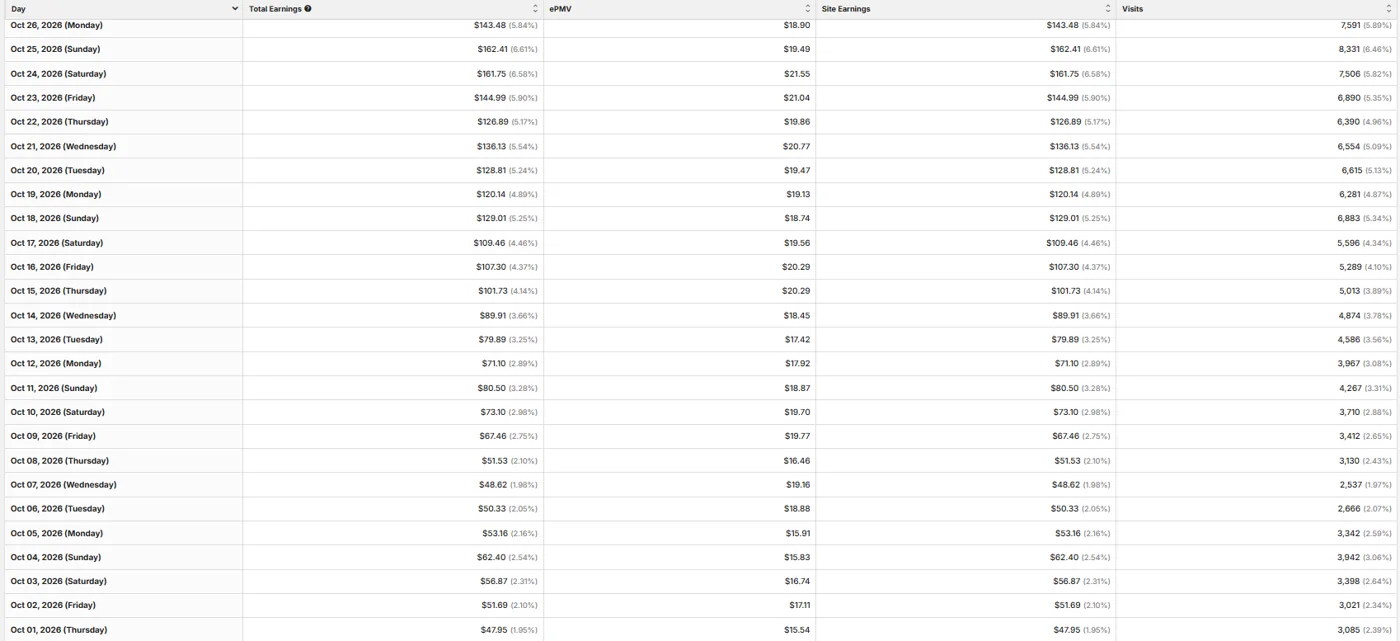
Rounded, for those 26 days:
• About $2,450 in total ad earnings
• About 129,000 visits
• Daily earnings grew from about $48 to over $160
• Daily visits grew from about 3,000 to over 8,000
• Earnings per 1,000 visits (ePMV) stayed between roughly $15 and $22
Clicks, pageviews and visits: why the numbers differ
For October 1 to 26, Pinterest showed about 161,000 outbound clicks. Ezoic recorded about 169,500 pageviews across about 129,000 visits for the same days.

Pageviews and visits measure different things:
• A pageview is counted every time a page on my site loads. When someone clicks a pin and lands on my post, that’s a pageview.
• A visit is one session. If the same person clicks another of my pins or reads another post during that session, Ezoic counts more pageviews but still only one visit.
That’s why my visits are lower than my Pinterest clicks, while my pageviews are close to them. On average, each visit included about 1.3 pageviews, because readers often go on to a second post.
The quality of these visits matters too. The average visit lasted about 3 and a half minutes, and only about a third of visitors left without engaging further. That tells me people weren’t just clicking and leaving. They were reading.
What matters most is the trend. As impressions grew, clicks grew, visits grew, and earnings grew with them. If you want to see how I went from $2 a day to $100 a day, read How to Make $100 a Day Blogging.
Curious what your own impressions could be worth? Enter your monthly impressions, your click-through rate and your earnings per 1,000 visits. The estimator below works out your likely clicks, visits and ad earnings. For my full numbers by country, see my blog income report.
Free tool · Trek Pelican
Pinterest Impressions to Earnings Estimator
Turn monthly impressions into estimated clicks, blog visits and ad earnings.
An estimate only. Real earnings depend on your niche, countries, season, ad setup and how many pages each visitor reads.
The Honest Truth: Pinterest Traffic Always Fluctuates
I don’t want this post to make Pinterest sound like a machine that only goes up. It isn’t.
Pinterest traffic always rises and falls. Seasons end. Trends fade. A pin that’s viral today can slow down next week. After Christmas, my impressions will drop, and that’s completely normal.
In my experience, how well you handle these ups and downs depends on three things:
• Planning: preparing the next season’s content before the current one ends.
• Your niche: some niches peak at certain times of the year, and some are steadier.
• Timing: publishing early enough for Pinterest to test and distribute your pins before demand peaks.
If you want fewer ups and downs in your account, mix in evergreen niche ideas: topics people search for all year, not just in one season. I explain how to combine seasonal and evergreen topics in Best Pinterest Niches for Seasonal Traffic.
If you understand this, a drop won’t scare you. You’ll already be working on the next season. And if you ever see a sudden, unexplained drop, read my guide on why Pinterest accounts get suspended and how to avoid it, so you can rule out account problems.
Mistakes I Made on the Way to 100 Million
I didn’t get here by doing everything right. These are the mistakes that cost me the most, so you can avoid them.
Publishing too many pins too fast
Pinterest didn’t send me a warning. Instead, when I published more pins than its limit allows, it simply stopped me. Pinterest has internal limits on how many actions you can take in a short time. If you go over them, it can temporarily block you from publishing, and in my case the restriction lasted up to 24 hours.
I don’t know the exact number, because Pinterest doesn’t publish it. For me, it happened when I went past roughly 100 to 120 pins. I made this mistake twice. Since then, I’ve stayed under that level, and it hasn’t happened again.
My advice: pace your pinning and spread it out. A temporary block costs you a day, and repeatedly pushing past the limit can put your account at risk.
Starting seasonal content too late
For a long time, I published holiday content close to the holiday itself. By then, other pinners’ content had already been tested and was ranking. Now I plan two to three months ahead, and this month’s results show why.
AI Is Everywhere on Pinterest: Be Aware of It
If you spend time on Pinterest today, you’ll notice that almost every piece of content is created with AI in some way: images, pin designs, titles and descriptions.
I think every new blogger and pinner should be aware of this, for two reasons.
First, AI saves a huge amount of time and effort. Tasks that used to take hours can now take minutes.
Second, if you refuse to use it, you’ll fall behind. Doing everything by hand isn’t wrong, but it’s slow. By the time you reach the level you’re aiming for, the people using AI will already be far ahead of you.
That doesn’t mean letting AI do everything. You still need to choose the right ideas, check quality and make sure your content genuinely helps people. AI is a tool, not a strategy.
I have a lot more to share about this, so I’m planning separate posts on:
• How AI changed my blogging life, and how much I earn since using it
• The AI tools you can use for blogging
• The AI tools you can use for Pinterest
Follow Trek Pelican on Pinterest so you don’t miss them.
Can a New Account Get 100 Million Impressions?
Yes, I believe a new account can get there too. It takes the right niche, the right ideas, good timing and a plan you follow consistently.
This post is already long, so I’ve shown how a new account can start, step by step, in Pinterest for Beginners: A Step-by-Step Guide to Your First Viral Pin.
If you’re starting from zero, focus on one niche, one account and one website first. Learn what your audience saves and clicks. Once you understand that, growth becomes much easier to repeat. And make sure your website is ready for the traffic: fast, helpful and set up properly. If you haven’t built it yet, my guide on how to start a WordPress blog on Hostinger walks you through it.
How to Read Your Own Pinterest Analytics Like This
Every screenshot in this post comes from Pinterest’s free analytics, which you get with a business account. Here’s how I use it, so you can track your own growth the same way.
1. Compare the same length of time
Pinterest compares your chosen date range with the same number of days before it. That’s where the green percentages come from. Use “Last 30 days” regularly, and use custom dates to compare full months, like I did with August and October.
2. Watch outbound clicks, not just impressions
Impressions show your reach. Outbound clicks show your traffic. Divide clicks by impressions to get your click-through rate. If impressions grow but clicks don’t, your pins need clearer headlines or a stronger reason to click.
3. Check your top boards and pins
Your top boards and top pins show which ideas Pinterest is pushing right now. When an idea starts growing, create fresh pins and new posts around it while the demand is there.
4. Take screenshots as you go
I took screenshots at 65 million and 84 million without knowing I’d reach 100 million so soon. Those screenshots became this post. Save yours too. They help you spot patterns from season to season, and they’re proof of your progress when you need motivation.
5. Match Pinterest with your website data
Compare Pinterest clicks with the pageviews, visits and earnings your site records for the same dates. That’s how I know roughly what a million impressions is worth to me, and where to focus next.
How You Can Grow Your Pinterest Impressions
These are the steps I’d follow if I were trying to grow an account today:
1. Pick a niche with strong seasonal demand, like home decor, crafts, recipes or DIY, plus some evergreen topics.
2. Plan your seasons two to three months ahead. Publish Christmas content in September and October, not December.
3. Do keyword research before you design. Use Pinterest search suggestions and tools like PinClicks to find what people actually search for.
4. Create fresh pins for every post, with a clear headline on the image.
5. Use vertical pin sizes, like 1000 × 1500, so your pins take up more space in the feed.
6. Link every pin to a helpful post that delivers exactly what the pin promises.
7. Stay within Pinterest’s limits and follow its rules, so your account stays safe.
8. Check your analytics every week, and make more pins for the ideas that are already working.
9. Use AI to save time, but check everything before you publish.
For the full step-by-step strategy, read How to Grow on Pinterest Fast: The Strategy Behind My 65M Monthly Views.
What I’m Doing Next
Reaching 100 million monthly impressions was a goal I’d set for myself for a long time. It was also the milestone I chose for launching something I’ve been planning.
My plan was to sell my full method as a paid playbook. I changed my mind. Instead, I’ve shared everything for free, with screenshots, in these guides:
• How to Grow on Pinterest Fast: The Strategy Behind My 65M Monthly Views: the full strategy, step by step.
• How I Find Pinterest Trends Before They Peak: how I find viral ideas before they peak.
• How to Do Pinterest Keyword Research with PinClicks: how I find the keywords people search for.
• Pinterest for Beginners: A Step-by-Step Guide to Your First Viral Pin: how I’d post and stay safe on a new account.
• Best Pinterest Niches for Seasonal Traffic: the seasonal niches behind my viral boards.
Next, I’m working on my high-CTR strategy and my AI posts. Follow Trek Pelican on Pinterest to hear when they’re live.
Free Downloads to Help You Grow
Each of my guides comes with a free download to help you put it into practice:
• Pinterest Seasonal Pinning Calendar 2027: what to plan, pin and expect every month of the year.
• Pinterest Trend Research Worksheet: find rising ideas before they peak and decide what to write.
• Pinterest Keyword Research Tracker: score every keyword and turn one research session into several posts.
• First 30 Days on Pinterest Checklist: set up a new account the right way and pin safely.
• Pinterest Niche Scorecard: choose the seasons and niches worth your time.
All of them are free and printable, and you can fill them in on screen.
Frequently Asked Questions
How long did it take to reach 100 million Pinterest impressions?
About two and a half months from the start of August, when my account had around 7 million monthly impressions. Before that came years of learning and an account I lost.
Is 100 million impressions from one account?
Yes, all the screenshots in this post come from my main Pinterest account. I’m keeping its name private to protect it from copycats.
How many clicks do 100 million impressions bring?
In my case, about 187,000 outbound clicks, a click-through rate of about 0.19%. It depends heavily on your niche and pin design.
How much did I earn from this traffic?
From October 1 to 26, my Ezoic ad earnings were about $2,450 from about 129,000 visits. These are my personal results, and yours may be very different.
Which ideas get the most impressions on Pinterest?
For me, crafts, home decor, DIY Christmas ideas and holiday recipes performed best in the fall. Seasonal ideas published early did especially well.
Do I need to pin every day to keep growing?
Consistency matters while you build. But I stopped publishing new posts around the first week of October, and my impressions kept growing because my pins were already ranking and being recommended.
Why are my website visits lower than my Pinterest clicks?
Because a visit and a pageview are different. Each click lands on a page and counts as a pageview, but one visit can include several pageviews. In October, my roughly 161,000 Pinterest clicks lined up with about 169,500 pageviews across about 129,000 visits.
Why do Pinterest impressions go up and down?
Seasons, trends and competition change all the time. Planning ahead, choosing the right niche and posting at the right time help you handle the ups and downs.
How much money do 100 million Pinterest impressions make?
It depends on clicks, your website and your ad network. For me, every million impressions brought about $29 in ad earnings in October. Some accounts earn much more or much less.
Should I use AI for Pinterest?
In my opinion, yes. Most Pinterest content is now created with AI’s help, and it saves a lot of time. Just make sure the ideas are useful and the quality is good before you publish.
Final Thoughts
When I lost my first Pinterest account, I never imagined I’d one day see 100 million impressions in a month. This number didn’t come from one viral pin or one secret trick. It came from years of learning, planning seasons ahead, choosing the right ideas and letting good pins keep working.
If you’re just starting, don’t compare your first month to my best month. Compare your account to where it was last month, and keep improving.
If this post helped you, follow Trek Pelican on Pinterest for more real numbers and lessons from my journey.
Sources
• My Pinterest Analytics screenshots, August to October 2026
• My Ezoic dashboard, October 1–26, 2026