Pinterest Keyword Research with PinClicks: The Free + Paid Methods Behind My 102M Monthly Views
This post may contain affiliate links. If you buy through them, I may earn a small commission at no extra cost to you. Read our full affiliate disclosure
For years, I did Pinterest keyword research the slow way. I typed ideas into the search bar, scrolled through suggestions, opened pin after pin, and tried to guess which keyword would work. Sometimes I guessed right. Often I didn’t.
Choosing a keyword without numbers is like walking a path with no destination marked.
In September 2025, I started using PinClicks, a paid Pinterest keyword tool. Within about two weeks, pins built on the keywords I found with it started bringing visitors to my website.
In this guide, I’ll explain how keyword research on Pinterest really works, how it’s different from Google, and exactly how I use PinClicks, with real screenshots. I’ll also show you the free method, so you can start today even without a paid tool.
The Short Version
Find a rising seasonal idea early. Turn it into long-tail keywords. Prefer keywords with roughly 50 to 500 estimated searches over the big ones. Check that recent blog pins rank in the top results. Skip keywords dominated by shops or image-only pins. Then use the keyword in your pin title, description, board name and blog post title.
The rest of this post shows you how to do each of those steps, and why they work.
What Pinterest Keyword Research Actually Means
Pinterest is a visual search engine. People type what they want, such as “small balcony christmas decor”, and Pinterest shows pins it believes match that search. Keywords are how Pinterest understands what your pin is about.
Keyword research simply means finding the words people actually type, then choosing the ones your pins have a real chance of ranking for. Get it right, and your pins appear in search results and in people’s home feeds for months. Get it wrong, and even a beautiful pin can sit unseen.
Pinterest is also huge. It reported 661 million monthly active users in the third quarter of 2026, a record high. And according to Pinterest, 97% of its searches are unbranded. People come looking for ideas, not brands, which is exactly why bloggers can win there.
Pinterest Search vs Google Search
Many bloggers bring their Google habits to Pinterest. That’s where they go wrong. The two work differently:
| Why people search | To find a specific answer | To browse, save and plan ideas |
| What they see | Mostly text results | A grid of images |
| What decides ranking | Site authority, backlinks, speed, content depth | Keyword match in title, description and board, plus engagement |
| What gets the click | The title and snippet | The image and the headline on it |
| How long content lasts | Until a competitor outranks you | A good pin can keep bringing traffic for months |
| High-volume keywords | Usually worth fighting for | Often too crowded; long-tail can travel further |
That last row is the most important for this guide. On Google, chasing a 30,000-search keyword can make sense. On Pinterest, an eye-catching pin on a 300-search keyword can be shown to a huge audience, and sometimes even ranks for the bigger keyword too.
The Free Method: Pinterest Search Only
You can do solid keyword research with nothing but Pinterest. This is the method I used before PinClicks:
1. Start with a trend. Use Pinterest Trends and the “Include keyword” filter to find rising ideas two to three months before a season.
2. Search the idea on Pinterest and click the suggestion cards under the search bar to make it more specific.
3. Click the search bar to see suggested searches, and type a, b, c after the keyword for even more.
4. Study the first two rows of pins: likes, comment dates, the account’s monthly views, the blog post behind each pin, and whether it targets your exact keyword.
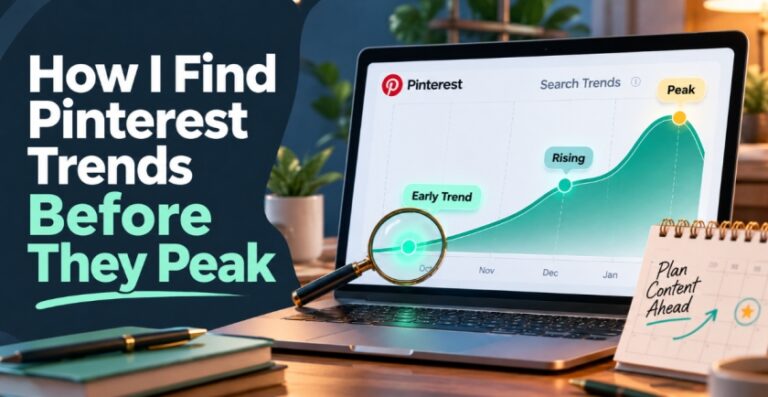
I explain each of these steps with screenshots in How I Find Pinterest Trends Before They Peak.
The free method works, but it has one big weakness: there are no numbers. You don’t know how many people search a suggestion, or how strong the competition is. You end up guessing, and research takes a long time.
The Paid Method: Why I Started Using PinClicks
PinClicks is a Pinterest keyword and pin research tool. Its founder began building it in early 2024, and it was introduced as a new Pinterest keyword tool that September. It works from publicly available Pinterest data.
When I started using it in September 2025, it was still new. There was almost no proper guidance on YouTube or Google, so I learned it myself through trial and error. The results were worth it: within about two weeks, pins built on its keywords were bringing visitors to my website.
What it gives you that Pinterest doesn’t:
• Estimated search volume for each keyword
• Related keywords and interests in one list
• Top Pins for each keyword, with their created date, repins, saves and reactions
• The website behind each top pin, so you can see whether blogs or shops are ranking
My PinClicks Walkthrough, Step by Step
I’ll use the same example as my trends guide: “apartment christmas decor”, a keyword I found rising in Pinterest Trends in October. I’ll use the same example as my trends guide: “apartment christmas decor”. If you’re wondering where this keyword came from, you can find it in my previous post, How I Find Pinterest Trends Before They Peak (The Method Behind My 102M Monthly Views). There, I spotted it rising in Pinterest Trends in October, with 60% weekly growth and a forecast icon. Then I searched it on Pinterest to find longer, more specific versions.
Here, I’ll take that same keyword into PinClicks to check its search volume, see which pins rank for it, and find long-tail keywords that are easier to rank for.
Step 1: Search the keyword in Keyword Explorer
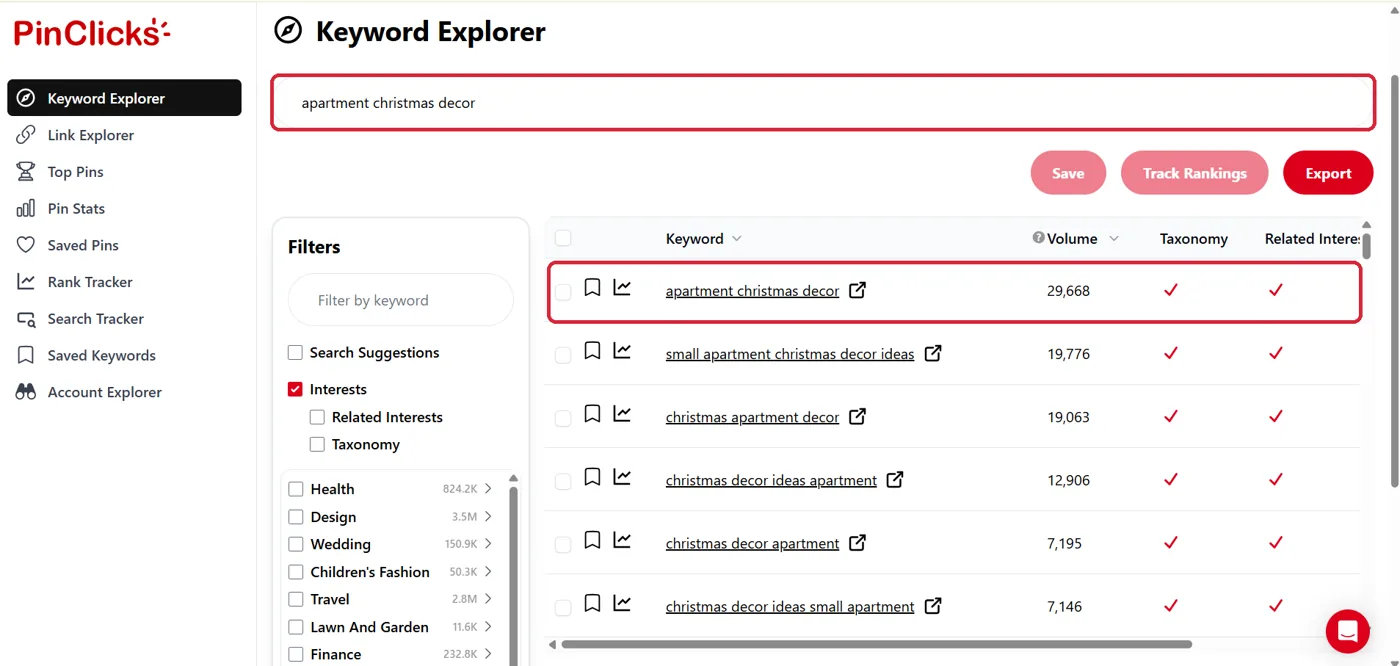
Open PinClicks, go to Keyword Explorer and enter your keyword. You’ll get a list of related keywords with PinClicks’ estimated volume for each.
Step 2: Open the keyword to see volume and related interests
Click a keyword to open its page. You’ll see the estimated volume, where it sits in Pinterest’s categories, and its related interests.
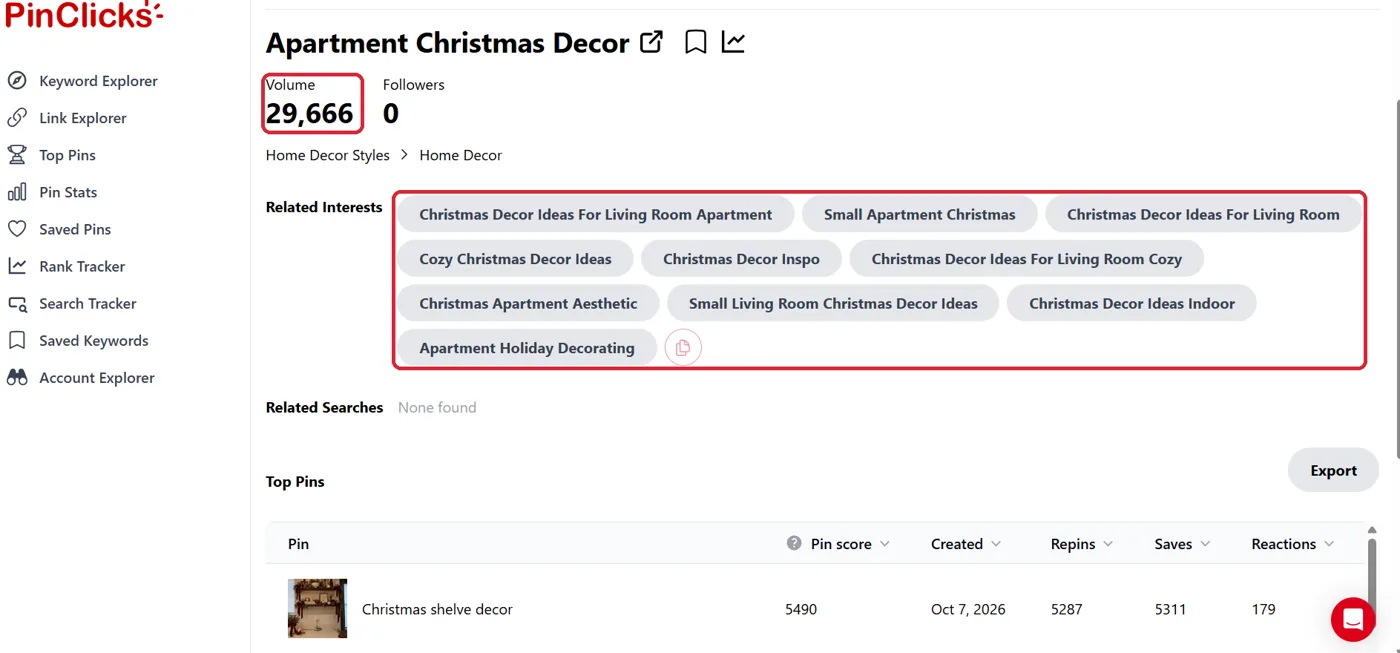
The related interests are gold for planning. Many of them are long-tail angles you can turn into separate posts or sections.
Step 3: Study the Top Pins
Scroll down to Top Pins. This is where I spend most of my time. For each pin, check four things: when it was created, its repins, its saves and its reactions. Then check the website it links to.
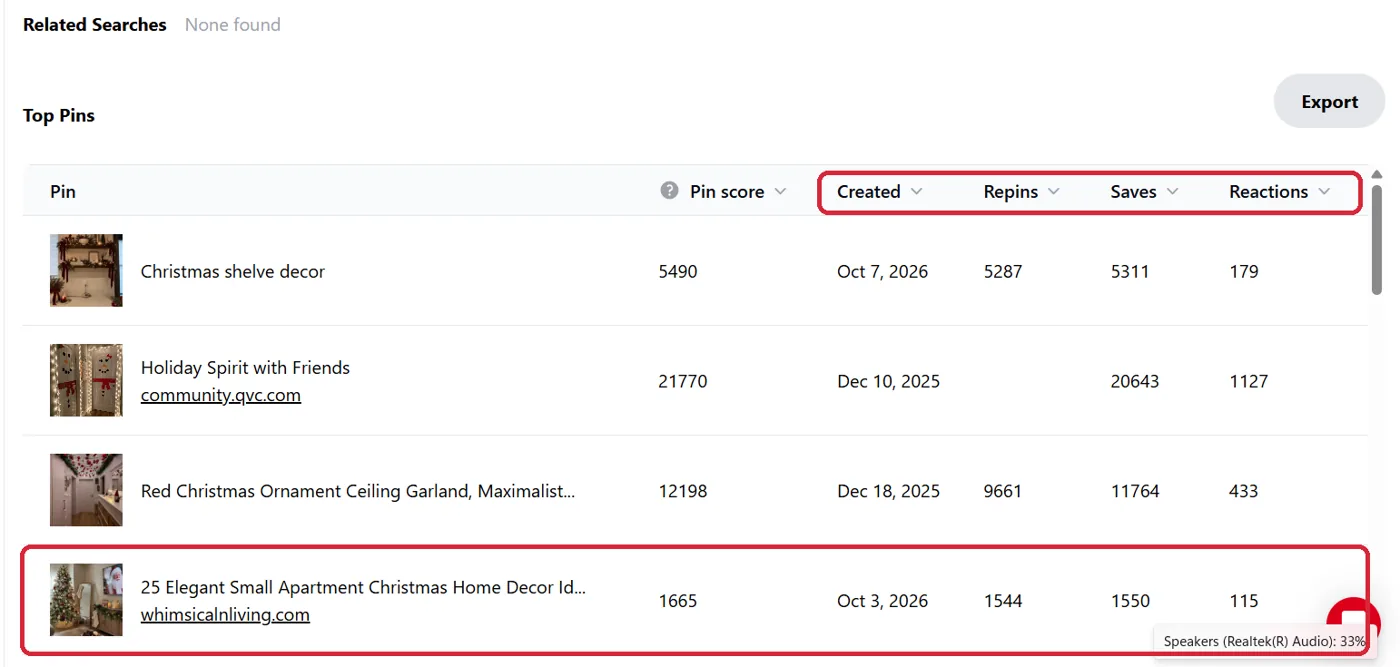
Here’s what I noticed in this list:
• The first pin is an image only, created on October 7, with over 5,000 saves. It has no website link.
• Some pins link to community pages or shops. I ignore those, because I’m looking for blogs like mine.
• Several blog pins were created in September and October 2026 and already have hundreds or thousands of saves. That tells me Christmas content is being pushed right now, and new blog pins can still rank.
Step 4: Watch out for shops and image-only pins
Keep scrolling. If most top pins link to shops or marketplaces, or have no website at all, I don’t target that keyword. Blog posts usually won’t get much room there.
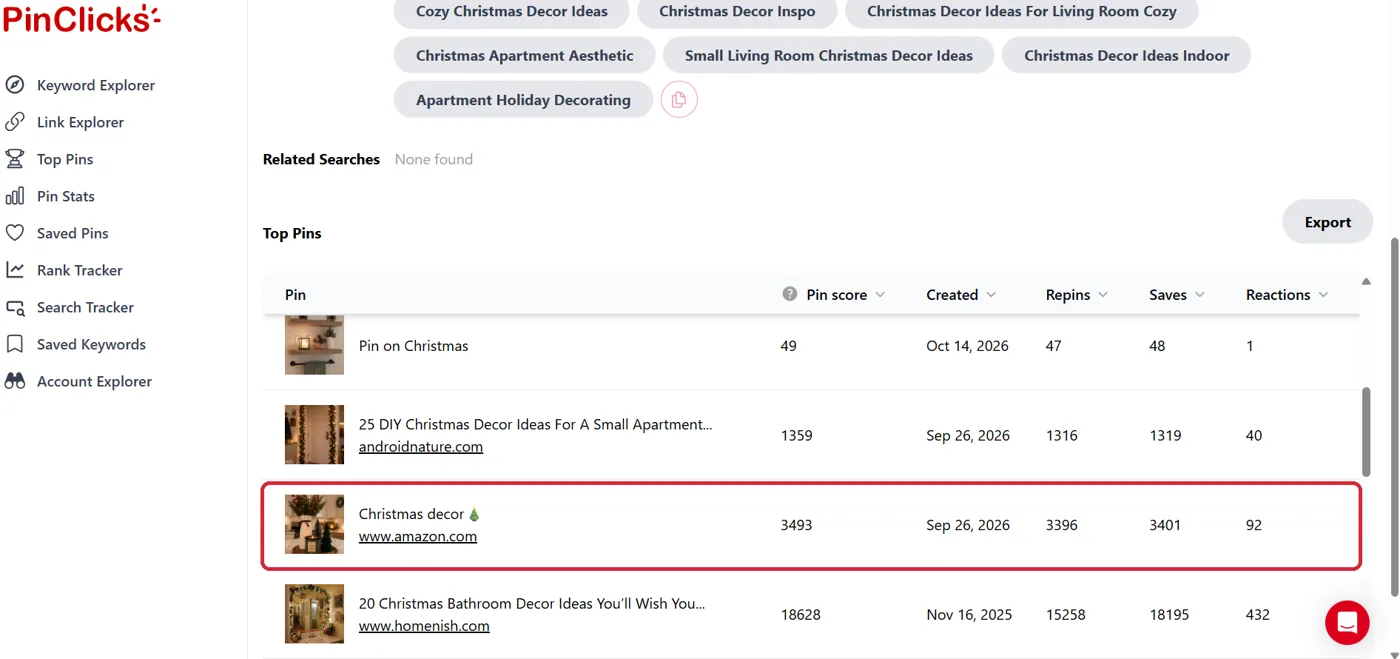
Image-only pins without text often collect huge numbers of saves and reactions. My guess is that platforms like to keep people on their own site, so these pins travel well. But they rarely send clicks. For bloggers, a pin with a clear headline and a link to a helpful post is what brings traffic. This is my opinion from experience, not something Pinterest has stated.
Step 5: Cross-check on Pinterest
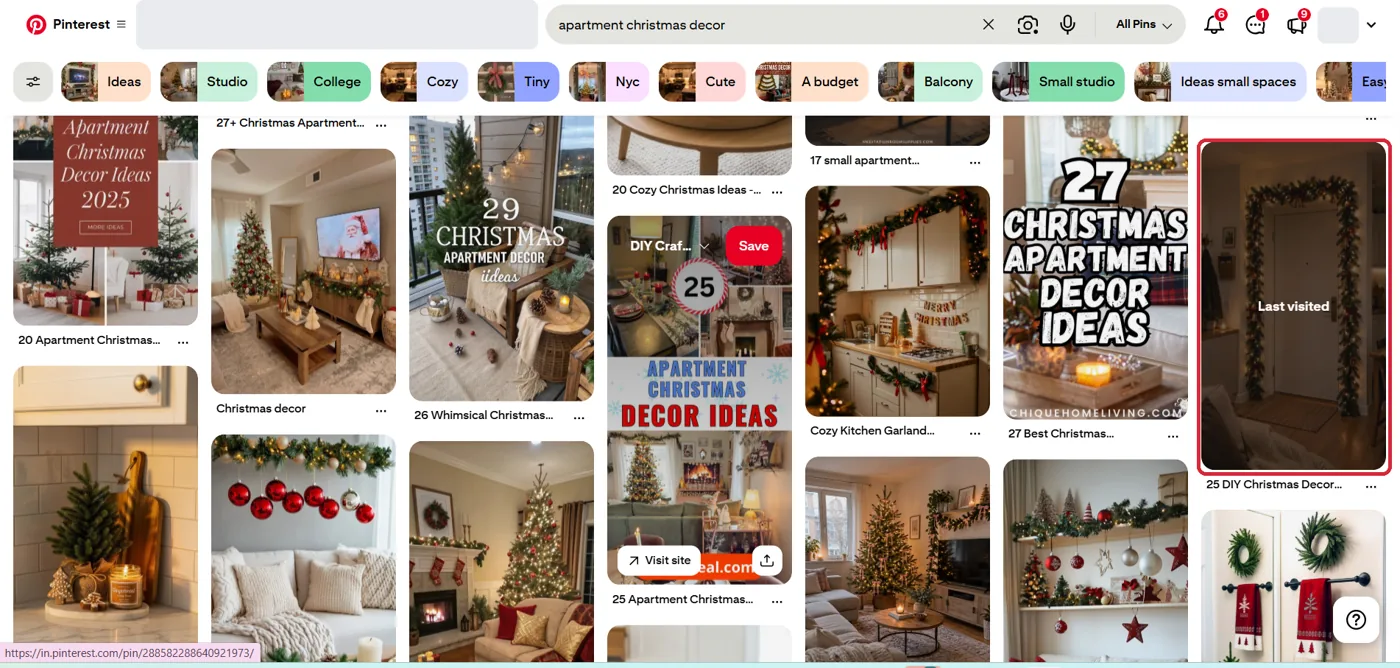
Next, I search the same keyword on Pinterest and look for the same pins. This confirms what PinClicks shows, and lets me see the pins exactly as users see them.
Click the pin to see its title, description and the blog post it links to.
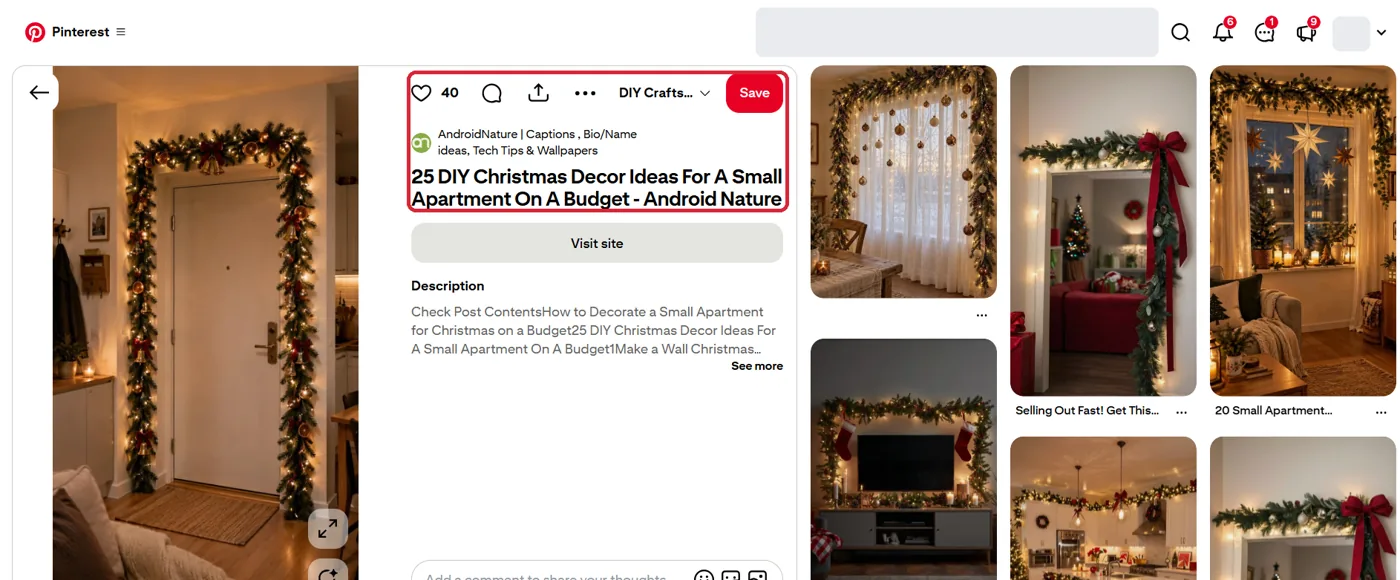
Notice how the title uses a long-tail version of the keyword. That’s a pattern you’ll see again and again among pins that rank well.
Case Study: 29,700 vs 325 Searches
Here’s where most bloggers make the wrong choice. They see “apartment christmas decor” with an estimated 29,700 searches and think: more searches, more clicks. On Pinterest, it doesn’t work that simply.
A broad keyword like this is what most pinners target. Your post can rank, but it usually won’t last. In my experience, Pinterest may push a pin for two or three weeks, and then the recommendations stop.
So I scroll down the Keyword Explorer list to the smaller keywords. These are the ones I’m really looking for.
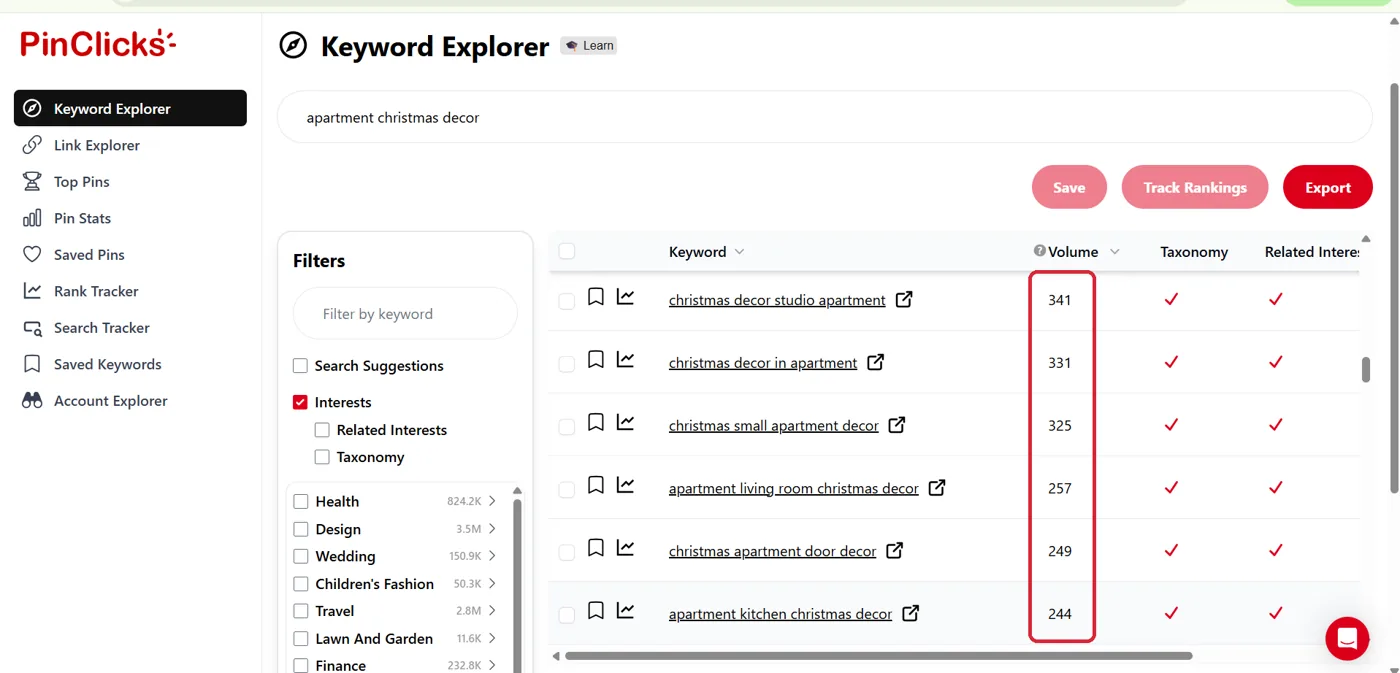
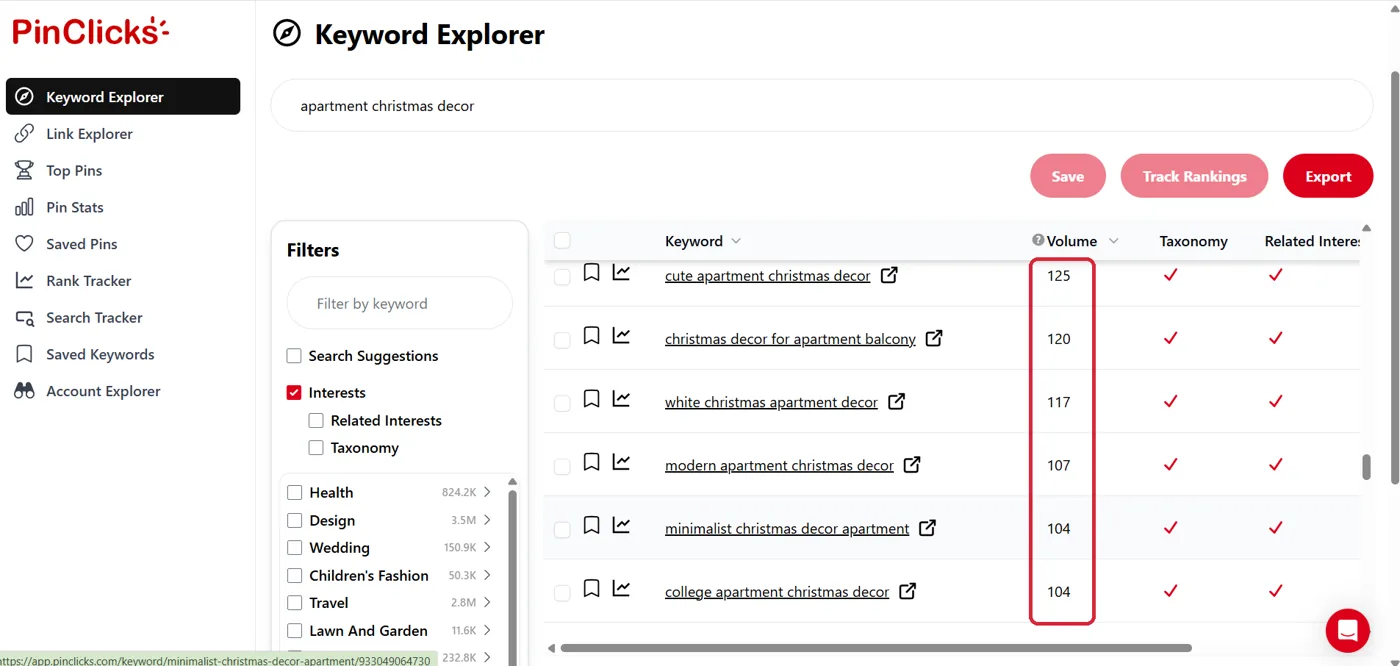
Now let’s test one. I clicked “christmas small apartment decor”, with an estimated 325 searches.
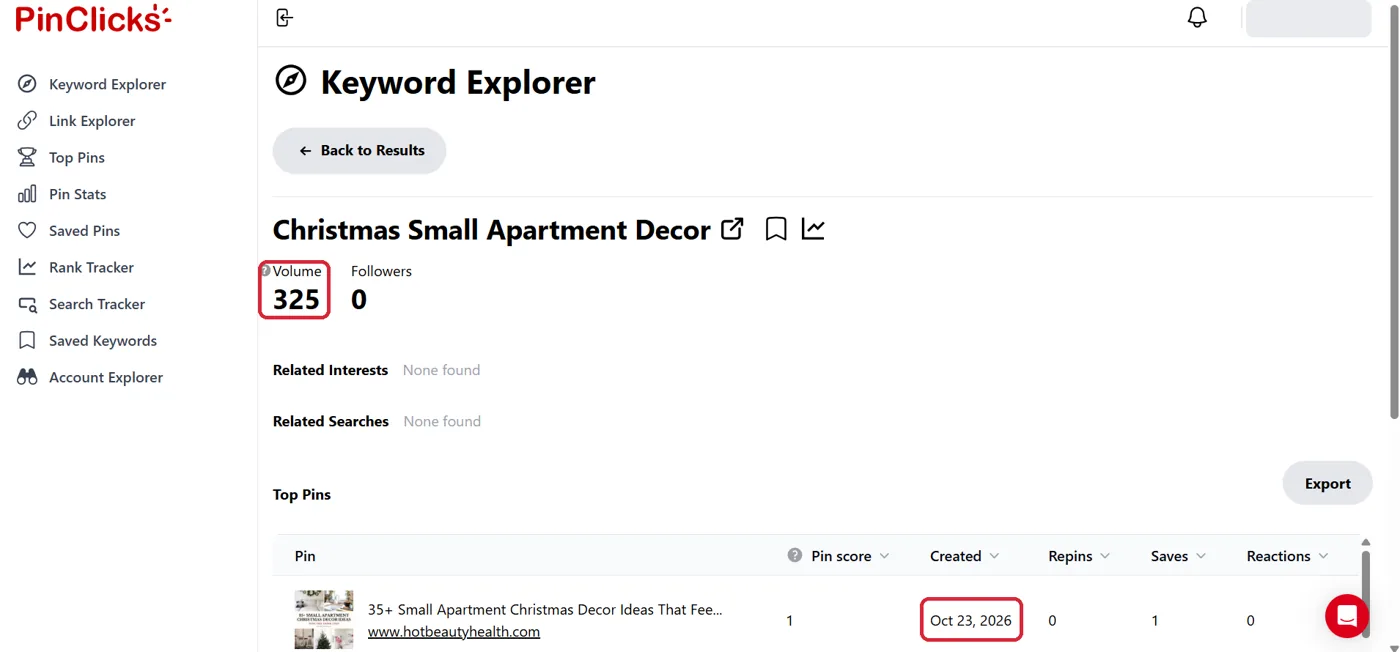
The top pins are mostly blog posts created in October 2026. Many have low numbers so far, but that’s only because they were just created. Repins, saves and reactions come in the following weeks. Don’t judge a brand-new pin by its numbers. Judge it by its date.
And when I scrolled further, I found the proof.
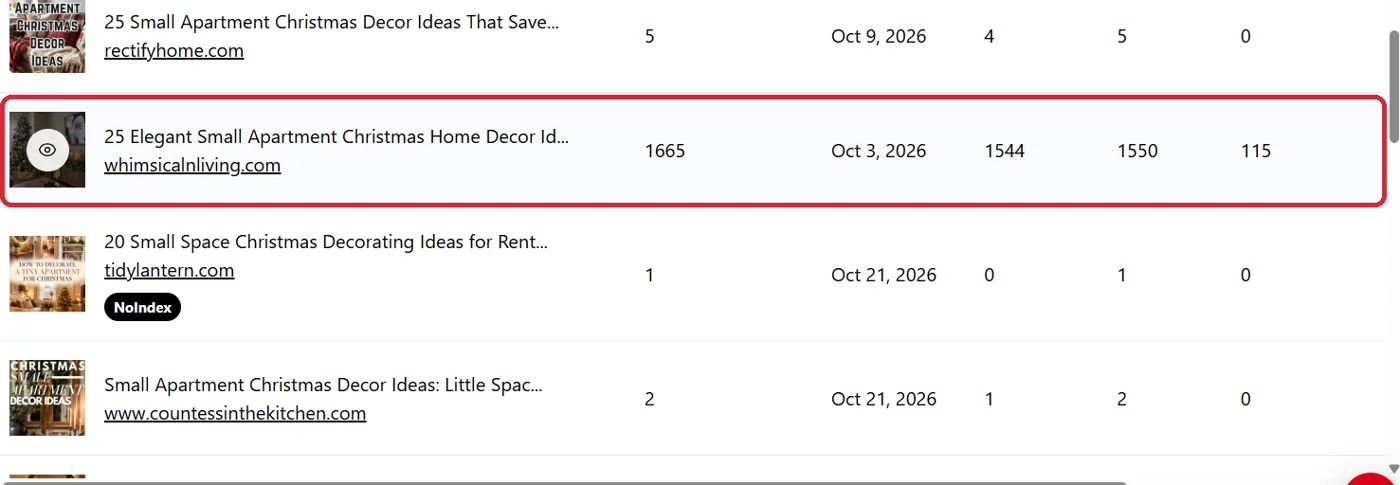
That’s the lesson. A long-tail keyword doesn’t limit you. A good pin on a smaller keyword can rank there and for the bigger keyword too. In my experience, long-tail pins often outperform short-tail ones, and sometimes my pins appear at the top for the short keyword as well.
What about very small keywords?
PinClicks lists hundreds of keywords, down to very small ones.
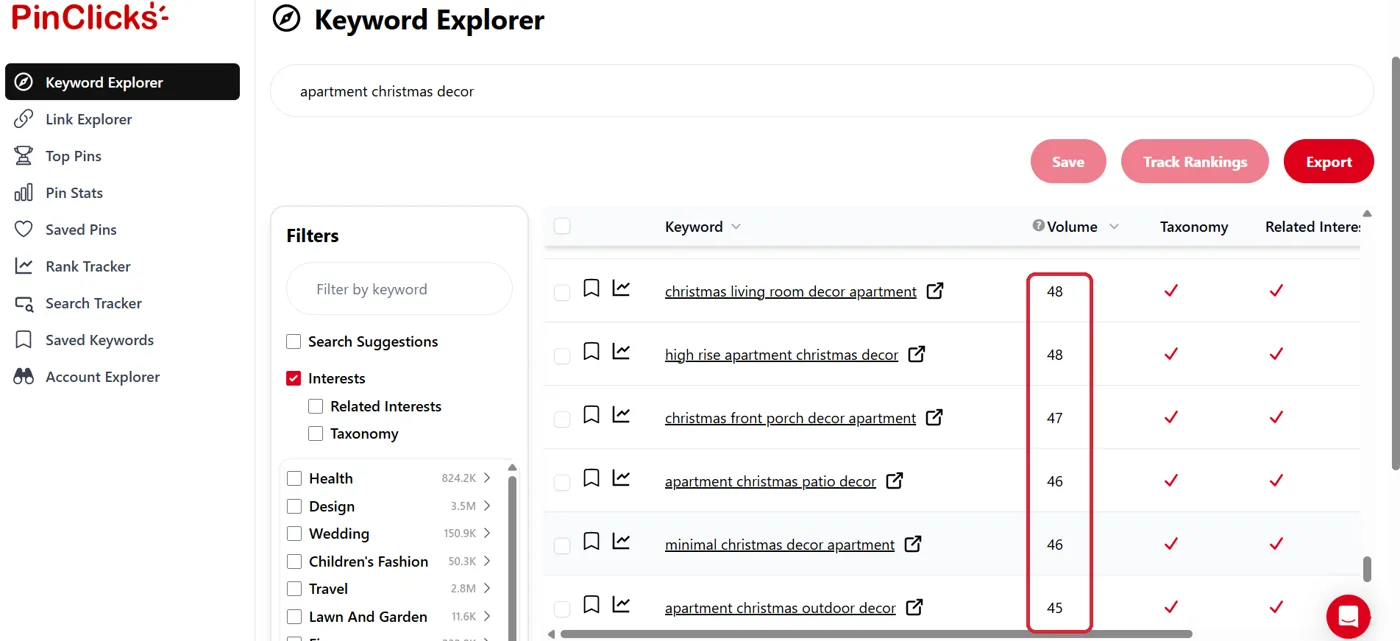
My sweet spot is about 50 to 500 estimated searches. Below that, I’ll still use a keyword as a section or pin headline inside a bigger post, but I rarely build a whole post around it.
My PinClicks Checklist
Every time I research a keyword in PinClicks, I go through this list:
| # | Check | Good sign |
|---|---|---|
| 1 | Estimated volume | About 50–500 for a main keyword |
| 2 | Created dates of top pins | Recent pins, from this season, are ranking |
| 3 | Repins, saves, reactions | High numbers on recent pins mean the topic is being pushed now |
| 4 | Websites behind top pins | Blogs rank, not just shops or image-only pins |
| 5 | Related interests | Several long-tail angles you can cover |
| 6 | Brand-new pins | Judge them by their date, not their low numbers |
| 7 | Pinterest cross-check | The same pins appear in Pinterest’s first two rows |
| 8 | Fit with your niche | It matches your blog and your audience |
One thing to remember: PinClicks’ volumes are its own estimates. Pinterest doesn’t publish search volumes, so treat the numbers as a comparison tool, not exact counts.
PinClicks Mistakes to Avoid
When I started, there was no proper tutorial, so I learned PinClicks through trial and error. These are the traps I see most often, and the ones I watch for in my own research.
1. Chasing the biggest number
The highest-volume keyword looks like the best choice. But that’s exactly where most pinners compete. Your pin gets buried, and even if it ranks, it may fade within a few weeks. The 50–500 range is usually where a new pin has room.
2. Ignoring the created dates
A pin with 20,000 saves looks like proof that a keyword is great. But if that pin is two or three years old, it tells you little about whether a new pin can rank today. Recent pins ranking tells you much more.
3. Not checking who is ranking
If the top pins are nearly all shop listings or image-only pins, a blog pin has a weak chance. Check the websites behind the top pins before you write a single word.
4. Researching too late
Some of my Halloween pins went live in October and still went viral. But late pins have less time to build saves before the season ends. Research each season two to three months ahead whenever you can. If you’re already late, it’s not hopeless, as I explain in the section on November and December below.
5. Treating volumes as facts
PinClicks’ volumes are estimates, and they change. Use them to compare keywords against each other, not to predict exact traffic.
Turning One Research Session into a Post Plan
One good research session can give you several posts, not just one. Here’s how I’d group the keywords from the “apartment christmas decor” example above into a simple plan. These keywords are only examples to show the method, not my recommendations for you to target. Run your own search, because volumes change every season.
| Post idea | Main keyword | Supporting keywords for pins |
|---|---|---|
| Small apartment Christmas decor ideas | christmas small apartment decor | christmas decor studio apartment, college apartment christmas decor |
| Balcony Christmas decorating | apartment balcony christmas decor | christmas front porch decor apartment |
| Minimalist apartment Christmas | minimalist christmas decor apartment | white apartment christmas decor, modern apartment christmas decor |
Each post gets its own main keyword. The supporting keywords become extra pins for the same post, each with a different design and headline. That way, one post can rank for several searches at once.
I also link these posts to each other. Someone reading about balcony decor will often want small-space ideas too, which keeps them on your site longer.
Is It Too Late to Target Keywords in November or December?
Not necessarily. Two to three months ahead is still my rule, but some of the keywords I covered in November and December ranked within a week. Whether that happens for you depends mainly on three things.
• Your account’s age and momentum. When many of your pins are already being recommended and you’re getting millions of views, Pinterest tends to test your new pins quickly too, sometimes even on shorter keywords.
• Your competition on the exact keyword. Before you write, check whether bloggers have already made pins for that exact phrase. If the top results only target something related, a well-made pin on the exact keyword has room.
• How carefully you research. Late in the season, random keywords are a gamble. Use PinClicks or the free method to find specific phrases that recent blog pins are ranking for.
These are my own observations from my accounts. They may not work the same way for you, especially on a new account, but they’re worth trying.
The secret: a unique, catchy pin idea
At the end of November 2025, one of my pins went viral well after most people had stopped planning Christmas content. The keyword helped, but the real reason was the idea itself.
Think about how you scroll Pinterest. Most pins look alike. Then one idea makes you stop, look closer and check how many people have saved or commented on it. That’s the kind of pin that travels, even late in the season. Most pinners never make one, because they copy what’s already ranking instead of adding their own twist.
Views or visitors: decide what you want
A catchy, unusual idea can bring huge reach. If you only want to grow your Pinterest views, that’s enough. But if you want outbound clicks to your blog, the idea must match your niche and give people a reason to visit.
In my experience, clicks come more easily in niches where the full answer lives on your website:
• Recipes: people need the ingredients and steps. My recipe board had my best click-through rate in October, about 0.27%.
• DIY and crafts with instructions: the pin shows the result, but the how-to is on your post.
• Gift guides and product roundups: readers click to see the products, which also helps affiliate income.
• Printables and planners: people click to download.
• Gardening and home how-tos: step-by-step guides earn clicks more often than a single pretty photo.
Pure inspiration niches, like room decor photos, often get lots of saves but fewer clicks, because the pin already gives people what they wanted. For seasonal ideas in each of these niches, see Best Pinterest Niches for Seasonal Traffic.
Where to Put Your Keyword
Finding the keyword is half the job. Using it in the right places is the other half. I put my main keyword in:
• The pin title, near the start
• The pin description, written naturally in a sentence or two
• The board name, or a board closely related to it
• The blog post title and headings
• The text on the pin image, where it fits naturally
Don’t stuff keywords. Write for people first. A clear, natural title that includes the keyword works far better than a list of repeated words.
How to Get the Most from a PinClicks Free Trial
A free trial goes fast. If you sign up without a plan, you’ll spend it clicking around. Here’s how I’d use it if I were starting again:
| Day | What to do |
|---|---|
| Before you sign up | Use Pinterest Trends to list 5–10 seasonal ideas for the next two to three months |
| Day 1 | Run each idea through Keyword Explorer and note keywords in the 50–500 range |
| Day 2 | Check Top Pins for your best 10–15 keywords: dates, saves and websites |
| Day 3 | Cross-check the winners on Pinterest and group them into post ideas |
| Day 4 | Research your evergreen topics too, so the list lasts beyond one season |
| Last day | Save everything in your tracker and decide whether the tool is worth paying for |
Even if you don’t continue after the trial, you’ll walk away with a keyword list that can keep you busy for weeks.
My Keyword Research Stack
PinClicks is only one part of my process. Here are the tools I use from finding a keyword to earning from the post:
| Tool | What I use it for | Cost |
|---|---|---|
| Pinterest Trends | Finding rising seasonal ideas early | Free |
| Pinterest search | Suggestions, cross-checking top pins | Free |
| PinClicks | Estimated volumes, top pins, related keywords | Paid, with a free trial |
| A keyword tracker | Recording keywords, decisions and publish dates | Free (download below) |
| Lasso | Managing affiliate links and product boxes inside posts | Free plan, paid plans available |
Lasso is worth mentioning if you add affiliate products to your posts. Once a Pinterest post starts getting traffic, you want those visitors to see clean product boxes, not plain links scattered through the text. Lasso helps you manage and display those links in one place. It has a free plan, so you can try it before paying. Try Lasso here.
Is PinClicks Worth Paying For?
It depends on where you are. Here’s my honest view:
| You should probably wait if… | It’s worth trying if… |
|---|---|
| You’re just starting and have few posts | You publish regularly and want to save research time |
| Your budget is very tight | Pinterest is a main traffic source for your blog |
| You haven’t tried the free method yet | You’re tired of guessing which keyword to target |
PinClicks offers a free trial, so you can test it before paying. According to one recent review, plans start at $29 a month, with a $49 plan above it. I pay for it monthly, alongside my other blogging costs. Check the current pricing on their website, because it can change.
If you’re starting from scratch and don’t have a blog yet, set that up first. My guide on how to start a WordPress blog on Hostinger walks you through it, and you can get 20% off with my Hostinger link.
What Results Can You Expect?
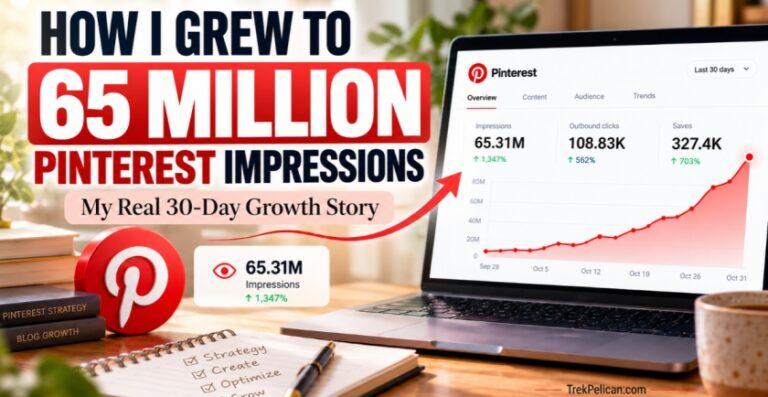
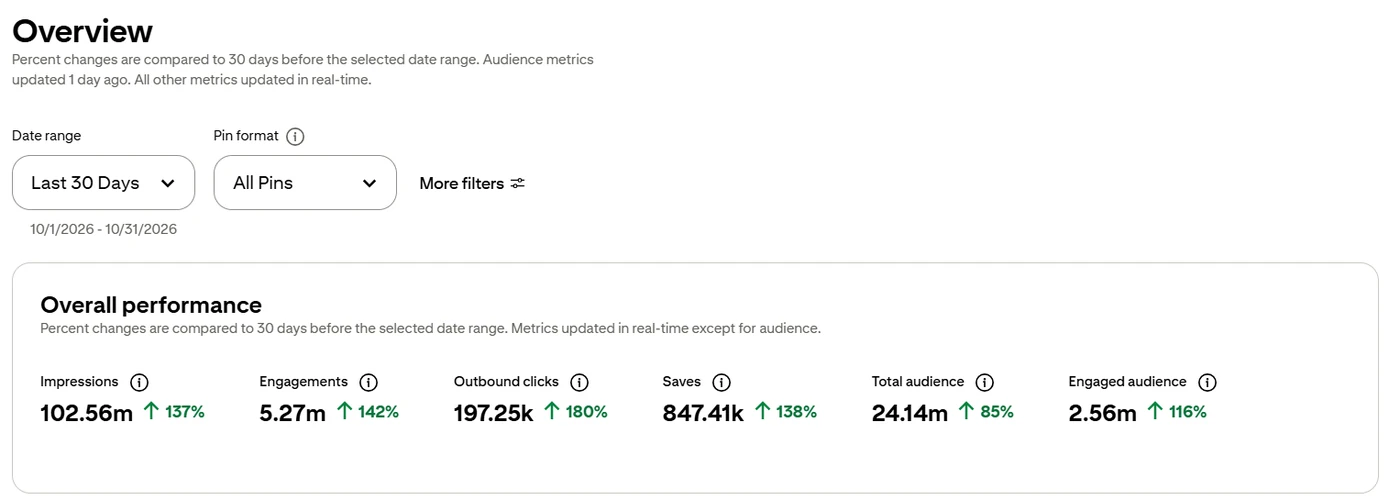
For me, the first results came within about two weeks: pins built on PinClicks keywords started sending visitors to my site. A year later, combining this keyword research with early trend research, here’s what my account did in October 2026:
And in a single day at the end of the month:
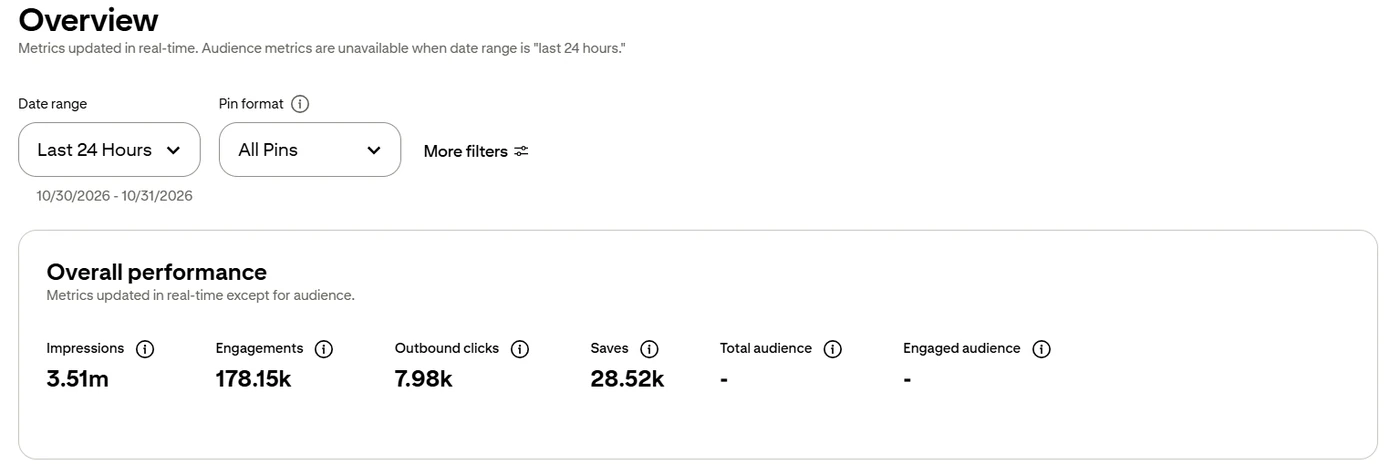
Keyword research wasn’t the only reason. Timing, pin design and account history all matter, and my account is older. Your results will depend on:
• Your account’s age and history. Pinterest seems to trust older accounts with good engagement.
• Your pin design. Even the perfect keyword won’t help a pin nobody stops to look at.
• Your timing. Seasonal keywords work best two to three months before the season.
• Your strategy overall. I don’t know exactly how you’ll apply this, so I can’t promise the same results.
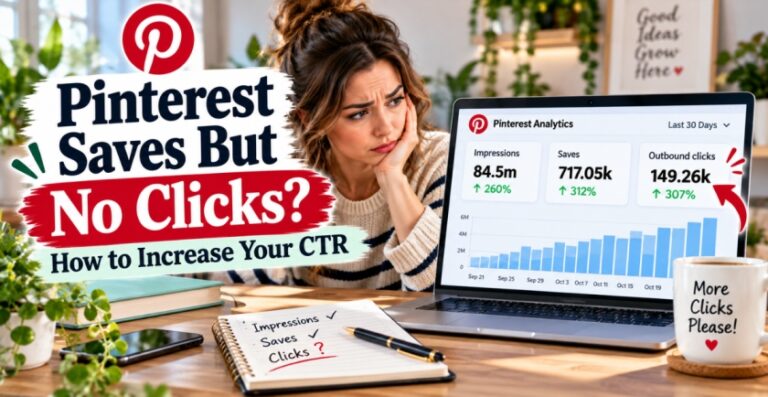
For the full strategy behind my growth, read How to Grow on Pinterest Fast. If your pins get saves but few clicks, read How to Increase Your Pinterest CTR. To see what this traffic earns, read my blog income report and How to Make $100 a Day Blogging.
Free Pinterest Keyword Research Tracker
I’ve made a simple tracker for everything in this guide: the keyword, PinClicks’ estimated volume, top pin dates, whether blogs rank, your decision and your publish date. Use it for every post, and you’ll build a keyword list you can reuse every season. It’s free, with no signup needed.
It’s part of a small free toolkit I made for Pinterest bloggers. You can also grab the Pinterest Trend Research Worksheet, the First 30 Days on Pinterest Checklist and the Pinterest Niche Scorecard.
Pair it with my free calendar, so you always know which season to research next.
Frequently Asked Questions
Does Pinterest show keyword search volume?
No. Pinterest Trends shows growth and relative interest, but not exact search counts. Tools like PinClicks provide their own estimates.
What’s a good search volume to target on Pinterest?
In my experience, about 50 to 500 estimated searches in PinClicks is the sweet spot for a main keyword. Bigger keywords are crowded and often fade quickly.
Can I do Pinterest keyword research for free?
Yes. Use Pinterest Trends, the search suggestion cards, the search bar suggestions and the a, b, c trick. It takes longer and gives you no volumes, but it works.
When did PinClicks launch?
Its founder started building it in early 2024, and it was introduced as a new Pinterest keyword tool in September 2024.
Should I avoid keywords where Amazon pins rank?
If shops and product pins dominate the top results, yes. One or two shop pins are fine, but you want to see blog posts ranking too.
Why do new top pins show zero saves?
They were just created. Repins, saves and reactions build up over the following weeks, so judge new pins by their created date.
How is Pinterest SEO different from Google SEO?
Google ranks text pages by authority, backlinks and depth. Pinterest ranks pins by keyword match and engagement, and the image does most of the work.
Is it too late to target Christmas keywords in November?
Not always. Some of my November and December keywords ranked within a week. It depends on your account’s momentum, whether bloggers already target the exact keyword, and how unique your pin idea is.
How long until PinClicks keywords bring traffic?
For me, about two weeks. Results vary with your account’s age, your pins and your timing.
Final Thoughts
Good keyword research on Pinterest isn’t about finding the biggest number. It’s about finding the right keyword, at the right time, where your pin can actually win.
Start with the free method if you’re new. When you’re publishing regularly and want to stop guessing, a tool like PinClicks can save you hours and point you to keywords you’d never find by scrolling.
Still choosing your topic? Best Pinterest Niches for Seasonal Traffic shows which seasonal niches are worth researching, and Pinterest for Beginners walks a new account from setup to its first viral pin.
For more Pinterest guides from my own accounts, follow Trek Pelican on Pinterest.
Sources
• Pinterest Q3 2026 results: 661 million monthly active users
• Tailwind: Pinterest vs Google search
• Modern Retail: Pinterest says 97% of its searches are unbranded
• PinClicks review: plans and free trial
• My PinClicks and Pinterest screenshots, October 2026