Pinterest for Beginners: How to Get Your First Viral Pin (Lessons From My 102M-Impression Month)
This post may contain affiliate links. If you buy through them, I may earn a small commission at no extra cost to you. Read our full affiliate disclosure
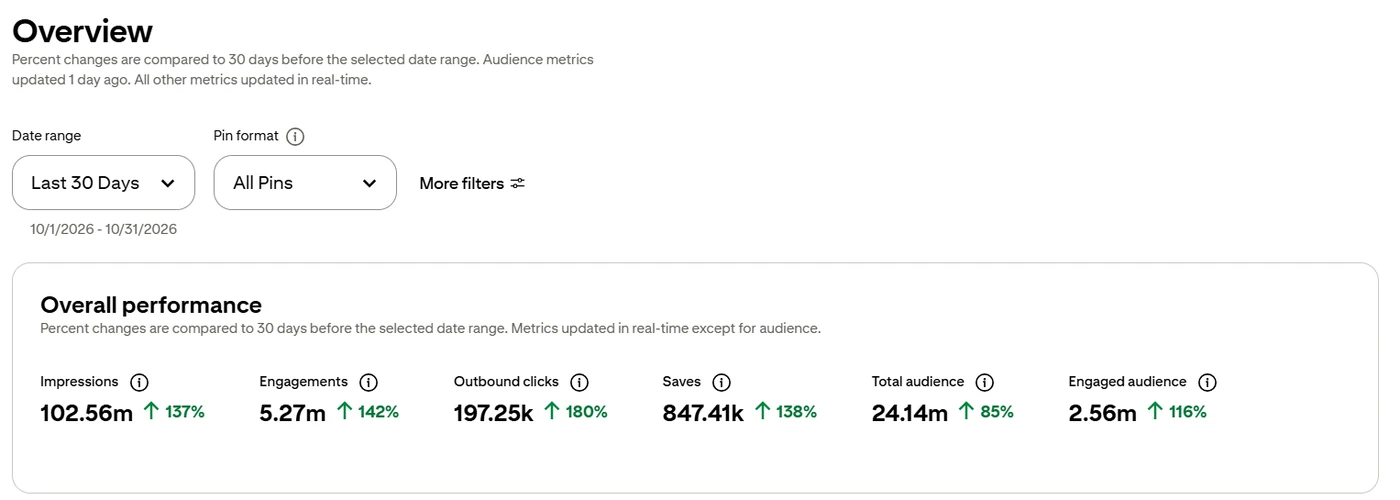
In October 2026, my Pinterest account was shown 102.56 million times and sent more than 197,000 clicks to my blog. Here’s the screenshot, taken on the last day of the month.
Your first viral pin is closer than you think, if you build it on purpose.
But I didn’t start here. The first time I started a Pinterest account from zero, I had no plan at all. I posted content I hadn’t created myself, and I had no idea why one pin flew while another sat at zero.
That first account grew to about 6 to 7 million impressions a month within three to four months. Then it was suspended, and I lost all of it. I made almost every beginner mistake there is, and some of them cost me a lot.
You’ll notice my account name isn’t shown in any screenshot. Fast-growing accounts get copied and sometimes falsely reported, so I keep it private. The dates and numbers are exactly as Pinterest shows them.
This guide is the roadmap I wish I’d had. First, I’ll show you what my analytics look like today and what a beginner can learn from them. Then I’ll walk you through five phases, from setting up your account to getting your first pin to take off. Each phase ends with a short “done when” list, so you always know when to move on.
What My Analytics Look Like Today
Big totals are exciting, but the details teach you more. Here’s what my account did in a single day, the day I wrote this update:
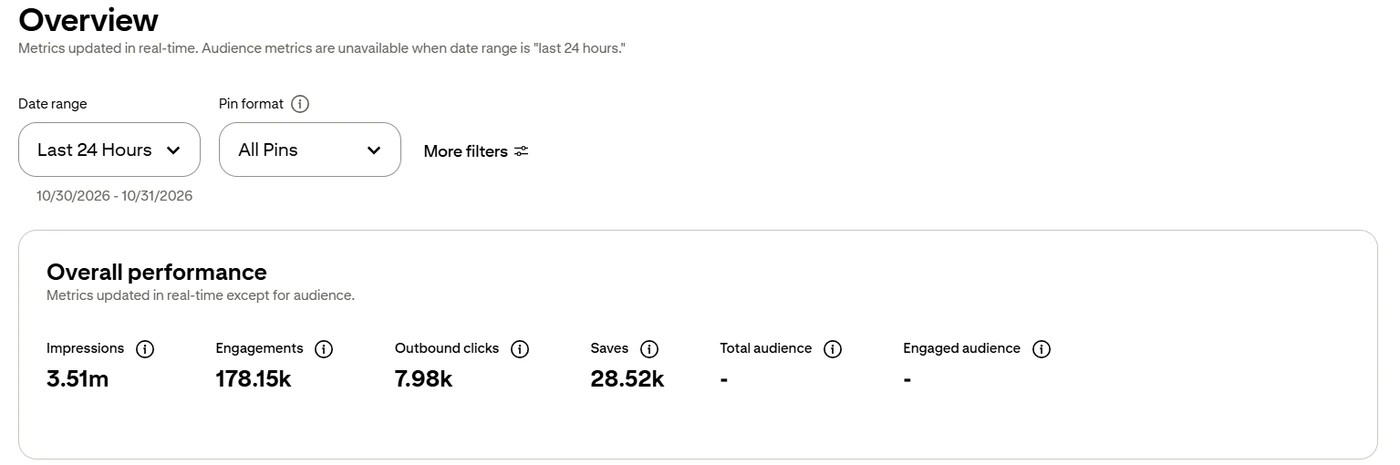
That’s nearly 8,000 clicks to my blog in one day, from Pinterest alone. In mid-August, my blog was getting about 300 visits a day.
And here are my top four boards for October. I’ve removed the pin images, so my designs can’t be copied, but every number is real.
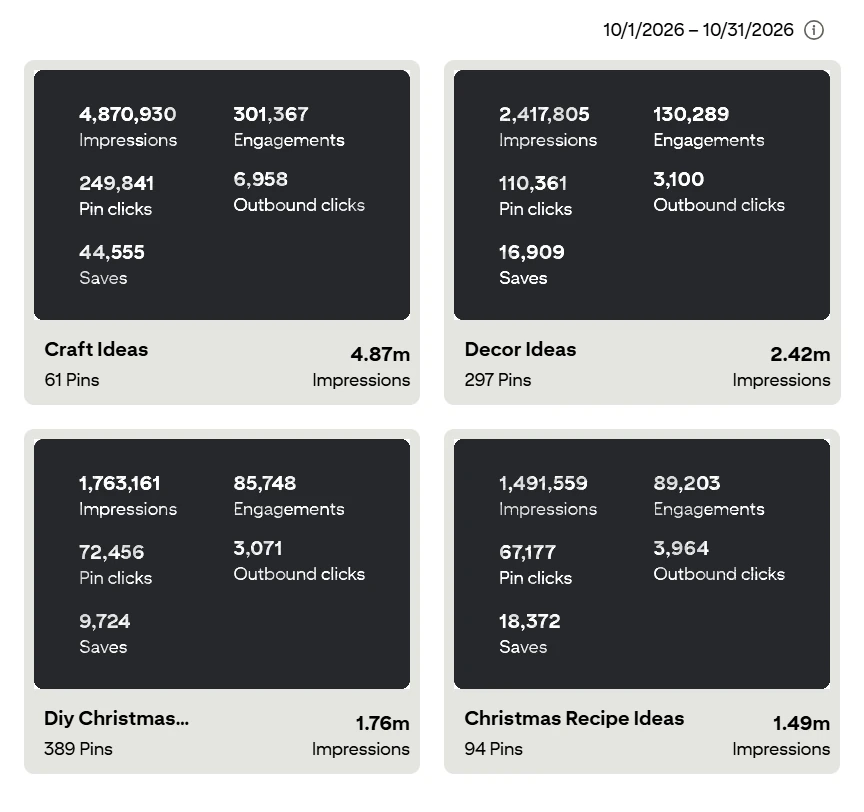
| Board | Pins | Impressions | Outbound clicks | Saves | Click-through rate |
|---|---|---|---|---|---|
| Craft Ideas | 61 | 4.87M | 6,958 | 44,555 | 0.14% |
| Decor Ideas | 297 | 2.42M | 3,100 | 16,909 | 0.13% |
| DIY Christmas | 389 | 1.76M | 3,071 | 9,724 | 0.17% |
| Christmas Recipe Ideas | 94 | 1.49M | 3,964 | 18,372 | 0.27% |
Four lessons a beginner can take from these numbers
1. A few strong pins beat hundreds of average ones. My Craft Ideas board has only 61 pins, yet it got more impressions than the DIY Christmas board with 389 pins. You don’t need a huge account to go viral. You need the right ideas.
2. Timing drives everything. Three of my top four boards are Christmas boards, and this was October. People plan holidays months ahead, so your seasonal pins should be live early.
3. Pin clicks aren’t blog visits. Craft Ideas got almost 250,000 pin clicks, but only about 7,000 outbound clicks. A pin click usually means someone opened the pin to look closer. An outbound click is a visit to your website, and that’s the number that earns.
4. Some topics click better than others. My recipe board had the best click-through rate, about 0.27%, nearly double my decor boards. People can admire a decor idea in the image, but they need to visit the blog to get the recipe.
Overall, my click-through rate for October was about 0.19% (197,250 ÷ 102.56 million). That’s on the low side, and I explain how to improve it in How to Increase Your Pinterest CTR. For a beginner, though, the lesson is simple: reach comes first, and clicks follow when your pins promise something worth clicking for.
My account is older now, so I won’t pretend your first month will look like this. But every one of these numbers grew from the same five steps below.
Before You Begin: What “Viral” Really Means
A viral pin is simply a pin Pinterest decides to show to far more people than usual. It might get tens of thousands of impressions in a week instead of a few hundred. Some go much further.
You can’t force a pin to go viral. But you can stack the odds in your favor: the right keyword, the right timing, an image people stop on, and an account Pinterest is starting to trust. That’s what this roadmap builds, one piece at a time.
Pinterest is big enough to make this worth your time. It reported 661 million monthly active users in the third quarter of 2026, a record high. Most of them come looking for ideas to save and try, which is exactly what bloggers create.
How Pinterest decides who sees your pin
Pinterest doesn’t publish its full formula, so nobody outside the company knows every detail. From my own accounts, though, a few things clearly matter.
• Keywords. Pinterest reads your pin title, description, board name and the page you link to, to understand what the pin is about.
• Engagement. When people stop, save, click or look at a pin longer, it tends to be shown to more people.
• Freshness. New images and new ideas seem to get more attention than the same pin posted again and again.
• Account trust. In my experience, older accounts with a good history get pins distributed faster. New accounts can still grow, but they need patience.
Every phase below works on one or more of these. Keep them in mind, and the steps will make more sense.
Phase 1: set up your home base (week 1). Phase 2: research before you pin (week 1–2). Phase 3: create your first pins (weeks 2–4). Phase 4: pin consistently and safely (days 30–90). Phase 5: read the signals and repeat what works (from day 30).
Phase 1: Set Up Your Home Base (Week 1)
Before you make a single pin, you need somewhere for your clicks to land, and an account Pinterest understands. Skip this, and even a viral pin won’t do much for you.
1. Create a free business account
A Pinterest business account is free. It gives you access to analytics and Pinterest Trends, which you’ll use constantly. If you already have a personal account, you can convert it or create a new business one.
Choose a profile name that tells people what you share, such as “Cozy Home Decor Ideas” rather than just your first name. Write a short bio that says what people will find on your boards.
2. Get a blog (if you don’t have one)
Pinterest can bring you millions of views, but views alone don’t pay. Clicks to your own website do, through ads, affiliate links or your own products. That’s why I always recommend starting with a self-hosted WordPress blog.
I moved my sites to Hostinger in January 2023, after starting on free Blogspot, and I’ve stayed since. If you’re starting today, my step-by-step guide on how to start a WordPress blog on Hostinger walks you through it, and my Hostinger link gives you 20% off eligible plans.
3. Claim your website
Claiming your website tells Pinterest that you own it. Your profile picture then appears on pins from your site, and you can see analytics for them. Pinterest’s help center explains the steps, and on WordPress it usually takes a few minutes with a plugin or a short code.
4. Publish a few posts first
Don’t start pinning with one lonely blog post. Aim for at least 10 helpful posts before you pin heavily. When a visitor arrives from Pinterest, they should find more than one page worth reading.
5. Create five to ten focused boards
Boards help Pinterest understand your topics. Give each board a clear, keyword-rich name, like “Small Apartment Christmas Decor” instead of “Christmas Stuff”. Add a one- or two-sentence description using words people would search.
| Weak board name | Stronger board name |
|---|---|
| Christmas Stuff | Small Apartment Christmas Decor |
| My Garden | Easy Vegetable Garden Ideas for Beginners |
| Yummy! | Easy Christmas Cookie Recipes |
| Home | Cozy Living Room Decor Ideas |
Start with boards that match your blog categories. You can always add more later as you write new posts.
You have a business account with a clear name and bio, a live blog with about 10 posts, a claimed website, and five to ten boards with keyword-rich names.
Phase 2: Research Before You Pin (Weeks 1–2)
This is the phase most beginners skip. It’s also the phase that decides whether your pins ever get seen.
On my first account, I pinned whatever looked good to me. Some pins worked, and I had no idea why. Today I don’t design anything until I know what people are searching for, and when.
Find what’s rising, not what’s already peaked
Open Pinterest Trends and look two to three months ahead. If it’s October, look at Christmas and winter ideas, not Halloween. The trick is the “Include keyword” filter: type your season, and you’ll see the ideas that are already climbing before they reach the top of the list.
I explain the full method, with 13 screenshots, in How I Find Pinterest Trends Before They Peak.
Turn the idea into a long-tail keyword
New accounts struggle with short, broad keywords. Older accounts with years of engagement dominate those. Long-tail keywords, the longer and more specific searches, are where beginners can win.
Search your idea on Pinterest, then click the suggestion cards under the search bar. “Apartment christmas decor” becomes “studio apartment christmas decor”. Click the search bar for more suggestions, or type a, b, c after the keyword to see even more.
Check the first two rows
Before you commit, look at the first two rows of pins for your long-tail keyword. Are blog posts ranking, or only shops? Are there recent comments? Do the top pins target your exact keyword? If blogs rank and the activity is recent, it’s a good sign.
If you want numbers instead of guesses, a tool like PinClicks shows estimated volumes and the top pins for any keyword. I explain how I use it in my PinClicks keyword research guide. As a beginner, though, the free method is enough to start.
You have a list of 10 to 20 long-tail keywords, each matched to a blog post you’ve written or plan to write, and you’ve checked the first two rows for each.
Phase 3: Create Your First Pins (Weeks 2–4)
Now you design. This is the fun part, but it’s also where beginners waste the most time on things that don’t matter.
The anatomy of a pin that can go viral
| Part | What works | What to avoid |
|---|---|---|
| Size | Vertical, 2:3 ratio, such as 1000 × 1500 pixels | Square or horizontal images that look small in the feed |
| Image | Bright, clear, beautiful or surprising | Dark, cluttered or blurry photos |
| Headline on the pin | Short, bold and readable on a phone | Long sentences in thin fonts |
| Pin title | Your keyword near the start | Vague titles like “Cute ideas!” |
| Description | One or two natural sentences using the keyword | Lists of repeated keywords or hashtags |
| Link | The exact blog post that delivers on the headline | Your homepage, or a post that doesn’t match |
| Board | The most relevant board you have | A random catch-all board |
Make the image do the work
In my experience, the image decides more than anything else. When a pin makes people pause and look a little longer, the chance of it being shown to more people goes up a lot. Some of my pins have gone viral within a single week of posting, and each one had an image that stood out in its search results.
Before designing, I study how the top pins for my keyword are laid out: how much text they use, where it sits, and whether they use one photo or a collage. Then I make my own version. Studying a layout is smart. Copying someone’s pin is not.
Make several pins for each post
Don’t stop at one pin per post. Make three to five, each with a different image and headline, and each using a slightly different keyword from your list. One post can then appear in several searches, and you’ll quickly learn which style your audience likes.
Canva’s free plan is enough for this. Make a few templates in your style, and you’ll be able to create a new pin in minutes.
You have three to five original pins for each of your first 10 posts, every pin is vertical, has a clear headline, uses a keyword in its title and description, and links to the matching post.
Phase 4: Pin Consistently and Safely (Days 30–90)
This is where most beginners give up. The pins are live, the numbers are small, and nothing seems to happen. Consistency is what turns those small numbers into growth.
How many pins a day?
On my main account today, I publish about 5 to 6 pins a day. Some are scheduled and some I post manually. If you’re new, a few quality pins every day is a great start. Showing up daily matters far more than posting a lot on one day.
Respect Pinterest’s limits
Pinterest doesn’t publish an exact daily limit, but it does temporarily block accounts that act too fast. It happened to me twice, when I went past roughly 100 to 120 pins in a short time. Both times, I was restricted for up to 24 hours.
A temporary block isn’t the end of the world, but repeated spam-like behavior can lead to something much worse.
Protect your account from day one
Here’s the email I received in August 2022, when Pinterest suspended my first account:
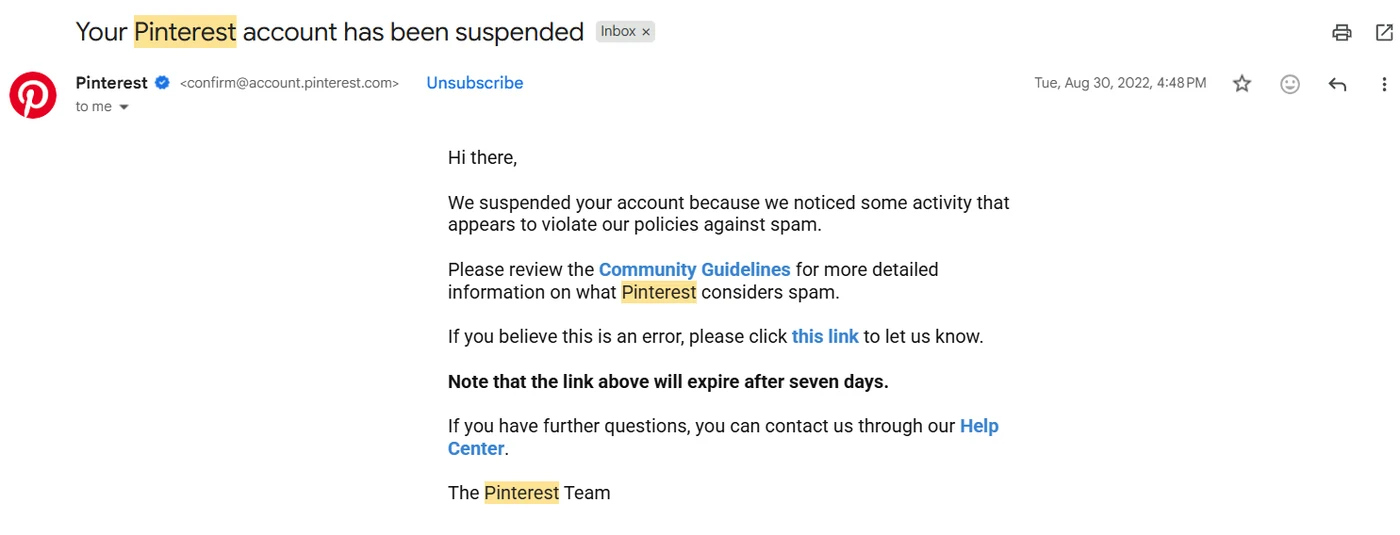
That account was in the weight loss niche, and I was posting short exercise videos I hadn’t created myself. I appealed, and the appeal was rejected the next day. I still don’t know the exact reason, but I can see what put the account at risk.
So from day one:
• Post original content. If you ever share someone else’s work, credit them, but know that credit isn’t a guarantee.
• Be careful with sensitive niches like weight loss, health claims and money promises. They get extra scrutiny.
• Stay on one account while you’re learning. Running several accounts that share links can look like spam.
• Keep a backup of your pin images and URLs, so you’re never starting from nothing.
I share the full story, and what to do if it happens to you, in Pinterest Account Suspended? Why It Happens and How to Avoid It.
Give it at least 60 to 90 days
A new account usually won’t explode in its first month. Pinterest needs time to understand your topics and see how people respond to your pins. My first account took three to four months to reach millions of impressions, and that was with content that went viral easily.
Keep publishing posts, keep making fresh pins, and keep researching. The work you do in month one often pays off in month three.
You’ve pinned a few quality pins almost every day for at least 60 days, you’ve never hit a block, and you’re still publishing new blog posts alongside your pins.
Phase 5: Read the Signals and Repeat What Works
Around day 30, you’ll start to have real data. This phase is about noticing which pins are starting to move, and doing more of what worked.
The early signs of a pin taking off
| Signal | What it usually means | What to do |
|---|---|---|
| Impressions jump suddenly | Pinterest is testing your pin with more people | Make two or three new pins for the same post |
| Lots of saves | People love the idea and are planning ahead | Create fresh designs on the same topic |
| Saves but few clicks | The pin is pretty, but the reason to click isn’t clear | Test a stronger headline that promises something specific |
| Steady clicks over weeks | The keyword and pin are a good match | Write related posts and link them together |
| A burst that fades after 2–3 weeks | Often a short, broad keyword | Target a long-tail version next time |
That last row caught me out for a long time. With short keywords, Pinterest sometimes pushed my pins for two or three weeks, and then the recommendations simply stopped. I kept wondering what I’d done wrong. Moving to long-tail keywords made my pins last much longer.
If your pins get saves but few clicks, my guide on how to increase your Pinterest CTR goes deeper.
Timing is a growth lever too
Seasonal content works best when your pins are live two to three months before the season. Pinterest itself suggests launching content four to six weeks before big events. People plan early, and your pins need time to be found.
If you’re late, don’t skip the season. I’ve posted Halloween pins in October, and some still went viral. My account is older, which may have helped, but a well-chosen long-tail keyword gives a late pin a real chance too.
What happened when I pinned too late
I learned this the hard way in late 2023. I was only starting to post on Pinterest regularly, and I published holiday pins in mid-October and November with random short keywords, because I didn’t know any better.
Some of them took off quickly. My blog earnings climbed for a few weeks. Then, almost overnight, it all fell away:
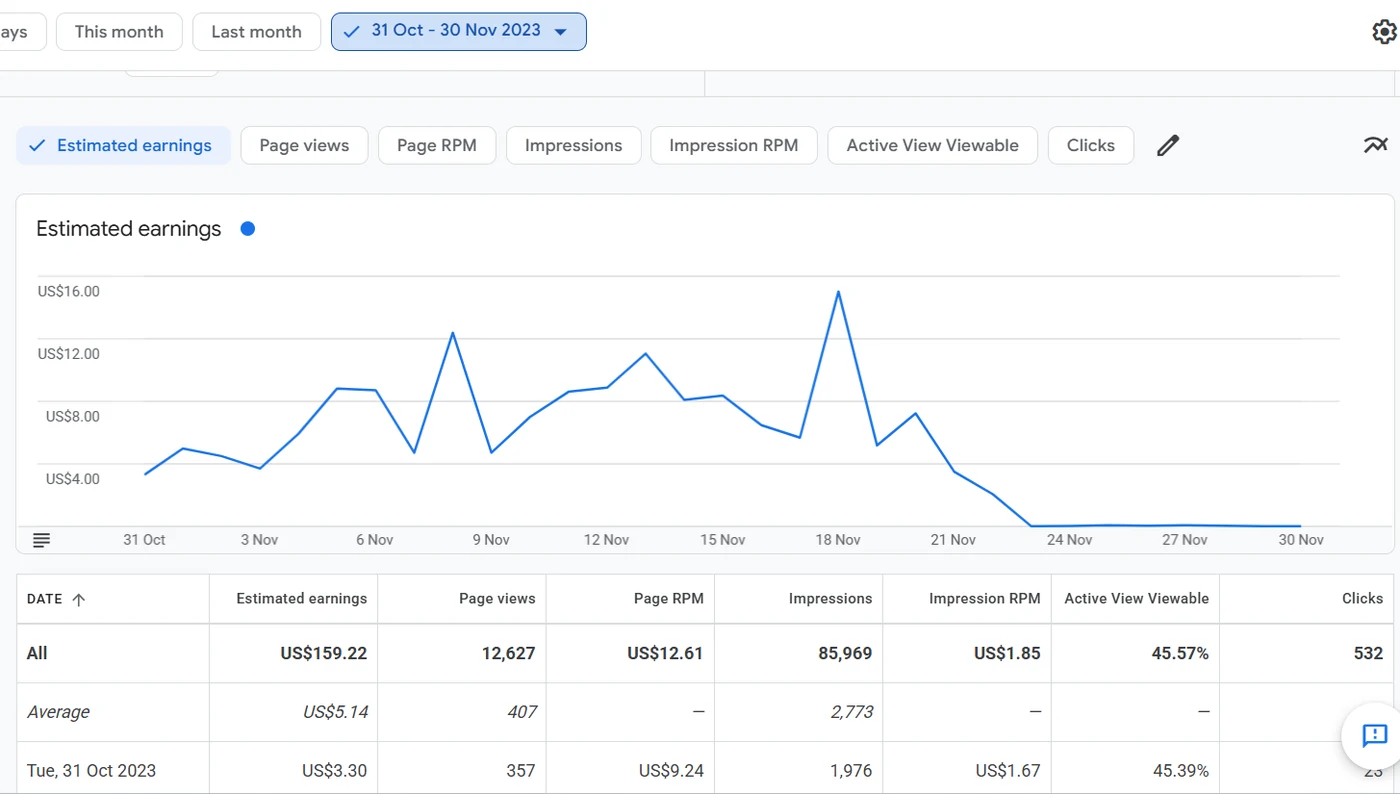
I was sure I’d been shadowbanned, so I asked Pinterest support. They confirmed my account wasn’t flagged. The pins had simply been too late and too broad, so they spiked for a week or two and faded just as fast. I share their full reply in my suspension and shadowban guide.
Publish seasonal pins two to three months before the season. If your account is new, aim for the full three months, and use long-tail keywords that keep working after the first spike.
Already in November or December? It’s not too late to try. Now that my account has momentum, some keywords I covered in November and December ranked within a week, and one pin I made at the end of November 2025 went viral. The difference was proper keyword research and a unique, catchy pin idea that makes people stop scrolling. I explain how in my PinClicks keyword research guide.
You can name your three best-performing pins, you know why you think they worked, and you’ve made new pins and posts based on them.
Your First Month, Week by Week
If the phases feel like a lot, here’s how they fit into your first four weeks. Don’t worry if you move slower. The order matters more than the speed.
| Week | Focus | By the end of the week |
|---|---|---|
| Week 1 | Setup | Business account, bio, claimed website, 5–10 boards |
| Week 2 | Research | 10–20 long-tail keywords, each matched to a post |
| Week 3 | Design | 3–5 pin templates and your first 15–20 pins |
| Week 4 | Pinning | A few pins every day, plus a new blog post |
From month two onward, the routine is simple: write a post, research its keywords, make several pins, and pin a few every day. Check your analytics once a week, not every hour.
Most importantly, keep going through the quiet weeks. Almost every account has them. The ones that grow are usually the ones that didn’t stop.
Making Your First Viral Pin Actually Earn
A viral pin feels amazing. But impressions don’t pay bills. Clicks to a monetized website do. Here are the three main ways beginners earn from Pinterest traffic:
• Display ads. Once you have steady traffic, ad networks pay you for the ads shown on your posts. My ad earnings grew a lot once my Pinterest traffic took off, and I explain how in How to Make $100 a Day Blogging. The full numbers are in my blog income report, and How to Increase Your Blog’s Ad RPM shows how to earn more per visitor.
• Affiliate links. Recommend products that genuinely help your readers, and earn a commission when they buy.
• Your own digital products. Printables, planners and checklists fit Pinterest perfectly, because people already come to save and plan.
If you use affiliate links, a plugin like Lasso makes them much easier to manage. It lets you add clean product boxes and comparison tables to your posts and keep all your links in one place, so a broken or expired link doesn’t quietly cost you commissions. It has a free plan, with paid plans when you need more. Try Lasso here.
What I’d Tell Myself on Day One
If I could go back to the first day of my first account, this is what I’d say:
1. Don’t post content that isn’t yours. Fast growth on borrowed content can disappear overnight.
2. Research first, design second. A beautiful pin on the wrong keyword is wasted work.
3. Choose long-tail keywords. They’re easier to rank for and last longer.
4. Pin a little every day. Slow and steady beats bursts that trigger blocks.
5. Plan seasons early. Two to three months ahead is the sweet spot.
6. Build a real website. Your pins need somewhere worth landing.
7. Be patient. Give every new account at least 60 to 90 days before judging it.
Free First 30 Days on Pinterest Checklist
I’ve turned this roadmap into a printable checklist for your first 30 days: account setup, board names, keyword research, your first pins, and a daily pinning tracker, with a box to tick for every step. Print it, stick it next to your desk, and work through it one day at a time. It’s free, with no signup needed.
It’s part of a small free toolkit I made for Pinterest bloggers. You can also grab the Pinterest Trend Research Worksheet, the Pinterest Keyword Research Tracker and the Pinterest Niche Scorecard.
When you’re ready to plan beyond your first month, my free calendar shows what to plan, pin and expect every month of the year.
Frequently Asked Questions
Is Pinterest still good for beginners in 2026?
Yes. It reported a record 661 million monthly active users in the third quarter of 2026, and people come to find ideas, not brands. New accounts can still grow, especially with long-tail keywords and original pins.
Do I need a blog to use Pinterest?
You can use Pinterest without one, but you’ll struggle to earn. Pins that link to your own blog let you earn from ads, affiliate links or your own products.
How long does it take to get a viral pin?
There’s no fixed timeline. Some of my pins went viral within a week, but that was on an older account. For a new account, give it 60 to 90 days of consistent pinning.
What size should my pins be?
Pinterest recommends a 2:3 ratio, such as 1000 × 1500 pixels. Vertical pins take up more space in the feed and are easier to notice.
How many pins should a beginner post each day?
A few quality pins a day is a great start. I post about 5 to 6 a day on my main account. Avoid sudden bursts, since pinning too fast can trigger a temporary block.
Can I post the same pin to several boards?
Fresh pins, with new images or headlines, tend to do better than repeating the same one. Make several different pins for each post instead.
Which niches are best for beginners?
Visual niches with seasonal and evergreen demand, like home decor, gardening, recipes and holidays, work well. Be careful with sensitive niches like weight loss. I cover this in Best Pinterest Niches for Seasonal Traffic.
Do hashtags help on Pinterest?
Keywords matter much more than hashtags. Clear keywords in your pin title, description and board name do far more to help Pinterest understand your pin.
Should I use video pins or image pins?
Both can work. My first account grew with short videos, but the pins I make for my blog posts today are mostly image pins with clear headlines. Start with images, since they’re quicker to make and test. Once you know which topics work, you can try short videos for your best posts.
Should I use more than one account?
Not as a beginner. Focus on one account and do it well. Multiple accounts that share links can look like spam to Pinterest.
Final Thoughts
Your first viral pin won’t come from luck or a secret hack. It comes from a simple sequence: a real home base, research before design, original pins, steady daily pinning and paying attention to what works.
Work through the phases one at a time. When your first pin takes off, you’ll know exactly why, and you’ll be able to do it again. When you’re ready for the bigger picture, read How to Grow on Pinterest Fast.
For more beginner-friendly Pinterest guides, follow Trek Pelican on Pinterest.
Sources
• Pinterest Q3 2026 results: 661 million monthly active users
• Pinterest Help: product specs and pin sizes
• Pinterest Help: claim your website
• Pinterest: plan seasonal content early
• My Pinterest analytics and email screenshots