How to Increase Your Blog’s Ad RPM: What Raised My Earnings per Visitor by 64%
This post may contain affiliate links. If you buy through them, I may earn a small commission at no extra cost to you. Read our full affiliate disclosure
Earnings disclaimer: the numbers in this post are my personal results. Your results will depend on your niche, traffic sources, season and many other factors. Nothing here is a promise of earnings. Read our earnings disclaimer
Two blogs can get the same number of visitors and earn completely different amounts from ads. The difference is RPM: how much you earn for every 1,000 visitors or page views.
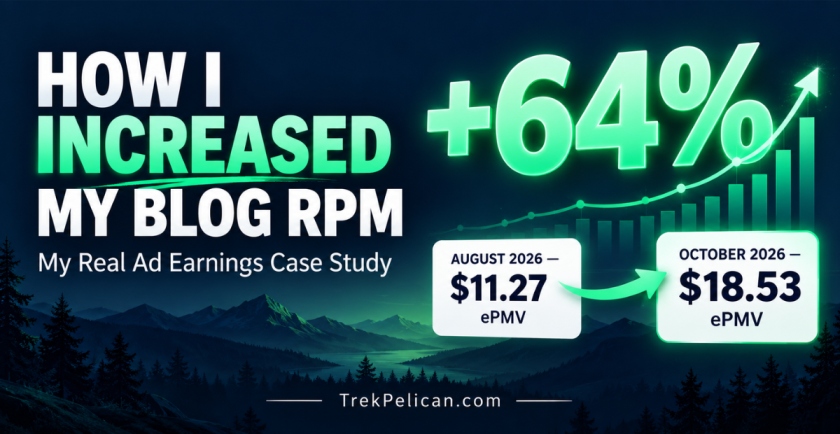
In August, my blog earned about $11.27 for every 1,000 visitors. In October, it’s earning $18.53, about 64% more per visitor. My visitors from the United States now earn about $34.82 per 1,000 visits, and Ezoic’s new Lifetime Value report shows my readers are worth about $20.08 per 1,000 visitors once their return visits are counted.
That increase didn’t come from one magic setting. It came from years of learning what actually makes ads pay more: who your readers are, where they live, how long they stay, how fast your pages load and how genuinely useful your content is.
In this post, I’ll explain RPM in plain words, compare my old AdSense RPM with my Ezoic RPM, explain what a good and bad bounce rate looks like, and walk you through 12 practical ways to raise your RPM, including the mistakes that kept mine low for a long time.
What Is RPM? (And Why There Are Different Versions)
RPM stands for “revenue per mille,” which simply means revenue per thousand. It tells you how much you earn for every 1,000 of something. The confusing part is that different ad networks measure different things:
| Metric | What it measures | Used by |
|---|---|---|
| Page RPM | Earnings per 1,000 page views | Google AdSense and many others |
| Session RPM | Earnings per 1,000 visits (sessions) | Several premium ad networks |
| ePMV | Earnings per 1,000 visitors in a single visit | Ezoic |
| Lifetime Value (LTV) | Earnings per 1,000 visitors including their return visits | Ezoic |
Here’s the formula for ePMV:
ePMV = (Ad earnings ÷ Visits) × 1,000
For my blog from October 1 to 21: $1,708.06 ÷ 92,168 visits × 1,000 = about $18.53.
And here’s page RPM for the same period: $1,708.06 ÷ 120,792 page views × 1,000 = about $14.14.
Same blog, same month, same money, but two different numbers. That’s because my readers view about 1.31 pages per visit, so the earnings are spread across more page views than visitors. This is why you should never compare a page RPM from one network with an ePMV from another without converting first. Compare like with like, and compare your own numbers over time.
Want to check your own numbers? Enter your ad earnings, pageviews and visits for any period. The calculator below shows your page RPM and ePMV, and what a higher RPM would add to your monthly earnings.
Free tool · Trek Pelican
Blog RPM and ePMV Calculator
Work out your page RPM, ePMV and pages per visit, and see what a higher RPM would add.
Page RPM = earnings ÷ pageviews × 1,000. ePMV = earnings ÷ visits × 1,000. Ad networks define these slightly differently, so compare like with like.
My RPM Today: The Proof
Here’s how my earnings per 1,000 visitors changed this year:
| Period (2026) | Visits | Ad earnings | ePMV | Pages per visit |
|---|---|---|---|---|
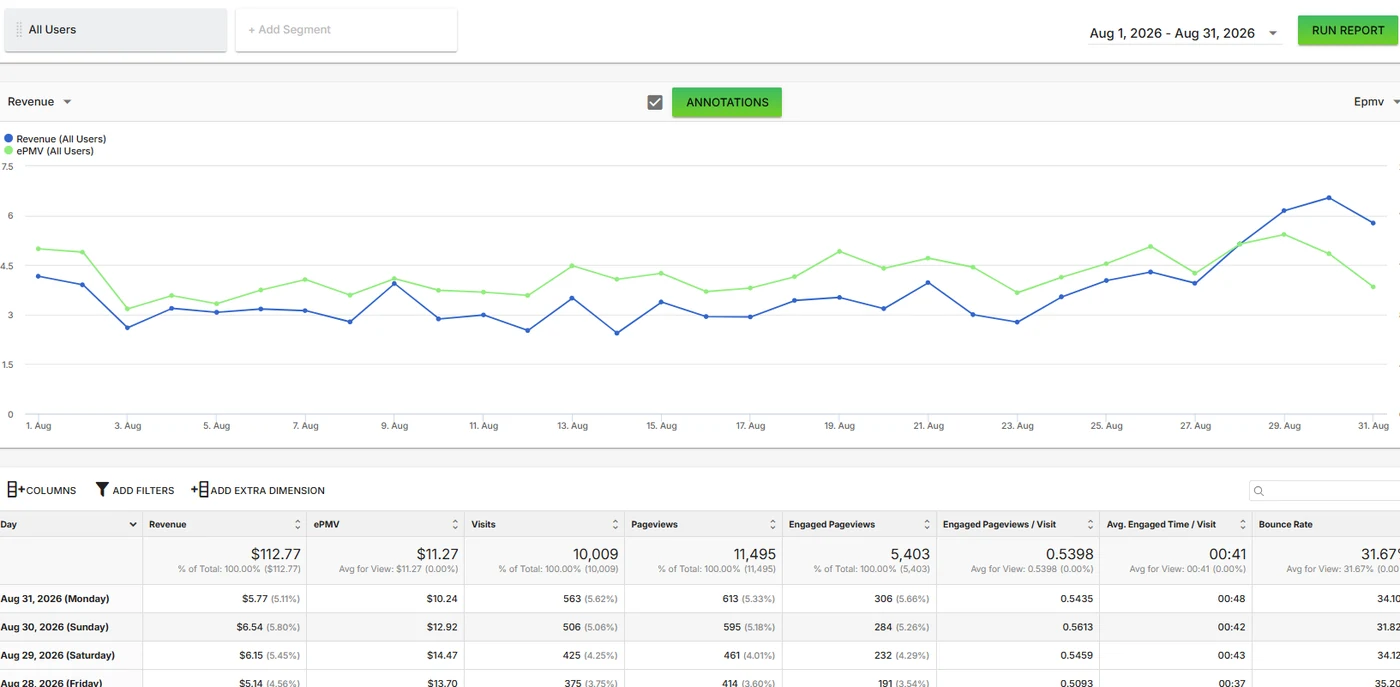
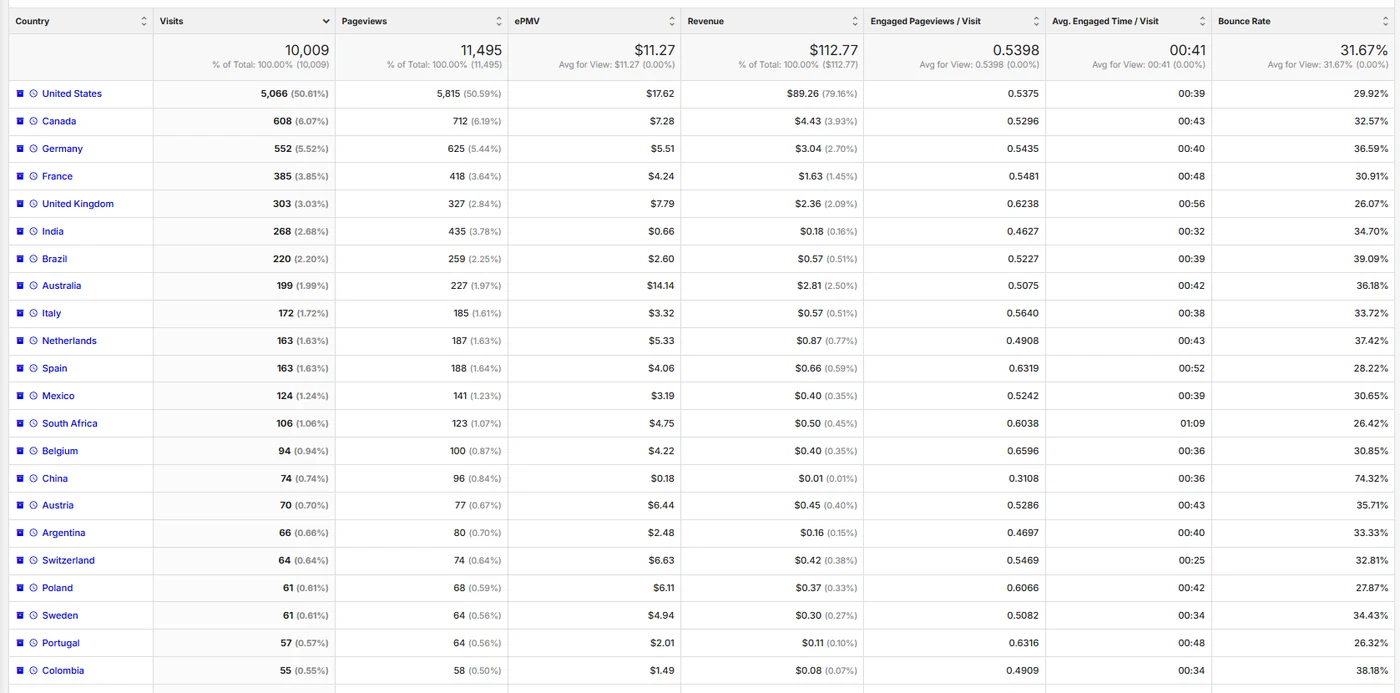
| August | 10,009 | $112.77 | $11.27 | 1.15 |
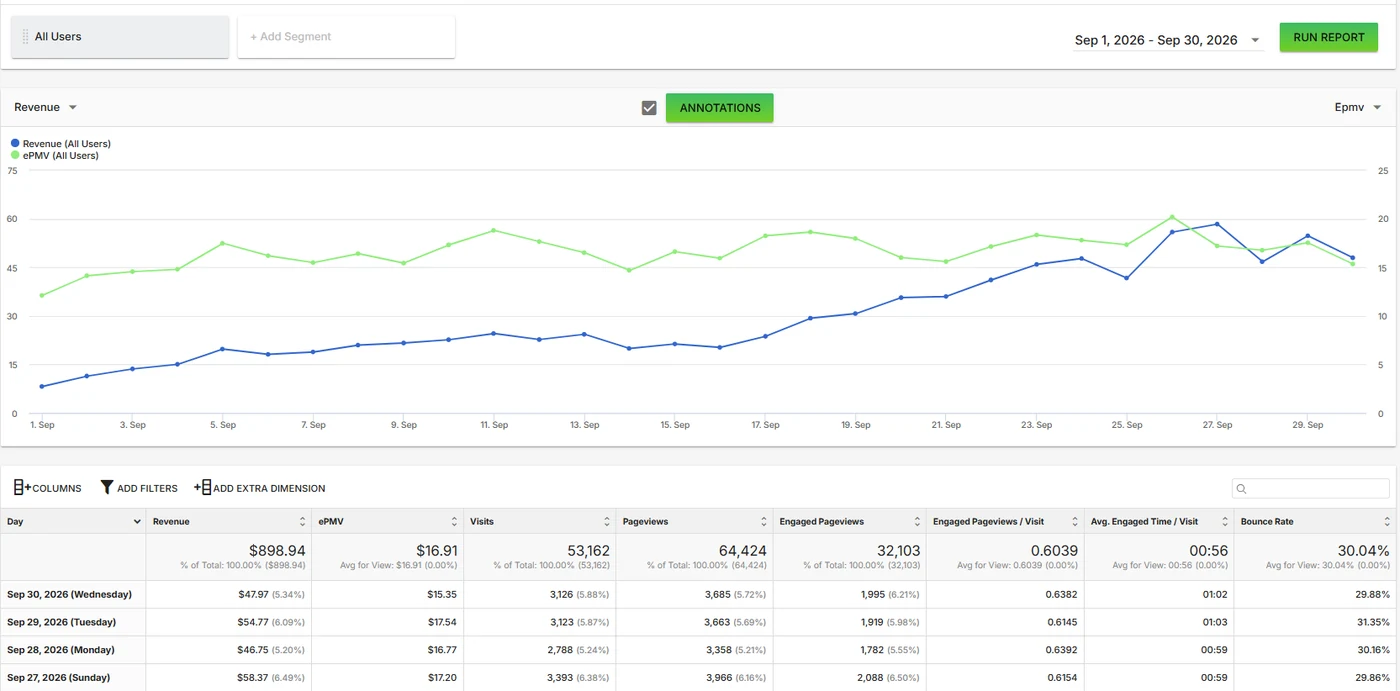
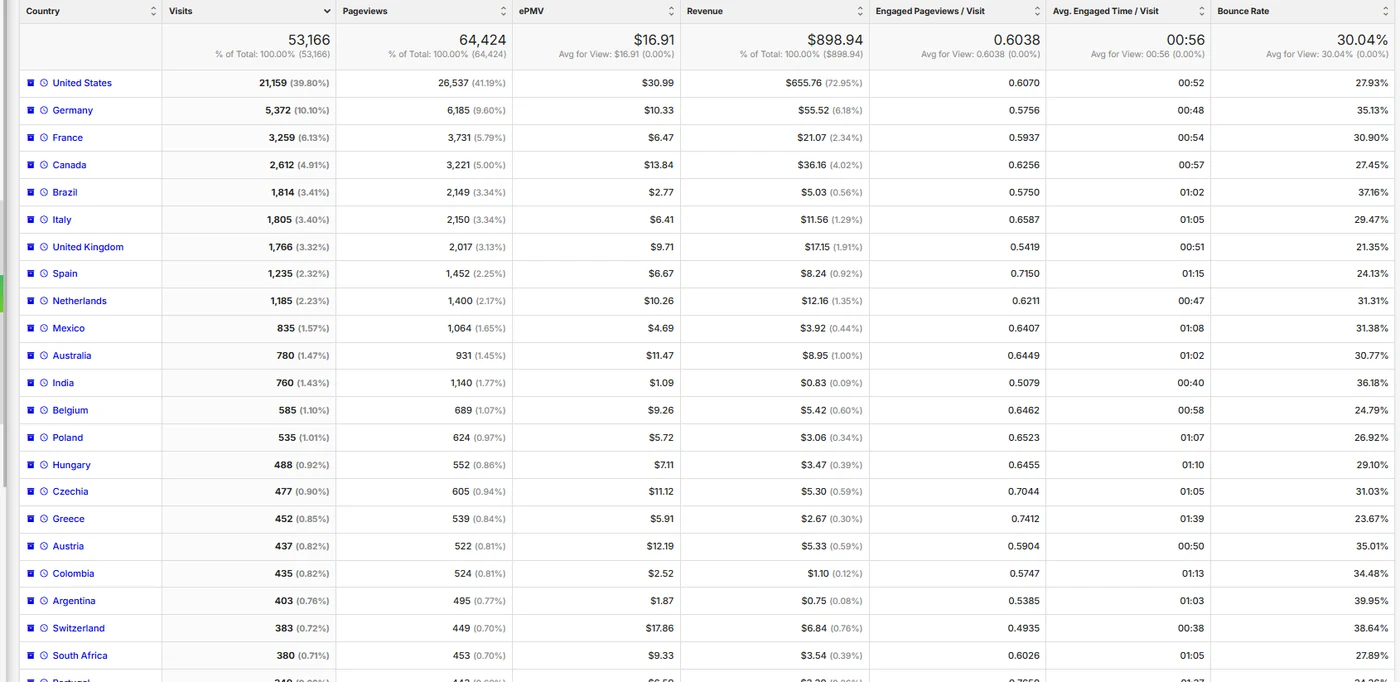
| September | 53,162 | $898.94 | $16.91 | 1.21 |
| October 1 – 21 | 92,168 | $1,708.06 | $18.53 | 1.31 |
Watch the green ePMV line in my August and September reports. It starts low and climbs as the months go on.
And here’s October so far, day by day. Every day since October 9 has earned over $15 per 1,000 visitors, and most days are close to $19 or $20.

In the last seven days, my blog earned $823.56 from 43,367 visits, which works out to about $19 per 1,000 visitors. Every one of those days earned over $100.

Lifetime Value: what a reader is really worth
Ezoic recently added a Lifetime Value report. Instead of counting only one visit, it adds up what a group of readers earns over time, including when they come back. Ezoic describes it as cumulative revenue per 1,000 users, tracked from their first visit.

Over a 30-day window, my readers are worth about $20.08 per 1,000 visitors, based on more than 31,000 visitors. That’s higher than my single-visit ePMV of $18.53, because some readers come back and earn me more on later visits.
This is a useful reminder: returning readers increase your RPM. Every reader who follows you on Pinterest, saves your pins or bookmarks your blog is worth more than a one-time visitor.
RPM by country
Here’s what different countries earned per 1,000 visits in October:
| Country | Visits | ePMV |
|---|---|---|
| United States | 29,037 | $34.82 |
| Switzerland | 1,008 | $20.31 |
| Canada | 5,026 | $15.99 |
| Germany | 10,562 | $13.55 |
| United Kingdom | 2,949 | $12.96 |
| Australia | 1,559 | $11.22 |
| France | 5,829 | $9.19 |
| Brazil | 2,323 | $3.68 |
| India | 851 | $1.18 |

A US visitor was worth about 30 times more than a visitor from India. Keep that in mind, because it’s the foundation of the first two steps later in this post.
AdSense RPM vs Ezoic RPM: My October Comparison
I’ve used both Google AdSense and Ezoic on this blog, so I can compare them honestly, using October numbers from both.
October 2023: AdSense and Ezoic side by side
In 2023, I ran both networks at the same time. AdSense showed most of the ads, which I placed manually with a plugin called Ad Inserter, and Ezoic showed fewer ads alongside them.
Here’s what AdSense earned in late October 2023:

From October 22 to 30, 2023, AdSense earned $23.18 from 3,243 page views. That’s a page RPM of about $7.15, or about $2.32 a day.
Here’s the Ezoic side for the second half of October 2023:

Ezoic earned $50.54 from 4,664 visits, an ePMV of about $10.84.
Comparing them fairly
At first glance, $10.84 looks much better than $7.15. But remember, AdSense measures per page view and Ezoic measures per visitor. To compare them fairly, I need to convert one into the other.
In November 2023, my readers viewed about 1.53 pages per visit on average. Using that number, Ezoic’s $10.84 per 1,000 visitors works out to roughly $7 per 1,000 page views. So in October 2023, the two networks were actually earning almost the same per page view.
| Period | Network | Per 1,000 page views | Per 1,000 visitors |
|---|---|---|---|
| Oct 22 – 30, 2023 | AdSense | $7.15 | not shown by AdSense |
| Oct 17 – 31, 2023 | Ezoic | about $7 (estimated) | $10.84 |
| Oct 1 – 21, 2026 | Ezoic (with AdSense Mediation) | $14.14 | $18.53 |
So what changed? In late November 2023, I stopped running AdSense as a separate setup and connected it to Ezoic through AdSense Mediation. Since then, AdSense and Ezoic’s ad partners compete for every ad space on my site.
Today, in October 2026, my blog earns about $14.14 per 1,000 page views, roughly double the $7 per 1,000 page views both networks were earning in October 2023.
I want to be honest about what this comparison shows. Switching networks alone didn’t double my RPM. In 2023, both networks earned about the same. The big increase came from everything else in this post: better content, faster pages, more readers from premium countries, more traffic and the holiday ad season. Mediation simply makes sure that whichever network pays more for each ad spot wins it, so I don’t leave money on the table.
The lesson from late 2023
Soon after I switched, my traffic dropped sharply. I was still new to Pinterest, I wasn’t actively working on this site, and Pinterest started recommending other accounts instead of mine. I’ll share that story, and how I recovered, in a future post.

When visits fell from hundreds a day to a few dozen, my earnings per visitor fell too, to between about $1 and $8 on most days. With so few visitors, there was very little for advertisers to compete for.
That taught me something I still see today: as my traffic grows, my RPM tends to grow and become more stable too. More visitors means more competition for your ad space and more data for your ad network to optimise with.
What Changed When My Traffic Crossed 50,000 and 100,000 Page Views
This is one of the most interesting things I’ve noticed on my blog, and it’s a big reason my RPM rose.
How Ezoic groups sites
Ezoic places publishers into Levels: Level 1, 2, 3, 4 and VIP. According to Ezoic, your Level is based on your site’s revenue and visits, and each Level comes with its own benefits. Sites become eligible after they’ve been active on Ezoic for at least 90 days.
Ezoic also has Premium, which is invite-only. Ezoic says Premium gives selected publishers access to direct deals with advertisers, and invitations go to sites it believes can reliably meet advertiser demand in a specific niche. Ezoic doesn’t publish exact traffic thresholds for each Level or for Premium, and they can change, so check your own dashboard for where your site stands.
The general idea is simple: the more traffic your site has, the more advertisers and ad partners want to compete for it. Bigger, steadier traffic gives advertisers enough volume to run their campaigns, and more competition usually means better ads and higher prices.
What I saw on my own blog
| Period (2026) | Page views | ePMV | What I noticed |
|---|---|---|---|
| August | about 11,500 | $11.27 | Standard, everyday ads. Many looked similar and repeated often. |
| September | about 64,400 | $16.91 | After crossing 50,000 page views, the ads noticeably improved in quality. |
| October 1 – 21 | about 120,800 | $18.53 | After crossing 100,000 page views, premium brand ads started appearing, and video ads were upgraded too. |
Once my blog crossed 50,000 page views a month in September, I noticed the quality of the ads changed. They looked better and more relevant, and my earnings per visitor went up.
Now that my blog has crossed 100,000 page views a month, it’s showing premium-quality ads from brands I’d never seen on my site before. These ads change automatically; I didn’t set anything up. Even the video ads have been upgraded. Higher-quality ads mean advertisers are paying more for each spot, and that’s one of the reasons my ePMV has kept rising.
For me, this is a big achievement. A few years ago, my blog earned a few dollars a day from generic ads. Today it’s attracting premium advertisers.
Instead of worrying about your RPM, focus on bringing more traffic to your website. As your traffic grows, better advertisers follow, and your RPM tends to rise with them.
How my RPM compares with Raptive and Mediavine
I want to be honest here. Even with these improvements, my Ezoic RPM is not as high as what premium ad management networks like Raptive and Mediavine are known for in many niches. Those networks work with large, established publishers and have strong direct relationships with advertisers.
In home decor, holiday and seasonal content, my blog earns around $20 per 1,000 visitors on Ezoic right now, and it’s still increasing. Based on what I’ve seen and heard from other bloggers in similar niches, I believe the same traffic could earn around $30 to $34 per 1,000 visitors or more on a network like Mediavine. That’s my own estimate, not a promise, because every site, niche and traffic mix is different.
Each of these networks has its own requirements for traffic, content quality and audience, and they change over time. If you’re considering one, check its current requirements directly.
What Actually Decides Your RPM
Advertisers pay more when they believe a visitor is valuable and likely to see their ad. These are the main factors:
• Where your visitors live. Advertisers pay much more to reach readers in countries where people spend more online.
• The time of year. Ad rates rise sharply from October to December and usually fall in early January.
• Engagement. Ezoic says more engaged time leads to higher ad rates, and longer sessions with more page views raise earnings per visitor.
• Bounce rate. Readers who leave immediately see very few ads.
• Pages per visit and return visits. Every extra page and every return visit shows more ads.
• Page speed. Slow pages lose readers before ads even load.
• Your niche. Some topics attract advertisers who pay more.
• Competition for your ad space. The more advertisers bidding, the higher the winning price tends to be.
Bounce Rate: What’s Good, What’s Bad and How to Improve It
Bounce rate is one of the most misunderstood numbers in blogging, so it deserves its own section.
What bounce rate means
Bounce rate is the percentage of visitors who leave without really engaging with your site. But different tools measure it differently:
• Ezoic counts a single-page visit as a bounce only if the reader leaves in less than 30 seconds. A reader who stays on one page for two minutes and leaves isn’t counted as a bounce.
• Google Analytics 4 counts a bounce as a session that isn’t “engaged.” An engaged session lasts at least 10 seconds, views two or more pages, or triggers a conversion.
That’s why the same blog can show very different bounce rates in different tools. Always compare your bounce rate within the same tool, over time.
My bounce rate
| Period | Bounce rate (Ezoic) |
|---|---|
| August 2026 | 31.7% |
| September 2026 | 30.0% |
| October 1 – 21, 2026 | 32.8% |
| Daily range in October 2026 | about 27% to 36% |
| Late November 2023, when traffic collapsed | about 40% to 78% on most days |
By country in October, US visitors had a bounce rate of about 29%, while Germany was about 41% and Switzerland about 43%. Language likely plays a part, since my posts are in English.
Good, average and bad bounce rates
There’s no single official benchmark, and every niche is different. Using Ezoic’s definition (leaving a single page in under 30 seconds), this is the rule of thumb I use for my own blog:
| Bounce rate (Ezoic) | What it means | What to do |
|---|---|---|
| Under 35% | Good. Most readers stay at least 30 seconds or read more pages. | Keep doing what works, and focus on pages per visit. |
| 35% – 50% | Average. Some content or traffic sources aren’t matching expectations. | Check which pages and countries have the highest bounce rate. |
| Above 50% | Needs improvement. Many readers leave within 30 seconds. | Check page speed, introductions, pin-to-post match and content depth. |
If you use Google Analytics, expect higher numbers. One industry benchmark puts typical bounce rates for content blogs at around 40% to 60%, because many visitors read one article and leave.
What causes a high bounce rate
• Slow pages. Readers leave before the content even appears.
• A mismatch between the pin and the post. The reader expected something different.
• Long, slow introductions before the useful part starts.
• Image-only content with no real value, so readers scroll to the bottom and leave.
• Intrusive pop-ups or ads that block the content the moment someone arrives.
• Poor mobile layout, with tiny text or crowded elements.
How to lower your bounce rate
1. Make the first screen match the pin: same topic, same title, a familiar image near the top.
2. Get to the point fast with a short, helpful introduction.
3. Add a table of contents so readers can jump to what they want.
4. Write useful text under every image, not just captions.
5. Speed up your pages, especially on mobile.
6. Add related posts and internal links so readers have somewhere to go next.
7. Check your worst pages in your analytics and improve them one by one.
12 Ways to Increase Your Blog’s RPM
1. Target readers in premium countries
This is the biggest reason my RPM is high. In October, visitors from the US, Canada, the UK and Australia made up about 45% of my traffic but earned about 73% of my ad income.
Since my traffic comes from Pinterest, I start my keyword research in Pinterest Trends, with the region set to the United States. That way, I see what US users are searching for and saving right now.

This pattern isn’t new for my blog. Even in August, when ad rates were lower, US visitors earned far more than anyone else:
By September, US earnings per visitor had almost doubled, and other countries were rising too:
Writing about topics that matter to US readers, such as American holidays, seasons and home styles, naturally attracts more of the visitors advertisers value most.
How much country mix can change your income
In August, about half of my visitors were from the US. By October, only about a third were, because Pinterest was showing my pins to many more people in Europe and other regions. If my October visitors had kept August’s US share, my October 1–20 ad income would have been roughly 22% higher from exactly the same number of visits. Where your readers come from can change your income as much as how many readers you have.
2. Don’t target just one country
Here’s the part many people miss. I don’t stop at the US. After finding a keyword, I switch the region in Pinterest Trends to the United Kingdom, Canada and Australia to check whether the same topic is trending there too.
If a keyword is popular in several countries, Pinterest can recommend my pins to all of those audiences. That’s a big part of why my pins now reach more than 85 million impressions a month, with visitors from Europe, South America and Asia as well as the US. I’m hoping to cross 100 million soon, and if I do, I’ll share that journey in an upcoming post.
So the balance is: start with the highest-value country, then confirm the topic travels.
3. Write long, genuinely useful listicles
Most of my posts are listicles, and they’re long and detailed. For a listicle, you can add up to 40 to 45 ideas, with 50 to 60 words of useful text under each one. That naturally brings an article to 3,500 words or more.
This wasn’t always how I wrote. In the past, my listicles were much shorter, with only 20 to 25 ideas, and my RPM stayed below $10. When I made my articles longer and more useful, my earnings per visitor went up.
A longer, useful article gives readers more reasons to keep scrolling, and gives your ad network more natural places to show ads without crowding the page.
But length alone isn’t the secret. Ezoic studied word count across several sites and found there’s no universal ideal length. What mattered most was engagement and bounce rate. Write long when the topic deserves it, and make every section worth reading.
4. Give real value, not just pretty pictures
This is the mistake I see most often, and I made it myself.
If your article is just a gallery of beautiful images with a line or two under each, readers don’t get anything they couldn’t get from Pinterest. They land on your page, scroll quickly to the bottom, skip everything and leave. That raises your bounce rate and lowers your RPM.
Under every idea, add something useful:
• What makes this idea work
• What you need to recreate it
• A quick tip, a budget alternative or a common mistake to avoid
• Who it suits best, like small spaces, renters or beginners
When readers find real value, they slow down and read, and readers who slow down see more ads.
A note on how my content is written
I want to be transparent with you. The articles on my Pinterest blog are written with AI. But they’re never thin, scraped or copied. I plan every post around what readers are actually searching for, and I make sure each idea gives real, useful information, not just a pretty picture. That’s the difference between content that earns and content that gets skipped.
Whether you write by hand, with AI help or a mix of both, the rule is the same: the reader has to leave with something genuinely useful. If you plan to apply to premium ad networks, also check their current content policies. Raptive, for example, says content should have meaningful human involvement and be reviewed, fact-checked and edited by a person.
5. Optimise every image, without losing quality
Long listicles use a lot of images, often one for every idea. Without care, that makes pages slow, and slow pages lose readers before ads load.
My rules:
• Use WebP format, which is much smaller than JPG or PNG at similar quality.
• Always keep each image under 200 KB.
• Don’t squeeze images too hard. I usually keep mine between about 150 and 200 KB, because compressing much smaller than that starts to make photos look blurry, and blurry images hurt trust and engagement.
• Resize images to the width your theme actually displays, instead of uploading huge originals.
• Use lazy loading, so images further down the page load only when needed.
The goal is the right balance: images small enough to load fast, but sharp enough that readers enjoy looking at them.
6. Make your site fast, especially with ads
Speed is one of the most common problems for bloggers using ad networks, including Ezoic. Ads add extra scripts, extra requests and extra elements to every page. On long, image-heavy posts, that can make a site feel slow to load and slow to respond, which raises bounce rate and lowers RPM.
That’s why I use the premium version of Seraphinite Accelerator, a WordPress speed plugin. Here’s why it’s helpful on an ad-heavy blog:
• Page caching: it serves ready-made versions of your pages, so your server doesn’t rebuild them for every visitor. That matters when Pinterest sends thousands of visitors at once.
• Lower server load: cached pages use far fewer server resources, which helps your hosting cope with traffic spikes.
• Lazy loading: it can delay loading images, videos, iframes and fonts until they’re needed, so the top of the page appears faster.
• CSS and JavaScript optimisation: it minifies code and can inline or defer scripts and styles, so the visible part of the page isn’t held up by everything else.
• Compression: it supports compression methods like GZip and Brotli, which make files smaller to download.
• Separate caches for different devices, so mobile and desktop visitors each get a version optimised for them.
• Premium cloud optimisation: the premium version runs heavy optimisation work on the developer’s servers instead of yours, and removes the free version’s monthly page view limit for caching.
Good hosting matters too. I use Hostinger’s Business plan, which handles sudden traffic spikes well. Whatever tools you use, check your speed regularly with Google PageSpeed Insights, especially on mobile.
I’ve faced specific speed issues with Ezoic over the years, and I’ll explain exactly what happened and how I fixed them in a separate article.
7. Increase pages per visit and return visits
My pages per visit rose from 1.15 in August to 1.31 in October, and my Lifetime Value report shows returning readers add even more. Both raise earnings per visitor.
• Add a related posts section at the end of every article.
• Link naturally to your other posts within the content.
• Create small series that link to each other, like Christmas living room, porch and table ideas.
• Give readers reasons to come back: follow you on Pinterest, join your email list or save your posts.
8. Let ad networks compete for your ad space
When I connected AdSense to Ezoic through Mediation, AdSense became one more bidder for each ad space. According to Ezoic, Mediation lets your AdSense account bid against Ezoic’s partners, and whichever offers more wins. Ezoic also says it takes no commission on revenue won by AdSense, and Google pays those earnings to you directly.
As my comparison showed, this isn’t magic on its own. But more competition for each ad space usually means a higher winning price, and it means you don’t have to guess which network pays more.
9. Add video
I also use Humix, Ezoic’s video platform. Video players can add another source of ad income on the same page, especially for readers who stay and scroll. Test it and watch how it affects both your earnings and your page speed.
10. Plan your biggest content for Q4
Advertisers spend the most from October to December. My US ePMV almost doubled from $17.62 in August to $34.82 in October without any changes to my ad settings. That’s why I publish seasonal content two to three months early and increase my seasonal share during the festive season. In January, when ad rates usually drop, I rely more on evergreen and New Year content.
11. Grow your traffic
As my 2023 numbers showed, very low traffic means low and unpredictable RPM, and growing traffic usually brings higher and steadier RPM. In 2026, my traffic grew from about 10,000 visits in August to over 92,000 in the first 21 days of October, and my ePMV rose at the same time. The holiday season helped, but in my experience, growing traffic and rising RPM go together.
On my blog, crossing 50,000 and then 100,000 monthly page views brought better-quality ads, premium brand ads and upgraded video ads, as I explained above. Traffic doesn’t just bring more visitors. It brings better advertisers.
If you want to grow your traffic from Pinterest, start with How to Grow on Pinterest Fast: The Strategy Behind My 65M Monthly Views.
12. Improve engagement on every page
• A short, helpful introduction that gets to the point quickly.
• A table of contents for long posts.
• Short paragraphs and clear headings, easy to read on a phone.
• Useful text under every image, not just captions.
• A clear next step at the end, like a related post.
My average engaged time is around 50 seconds per visit, so this is something I’m still actively working on. Every extra second is another chance for an ad to be seen.
A Listicle Template for Higher RPM
Here’s a structure you can follow for long listicles. It’s built for readers first, and it also works well for ad earnings.
1. A clear, keyword-focused title with a number and a benefit, such as “41 Cozy Fall Porch Ideas on a Budget.”
2. A short introduction of three or four short paragraphs that tells readers what they’ll find.
3. A table of contents.
4. Up to 40 to 45 ideas, each with its own short heading, one optimised image and 50 to 60 words of useful text.
5. Small groupings for long lists, like “Budget ideas” and “Ideas for small spaces.”
6. A short conclusion with one practical tip.
7. Related posts at the end, plus a few natural internal links.
What 50 to 60 words under one idea looks like
12. Pumpkin and Lantern Steps
Line each step with one small pumpkin and a battery lantern for a warm, welcoming look that costs very little. Mix white and orange pumpkins for a softer style, and choose lanterns with timers so they switch on automatically at dusk. This works especially well on narrow porches where there’s no room for larger decor.
That’s about 55 words. It explains why the idea works, gives a practical tip and tells readers who it suits. That’s what turns a picture gallery into an article readers slow down to read.
Mistakes That Lower Your RPM
• Short, thin articles. My RPM stayed under $10 when my listicles had only 20 to 25 ideas.
• Image-only posts with no real value. Readers skim and leave.
• Heavy images over 200 KB that slow down your pages, or images compressed so hard they look blurry.
• A slow, ad-heavy site with no caching or optimisation.
• Ignoring where your traffic comes from.
• Comparing different RPM types, like AdSense page RPM with Ezoic ePMV, without converting.
• Judging RPM in January, when ad rates are usually lowest.
• Changing settings every day. Ad systems need time and data to optimise.
If Your RPM Is Under $10, Start Here
1. Check your country report. If most visitors come from lower-paying countries, research keywords with the region set to premium countries.
2. Upgrade your thinnest articles. Expand your five most-visited posts with more ideas and real, useful text.
3. Check your bounce rate and fix the pages with the highest numbers first.
4. Compress your images and test your speed on mobile.
5. Add related posts to every article.
6. Grow your traffic, and give changes a few weeks before judging them.
Quick RPM Checklist
• Did I research the keyword with the region set to the US, then check the UK, Canada and Australia?
• Does the post fully answer the search, with up to 40 to 45 ideas for a listicle?
• Is there 50 to 60 words of useful text under every idea?
• Are all images WebP and under 200 KB, while still sharp?
• Does the page load quickly on a phone?
• Is there a table of contents, clear headings and short paragraphs?
• Are there related posts and natural internal links?
• Is seasonal content being published two to three months ahead?
How to Track Your RPM
Once a month, write these down in a simple spreadsheet:
1. Visits, page views and ad earnings, to calculate ePMV and page RPM.
2. Earnings by country.
3. Bounce rate and pages per visit.
4. Lifetime value, if your network shows it.
5. Your top 10 earning posts.
6. One note about anything you changed that month.
If your RPM drops, check these in order: season, country mix, bounce rate, page speed and any recent changes to your site or ads.
Be Realistic About RPM
• Your niche matters. Some niches will always earn more per visitor than others.
• My blog isn’t new. I’ve been blogging since 2017.
• Season changes everything. October to December is the best time of year; January is usually the weakest.
• RPM moves daily. Look at weekly and monthly averages.
My Related Guides
1. How to Grow on Pinterest Fast: The Strategy Behind My 65M Monthly Views: how I grew my traffic.
2. Pinterest Saves but No Clicks? How to Increase Your Pinterest CTR: how to turn impressions into visitors.
3. How to Make $100 a Day Blogging: From $2 to $100 a Day in 10 Weeks: how those visitors turned into $100 a day.
4. Blog Income Report: How My Ad Earnings Grew 50x in 10 Weeks: my full numbers, including earnings by country and expenses.
5. How to Start a WordPress Blog on Hostinger (Beginner’s Guide): the hosting setup behind my fast, ad-heavy site.
6. How I Got 100 Million Pinterest Impressions in 30 Days: what happened when my traffic kept growing.
7. 15 Side Hustles That Actually Pay in 2027 (Plus My Real Payout Proof): my other income sources, with payout proof.
New here? Start with my Start Here page.
Premium-country traffic starts with the right topics. These free guides show how I find them:
• How I Find Pinterest Trends Before They Peak: the free method I use to spot seasonal ideas early.
• How to Do Pinterest Keyword Research with PinClicks: free and paid keyword research, with a real case study.
• Pinterest for Beginners: A Step-by-Step Guide to Your First Viral Pin: a 5-phase roadmap for new accounts.
• Best Pinterest Niches for Seasonal Traffic: 10 seasonal niches with their pinning months.
Free Downloads to Help You Grow
Better topics and better timing raise RPM too. These free downloads help you plan both:
• Pinterest Seasonal Pinning Calendar 2027: what to plan, pin and expect every month of the year.
• Pinterest Trend Research Worksheet: find rising ideas before they peak and decide what to write.
• Pinterest Keyword Research Tracker: score every keyword and turn one research session into several posts.
• First 30 Days on Pinterest Checklist: set up a new account the right way and pin safely.
• Pinterest Niche Scorecard: choose the seasons and niches worth your time.
All of them are free and printable, and you can fill them in on screen.
Frequently Asked Questions
What is a good RPM for a blog?
It depends on niche, country mix, season and how RPM is measured. On my blog in October 2026, earnings were about $18.53 per 1,000 visitors and about $14.14 per 1,000 page views, and about $35 per 1,000 visits from the US.
Is Ezoic RPM better than AdSense RPM?
Not automatically. In October 2023, both earned about $7 per 1,000 page views on my blog. My RPM doubled later because of content, speed, premium-country traffic, traffic growth and season. Using AdSense Mediation lets both compete, so the higher bid wins.
What’s the difference between RPM, ePMV and Lifetime Value?
Page RPM is earnings per 1,000 page views. ePMV is earnings per 1,000 visitors for one visit. Lifetime Value adds up earnings per 1,000 visitors over time, including return visits.
What is a good bounce rate?
Using Ezoic’s definition, under about 35% is good, 35% to 50% is average, and above 50% needs improvement. Google Analytics usually shows higher numbers because it measures bounce differently.
Does longer content increase RPM?
In my experience, yes, when it’s genuinely useful. Ezoic’s research shows length helps only when readers stay engaged.
How big should blog images be?
Keep each image under 200 KB in WebP format. Going much smaller than about 150 KB can make photos look blurry, so find the balance between speed and quality.
Why do Ezoic sites sometimes feel slow?
Ads add extra scripts and elements to every page. Caching, lazy loading, code optimisation and compressed images help a lot. I use Seraphinite Accelerator for this.
Does Ezoic show better ads as your traffic grows?
In my experience, yes. After my blog crossed 50,000 monthly page views, ad quality improved, and after 100,000, premium brand ads and upgraded video ads started appearing. Ezoic places sites into Levels based on revenue and visits, and its Premium program is invite-only.
Is Ezoic RPM lower than Mediavine or Raptive?
Often, yes, for established sites that qualify for those networks. My Ezoic ePMV is around $20 in home decor and seasonal content, and I estimate it could be around $30 to $34 or more on Mediavine, though every site is different.
Why does RPM drop in January?
Many advertisers end their holiday campaigns and start the year with smaller budgets, so there’s less competition for ad space.
Final Thoughts
Raising RPM isn’t about tricks. It’s about attracting the right readers, giving them something worth reading, keeping them on your site and making your pages fast.
For me, the biggest changes were targeting premium countries through Pinterest Trends while checking that topics travel to other regions, writing long listicles with real value under every idea, keeping images under 200 KB without losing quality, speeding up an ad-heavy site, letting ad networks compete and growing my traffic past 100,000 page views a month, which brought better advertisers. Together, they took my earnings per visitor up by about 64% this year.
Pick two or three steps from this post and start this week. Then track your numbers monthly and watch what changes.
Save this post to your Pinterest board so you can come back to the checklist when you plan your next article.