
Seasonal Digital Products: What to Create and When to Launch (Month-by-Month Calendar)
This post may contain affiliate links. If you buy through them, I may earn a small commission at no extra cost to you. Read our full affiliate disclosure
Earnings disclaimer: The income figures in this post are my personal results. Results vary from person to person and are not guaranteed. Read our earnings disclaimer
Most seasonal digital products don’t fail because the idea is bad. They fail because they launch on time, and on Pinterest, on time is already late.
I learned this the slow way. I’ve watched holiday pins spike and crash in a single week, and I’ve seen a product get downloads even though I launched it later than I should have. Timing decided more than design did.
Seasonal products are some of the easiest digital products to sell, because the buyer already has a deadline. A wedding date, a holiday dinner or the first week of January pushes people to act now instead of “someday.”
In this guide, you’ll get a month-by-month calendar of what to create and when to launch it, the timing rules I follow, what happened with my own seasonal products, and the mistakes that cost sellers the most.
Why Seasonal Digital Products Sell So Well
A seasonal digital product is a planner, printable, template or guide built around a specific date or time of year. Christmas planners, Valentine’s cards, back-to-school schedules and New Year budget trackers are all seasonal products.
They sell well for three simple reasons.
1. The deadline does the selling for you
An evergreen budget planner is useful any day, so people often save it for later. A Thanksgiving prep planner has a fixed date attached, so the buyer knows they need it now. That urgency is the strongest selling point a small product can have.
2. Search demand rises on its own
Every year, millions of people search for the same holiday ideas at roughly the same time. You don’t have to create demand. You only have to be visible when it rises, which is why seasonal products pair so well with free traffic from Pinterest and blog posts.
3. Buyers are already in a planning mood
People who plan holidays are making lists, setting budgets and organizing tasks. A printable that saves them time fits naturally into what they’re already doing.
The catch
Seasonal products have short selling windows. A Christmas planner can sell steadily for a few weeks and then go almost silent for ten months. If you rely only on seasonal products, your income comes in waves, with long quiet gaps in between.
Seasonal products are a powerful boost, not a full business. Pair them with evergreen products that sell all year.
Seasonal vs Evergreen Products: How I Balance Them
On my blogs, I’ve settled into a rough 60/40 split: about 60% seasonal content and 40% evergreen. During festival and holiday season, I push that closer to 70/30. That’s my own approach, built from watching my Pinterest traffic, not a rule that works for everyone.
I think about digital products the same way. Seasonal products bring bursts of attention and email sign-ups. Evergreen products keep earning quietly between those bursts. If you’re choosing which seasons to focus on, my list of the best Pinterest niches for seasonal traffic shows where the biggest spikes happen.
| Seasonal products | Evergreen products | |
|---|---|---|
| Examples | Christmas planner, Valentine’s cards, back-to-school schedule | Budget tracker, meal planner, habit tracker |
| Sales pattern | Sharp spikes, then quiet months | Slow and steady |
| Urgency | High, because of the date | Low, so buyers often wait |
| Timing risk | High if you launch late | Low |
| Best use | Traffic boosts, list building, quick sales | Steady income all year |
A simple way to balance both is to build one evergreen product first, then make seasonal versions of it. A year-round meal planner can become a Thanksgiving meal planner or a Christmas baking planner with new pages and a new cover.
The Golden Rule: Launch Before People Search
The biggest timing mistake I see is launching a holiday product the week people start shopping for that holiday. On Pinterest especially, people plan much earlier than they buy.
Pinterest has said that people traditionally started making holiday plans on the platform in September. In 2020, holiday searches started climbing as early as April. More recent Pinterest data from the UK shows that searches for fixed calendar moments like Christmas and Easter usually start rising about two months before the date, with Christmas searches spiking in October and November.
Pins also need time to collect saves and start appearing in searches. If your pin goes live the same week the search peak arrives, it’s competing with pins that have been gathering saves for weeks.
How I decide when to start
My own timing depends on how confident I am in the product and how I plan to sell it.
• When research shows strong demand: if I’m fairly sure a product will sell, I start about three months before the season, so the product, pins and blog posts are ready while people are still planning.
• When I’m less sure: I wait until my blog articles on that seasonal topic start getting pageviews, then promote the product to that warm traffic.
• Paid ads or free traffic: ads can reach buyers quickly, so the timing is more flexible. Free traffic takes longer to build, so it needs an earlier start.
Either way, research comes first. I never build a seasonal product just because a date is coming. I check whether people are actually searching for it and whether similar products are already selling.
What happens when you’re late
In November 2023, I published holiday pins late and targeted random short keywords. They spiked for a short time and then crashed after November 21. I worried that my account had been hit with a shadowban, so I contacted Pinterest support.
They confirmed my account wasn’t flagged. The real problem was timing: I had shown up when interest was already peaking and starting to fall.
That said, late doesn’t always mean hopeless. On an account that already has momentum (my guide on how to grow on Pinterest explains how I built mine), I’ve seen some November and December keywords rank within a week. One of my pins from the end of November 2025 even went viral, because the idea was unique and catchy rather than another copy of what everyone else was pinning.
Early is the safe plan. Late can still work, but only with a strong account and an idea that stands out.
| Stage | Timing before the date | What to do |
|---|---|---|
| Research | 3–4 months | Check Pinterest Trends, Etsy and blog search data |
| Build | 2–3 months | Create the product, mockups and sales page |
| Start pinning | 6–10 weeks | Publish pins and blog posts so they can gather saves |
| Push hardest | 2–4 weeks | Fresh pins, email reminders, small ad tests if you use ads |
| Wind down | After the date | Stop pushing, note what worked, plan next year |
If you want a ready-made version of this timing, my free Pinterest Seasonal Pinning Calendar 2027 lists the key dates and when to start pinning for each one.
Plan your seasonal pins for the whole year
Download the free Pinterest Seasonal Pinning Calendar 2027 and see exactly when to start pinning for every major holiday and season.
Download the Free Pinterest Seasonal Pinning Calendar →Seasonal Digital Product Calendar: What to Create Month by Month
Here’s a full-year calendar you can work from. The “build by” and “start pinning” columns follow the timing rules above. Adjust them earlier if you rely only on free traffic.
| Season or event | Product ideas | Build by | Start pinning |
|---|---|---|---|
| New Year (January) | Budget resets, goal planners, habit trackers | October | November |
| Valentine’s Day (February) | Love notes, date-night cards, kids’ Valentine cards | November | December |
| Tax season (February–April) | Tax document checklists, expense trackers | December | January |
| Spring and Easter (March–April) | Spring cleaning checklists, Easter activity sheets, egg hunt clues | January | February |
| Mother’s Day and Father’s Day (May–June) | Printable cards, coupon books, “all about mom/dad” sheets | February–March | March–April |
| Graduation and summer (May–July) | Party planners, summer bucket lists, kids’ activity packs | March | April |
| Back to school (August–September) | School schedules, lunch box notes, homework planners, teacher printables | May | June |
| Halloween (October) | Party packs, scavenger hunts, costume planners | July | August |
| Thanksgiving (November) | Dinner prep planners, gratitude cards, place cards | August | September |
| Christmas and holidays (December) | Gift trackers, holiday budget planners, baking planners, advent activities | August–September | September–October |
| Weddings and events (all year) | Wedding planners, shot lists, budget trackers, shower games | 3+ months before the busy season | 2–3 months before |
January: New Year resets
January is one of the best months for money and goal products. People want a fresh start, a new budget and a plan for the year. Budget trackers, savings challenges and goal planners all fit. My free January Money Reset 30-Day Tracker is built for exactly this moment.
February: Valentine’s Day
Valentine’s products are small and quick to make: printable love notes, date-night idea cards, classroom Valentine cards for kids and simple coupon books. They work well at low prices, because buyers often want something they can print the same day.
March and April: Spring cleaning, Easter and tax season
Spring brings three different buyers. Some want to deep clean and declutter, some are planning Easter activities for kids, and some need help organizing receipts and documents before tax deadlines. Checklists and trackers serve all three.
May and June: Parents, graduates and summer
Mother’s Day and Father’s Day cards, graduation party planners and summer bucket lists all peak in late spring. Parents also start looking for ways to keep kids busy over the summer, so activity packs and reading logs sell well.
July to September: Back to school
Back-to-school is one of the longest seasonal windows, because school start dates vary. Family schedules, homework planners, lunch box notes and teacher printables can sell from July through September.
October and November: Halloween and Thanksgiving
Halloween party packs and scavenger hunts are fun, low-cost products. Thanksgiving products lean practical: dinner timelines, grocery lists, guest planners and gratitude cards. Both need an early start, because they sit close to the Christmas rush.
November and December: Christmas and the holidays
This is the biggest window of the year. Gift trackers, holiday budget planners, baking planners, advent activities and Christmas card lists all sell. Because so many sellers compete here, a clear, specific angle matters more than in any other season.
All year: Weddings and life events
Weddings, birthdays and baby showers happen all year, but many markets have busy seasons. A wedding planner launched a few months before the main wedding season has a long runway of buyers who are still organizing everything.
Not sure which kind of product to start with? My guide to low-cost digital products under $10 covers simple product types that work well for seasonal versions.
How to Research a Seasonal Product Before You Build It
Research is the step I never skip, whether I plan to sell with ads or free traffic. It takes an hour or two, and it can save you weeks of building something nobody searches for.
Step 1: Check the search curve on Pinterest Trends
Pinterest Trends shows how interest in a keyword rises and falls through the year. Look for when the curve starts climbing, not just when it peaks. That early rise is your signal to have pins live. I explain my full process in how I find Pinterest trends before they peak.
Step 2: Search your idea on Pinterest itself
Type your product idea into Pinterest search and look at the suggested keywords that appear. Those suggestions show you how real people phrase the problem. Note the ones that match your product closely.
Step 3: Look at what’s already selling
Search Etsy and Gumroad for similar products. Existing sellers are a good sign, because they prove buyers are paying for this kind of product. Look at prices, page counts and what buyers mention in reviews.
Step 4: Find a gap you can fill
Your product doesn’t need to be completely new. It needs one clear reason to choose it, such as a narrower audience, a simpler layout, a fillable format or a specific problem the others ignore.
Step 5: Decide how you’ll sell it
If you plan to use ads, check that the price leaves room for ad costs. If you plan to use free traffic, check that you can start early enough for pins and posts to build momentum before the season.
If you can’t find people searching for it or anyone selling something similar, treat that as a warning, not an opportunity.
My Seasonal Products and What Happened
I don’t have dozens of seasonal products yet. I have a few, and each one taught me something different about timing.
The wedding planning kit
My first digital product was a wedding planning kit, and I chose it largely because of its season. In the market I was selling to, the main wedding season runs from late November into December, so I planned to launch months ahead while couples were still organizing everything.
The timing plan was right, but my ad setup wasn’t. The campaign I launched in mid-July sat stuck for almost three weeks because of mistakes in my Facebook ads account. Once I fixed them and switched to video reels, the first sale came the day after the ads were approved. The kit went on to make 25 sales.
The full story, including what it cost and every mistake, is in my post on digital products for beginners and how to make your first sale.
Starting months early gave me room to fix my mistakes and still catch the season. A late launch with the same problems would have missed it completely.
Festival printables
I also built a festival printables product, timed to a festival date in the same way. The process was the same: research what people search for before the festival, build the product early and have it ready before interest peaks.
Festival products have an even shorter window than big holidays, because the date is a single day or a few days. Once it passes, interest drops almost immediately. That makes early research and an early build even more important.
A free Christmas baking planner on Gumroad
For readers in the US and Europe, I use a slower plan on Gumroad: give away a free product first, then offer paid products later to the people who liked it. My first seasonal freebie there is a Christmas baking planner.
It went live at the start of November and had five downloads within nine days, all from free traffic and with no ad spend. The price is $0 on purpose. Each download is still valuable, because every person who downloads it joins my email list.
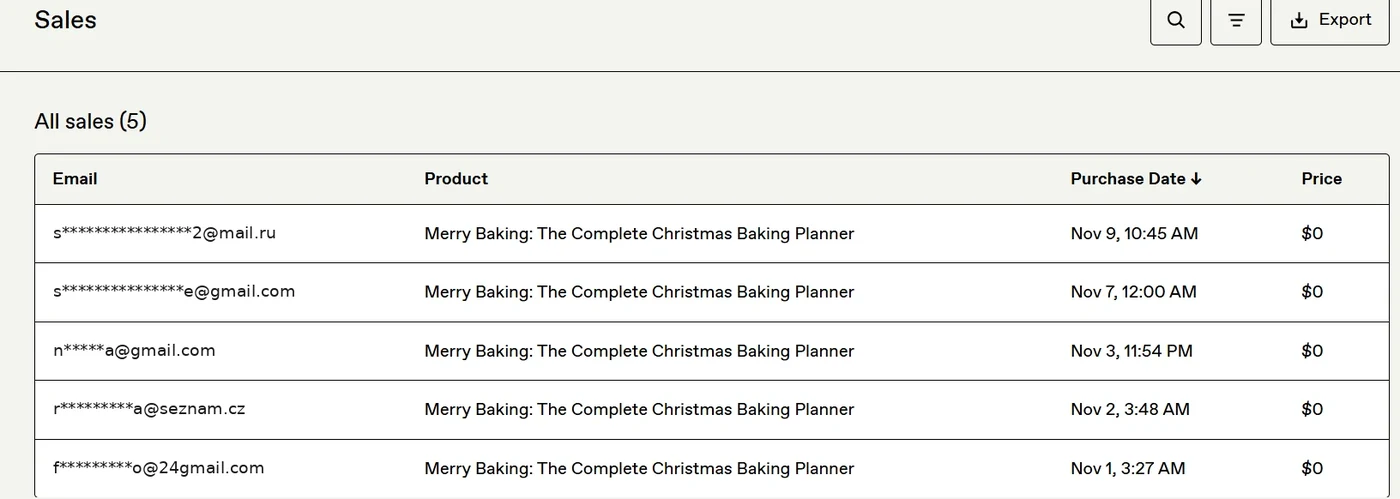
Five downloads is a small start, and I’m not pretending otherwise. By my own timing rules, a Christmas product would ideally be live by September. Even so, it showed me that a focused seasonal freebie can pull in subscribers from free traffic, even in a busy season.
A free seasonal product is a low-risk way to test an idea. If people download it, you’ve proven demand and built an email list for a paid version next season.
How to Create a Seasonal Product Fast
Seasonal windows are short, so speed matters. These are the shortcuts that save the most time.
Start from one evergreen template
Build a clean base layout once: a planner page, a checklist and a tracker. For each season, change the colors, cover, title and a few pages. One base template can become a Christmas planner, a Thanksgiving planner and a back-to-school planner.
Keep it focused on one job
A seasonal product doesn’t need 50 pages. A Thanksgiving dinner timeline plus a grocery list and a guest tracker can be enough. Buyers want to solve one problem before a date, not study a book.
Avoid dates that lock it to one year
Leave calendar pages undated or make the year easy to update. A product that says “2026” everywhere has to be rebuilt every year. An undated product can be relaunched with a new cover.
Make your mockups once
Create a set of mockup images for your seasonal pins and sales page, and reuse the layouts. Swap in the new product pages each season instead of designing from scratch.
Write the blog post alongside the product
A helpful blog post about the season, such as Christmas baking tips or a holiday budget guide, gives your product a natural home. If you don’t have a blog yet, my guide on how to start a WordPress blog on Hostinger walks you through the setup, and my Hostinger referral link gives you 20% off.
6 Seasonal Product Mistakes to Avoid
1. Launching when the season starts
By the time the holiday feels close to you, planners have been saving ideas for weeks. Build and pin early, using the timing table above.
2. Building too much for an untested idea
A huge bundle takes longer to make and pushes your launch later. Start with one focused product and add more next season if it sells.
3. Skipping research
Not every holiday is worth a product. Check Pinterest Trends, look at what’s already selling on Etsy and Gumroad, and see whether people are searching for your exact idea.
4. Using one pin for the whole season
One pin rarely carries a product. Create several pins with different images and headlines, and add fresh ones as the date gets closer. If your pins get saves but few clicks, my tips to increase your Pinterest CTR can help.
5. Forgetting the costs of paid ads
Seasonal products are often priced low. If you use ads, make sure your price leaves room for the ad cost per sale and platform fees. On Gumroad, for example, direct sales carry a 10% fee plus $0.50, with card processing on top.
6. Abandoning the product after one season
The first season is the hardest, because you’re starting with no saves, no reviews and no list. The second year, your old pins, posts and subscribers give you a head start. Many sellers quit right before that advantage kicks in.
What to Do After the Season Ends
The day after a holiday, demand for that product drops sharply. That’s normal. What you do next decides how well it sells the following year.
• Write down your numbers: downloads, sales, which pins worked and when traffic started rising.
• Bundle it: combine seasonal products into a year-round bundle, or add them as bonuses to an evergreen product.
• Update it: fix anything buyers asked about and refresh the design while the details are fresh in your mind.
• Plan next year’s start date: use this year’s traffic data to start a few weeks earlier next time.
• Email your list: thank the people who downloaded or bought, and point them to an evergreen product they can use now.
Treat every seasonal product as a yearly asset rather than a one-time launch. Each year it should start earlier, look better and reach more people than the year before.
See a seasonal product built for one clear job
My Holiday-Proof Money Planner is a fillable PDF that helps you plan holiday spending before it gets out of hand. It’s a good example of a focused seasonal product that solves one problem before a deadline.
View the Holiday-Proof Money Planner →Frequently Asked Questions
When should I launch a Christmas digital product?
Aim to have it live by September, with pins and blog posts going up from September to October. Pinterest data shows Christmas searches rising months ahead of December and spiking in October and November. A product launched in December misses most of the planning crowd.
What seasonal printables sell best?
Planners and checklists tied to big holidays tend to do well: Christmas gift trackers, holiday budget planners, Thanksgiving prep planners, back-to-school schedules and New Year goal planners. Kids’ activity packs for holidays are also popular with parents.
Can I sell seasonal products on both Etsy and Gumroad?
Yes. Etsy has buyers already searching for seasonal printables, but competition is heavy. Gumroad works well when you bring your own traffic from Pinterest or a blog. Many sellers use both and compare results.
Are seasonal digital products good for beginners?
They can be, because the deadline creates urgency and search demand is predictable. The main risk is timing. Beginners should start early, keep the first product small and pair it with at least one evergreen product.
Should I update my seasonal products every year?
Yes, but lightly. Refresh the cover, fix anything buyers asked about and update any dates. Keeping the product mostly undated makes yearly updates quick.
Final Thoughts
Seasonal digital products reward planning more than talent. The same simple planner can sell well or not at all, depending only on when it shows up.
Research first, build early and give your pins time to grow before the season peaks. Start small, learn from each season and relaunch your best products earlier every year.
If you’re still deciding which products to build, start with my digital products for beginners guide, and follow Trek Pelican on Pinterest for more seasonal product and pinning ideas.
Keep reading
• Digital Products for Beginners: How to Make Your First Sale
• 15 Low-Cost Digital Products Under $10 That Sell
• How I Find Pinterest Trends Before They Peak
• Best Pinterest Niches for Seasonal Traffic
• How to Grow on Pinterest Fast
• 18 Passive Income Ideas That Actually Work
• Side Hustles That Actually Pay
Sources
These are the outside sources I used for the facts and figures in this article:
• Pinterest Business: Change your plans. Your audience already did
• PPC Land: Pinterest reveals key marketing moments and search trends for 2025