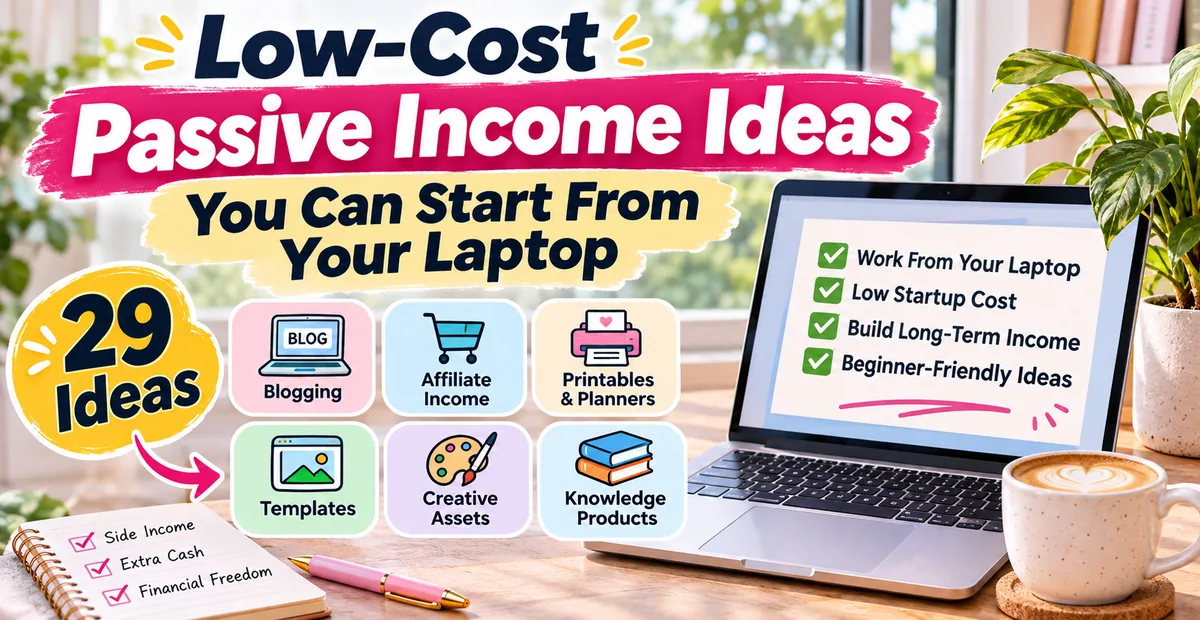
29 Low-Cost Passive Income Ideas You Can Start From Your Laptop
This post may contain affiliate links. If you buy through them, I may earn a small commission at no extra cost to you. Read our full affiliate disclosure
The earnings shown in this post are my own results. Yours will vary with your skill, time, niche and luck, and nothing here is a promise or guarantee of income. Read the earnings disclaimer
When I started earning online, I did not even own a laptop. I worked from a smartphone, my blog ran on a free platform, and the only thing I paid for was a $9.06 domain name.
Every idea in this post can be started the same way.
By low-cost I mean somewhere between nothing and about $50 to begin. You pay in time instead of money. That trade is slower, but it also means a failed attempt costs you a few weekends and not your savings.
Below are 29 passive income ideas you can run from a laptop, sorted by type. A laptop makes the work faster, but as you will see, it is not where I began. The ones I earn from come with my real numbers, including the small ones. The rest are explained as practical guidance, with the cost, the tools, where to sell and the first step to take.
If you want the bigger picture first, including ideas that need capital such as savings and dividend funds, read 18 passive income ideas that actually work.
What Low-Cost Really Means
A low startup cost does not make an idea easy. It moves the cost somewhere else. Free ideas usually need the most patience, because you are building an audience from zero with content alone.
Here is how I group the startup costs in this post:
• $0: free tools and free platforms only.
• Under $20: a domain name, a listing fee or one small tool.
• Under $50: a domain plus basic hosting, or a one-time seller fee.
My own start sits at the very bottom of that range, so let me show you exactly what it cost.
How I Started With a Smartphone and a $9 Domain
I wrote my first posts in 2017 on WordPress.com, typing on a smartphone because I had no laptop. It was not serious. I was learning and testing whether I would enjoy writing at all.
In 2019, while I was still a student, I decided to earn online properly. I did not want to spend money, so I started again on Blogspot, which is free.
Then I learned that a custom domain improves your chances of being approved for ads, because it shows you are committed for the long term. Money was tight, but in October 2019 I bought my first domain from Namecheap for $9.06. That was my entire investment, and in December 2019 the site was approved for Google AdSense.
I stayed on free Blogspot for more than three years. In January 2023 I moved to WordPress on Hostinger, and later I transferred the domain from Namecheap to Hostinger as well.
The main reason was payment. Renewing the domain needed a credit card, an international debit card or PayPal, and even with a PayPal account I kept running into payment problems at renewal time. I have not had that issue with Hostinger, and its hosting plans also bundle a domain name free for the first year.
If you are starting on a small budget, check which payment methods a company accepts before you buy. A cheap domain is no bargain if you struggle to renew it.
That move was not smooth. I did not check my URL slugs, so some posts that ranked in Google’s top 10 lost their rankings, and some posts failed to transfer at all. I explain how to avoid that in how to start a WordPress blog on Hostinger.
Here is the whole timeline in one place:
• 2017: first posts on WordPress.com from a smartphone. Cost: $0.
• October 2019: a serious start on Blogspot with a Namecheap domain. Cost: $9.06.
• December 2019: approved for Google AdSense.
• January 2023: moved to WordPress on Hostinger.
• 2026: started selling digital products with about $90 invested.
The smartphone was only my starting point. Once I had a laptop, I explored many more ways to earn, and today almost all of my income work happens on it: writing articles, designing pins and products, and managing my sites.
I share this so you can see that the slow part was never the money or the device. It was the learning.
All 29 Ideas by Startup Cost
| # | Idea | Startup cost | Time to first income |
|---|---|---|---|
| 1 | Niche blog with display ads | Under $50 | 6 to 12 months |
| 2 | Pinterest traffic for a blog | $0 | 2 to 6 months |
| 3 | Facebook page monetization | $0 | 3 to 6 months or more |
| 4 | Faceless YouTube channel | $0 | 6 to 18 months |
| 5 | Podcast with sponsors | Under $50 | 6 to 12 months or more |
| 6 | Brand links through LTK | $0 | 2 to 6 months |
| 7 | Amazon Associates | $0 | 2 to 6 months |
| 8 | Software and hosting affiliates | $0 | 3 to 6 months |
| 9 | Digital product marketplaces | $0 | 3 to 6 months |
| 10 | Printable planners | $0 | Weeks to months |
| 11 | Budget trackers | $0 | Weeks to months |
| 12 | Wedding and event planning kits | $0 | Weeks to months |
| 13 | Study notes and guides | $0 | Weeks to months |
| 14 | Worksheets for kids and teachers | Under $50 | 1 to 3 months |
| 15 | Recipe ebooks | $0 | Weeks to months |
| 16 | Canva templates | Under $20 | Weeks to months |
| 17 | Social media template packs | Under $20 | Weeks to months |
| 18 | Resume templates | Under $20 | Weeks to months |
| 19 | Notion templates | $0 | Weeks to months |
| 20 | Invitation templates | Under $20 | Weeks to months |
| 21 | Spreadsheet templates | $0 | Weeks to months |
| 22 | Printable wall art | Under $20 | Weeks to months |
| 23 | Digital stickers | Under $20 | Weeks to months |
| 24 | Phone wallpapers | Under $20 | Weeks to months |
| 25 | Print on demand | Under $20 | 1 to 4 months |
| 26 | Kindle ebooks | $0 | 1 to 3 months |
| 27 | Mini course or paid workshop | $0 | 1 to 3 months |
| 28 | Email list built with a free product | $0 | 2 to 6 months |
| 29 | Resource library membership | Under $50 | 3 to 12 months |
Part 1: Content That Earns From Ads
These ideas pay you for attention. You publish content, a platform shows ads around it, and you receive a share. They are slow to start and the most hands-off once they work.
1. Niche Blog With Display Ads
A blog is still my best earner and my most passive one. As I described above, mine began on free Blogspot with a $9.06 domain, and I did not pay for hosting until more than three years later.
If your budget is close to zero, you can follow the same route. Start on Blogspot, buy your own domain because ad networks expect one, and publish consistently. Move to WordPress when you can afford hosting, since it gives you far more control over design, speed and ads.
If you can spare a few dollars a month, skip the free stage and begin on WordPress. You avoid the migration that cost me my rankings.
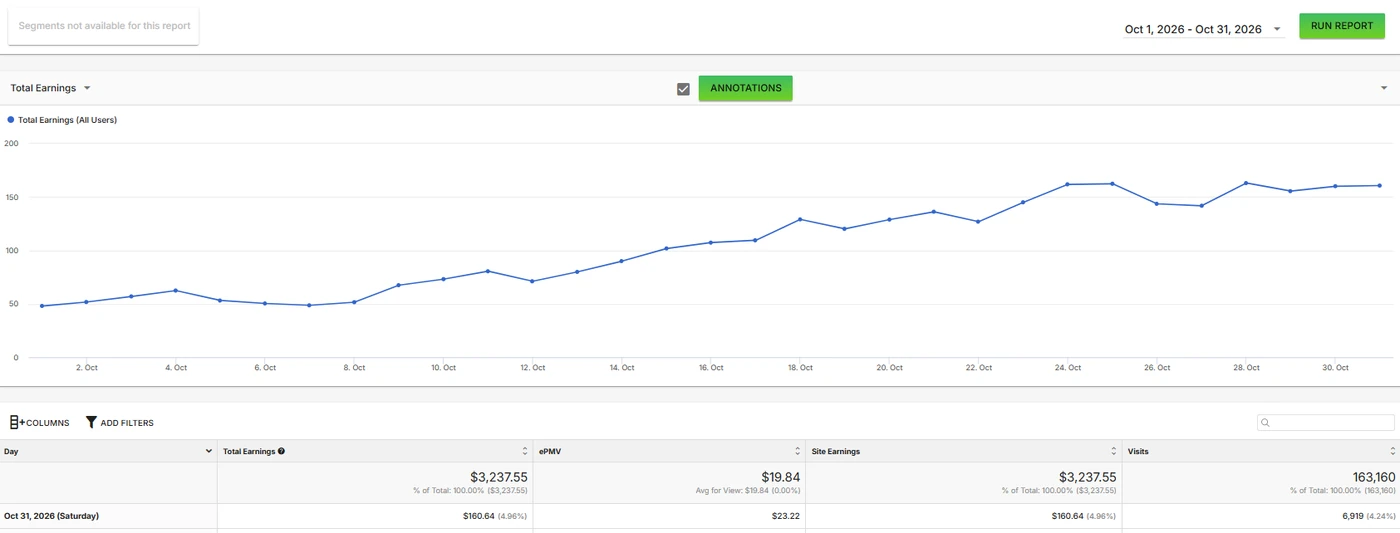
The wait was long, and most of my early years earned almost nothing. Today one of my sites looks very different. In October 2026 it earned a little over $3,200 from about 163,000 visits.
• Cost: a domain is roughly $10 to $15 a year, and basic hosting is a few dollars a month.
• Tools: WordPress and a hosting plan.
• First step: pick one niche and write your first ten helpful articles.
My setup guide is how to start a WordPress blog on Hostinger, and my Hostinger referral link gives 20% off with code BKXHEMANTLXU. For the income side, see how to make $100 a day blogging and how to increase ad RPM.
2. Pinterest Traffic for a Blog
A blog without readers earns nothing, and Pinterest is the cheapest way I know to get readers. An account is free, pins are free to make in Canva, and a good pin can send visitors for months.
Pinterest became my main traffic source after my search traffic collapsed. In the last 30 days my account reached about 120 million impressions and sent about 250,000 clicks out to my sites.

Pinterest does not pay for views directly in most cases. It feeds the things that do pay: ads, affiliate links and your own products.
• Cost: $0.
• Tools: a Pinterest business account and Canva.
• First step: create five boards in your niche and publish several pins for each article.
My full method is in how to grow on Pinterest and how to increase your Pinterest CTR.
3. Facebook Page Monetization
Facebook pays creators through its Content Monetization program, which covers Reels, photos, Stories and text posts. I spend about two hours creating and scheduling a batch of posts, and the page runs on its own after that.
The income is modest so far. In October 2026 Facebook paid me about $235 for what my content earned in September.

• Cost: $0.
• Tools: a Facebook page or a profile in professional mode, and Meta Business Suite for scheduling.
• First step: post original content daily and register your interest in the Monetization tab of your Professional Dashboard.
The program is invite-only, so you cannot count on getting in quickly. Original content matters most, because Meta’s rules penalize copied and reposted material.
4. Faceless YouTube Channel
A YouTube video keeps earning ad revenue for as long as people watch it. You do not have to appear on camera. Screen recordings, slides with a voiceover and tutorial walk-throughs all work.
To earn ad revenue you need to join the YouTube Partner Program. The long-standing bar is 1,000 subscribers plus 4,000 public watch hours in a year, or 10 million Shorts views in 90 days. YouTube has announced higher thresholds for new applicants from February 2027, so check the current numbers first.
• Cost: $0 with free recording and editing software.
• Tools: a screen recorder, a free video editor and a clear microphone if you can afford one.
• First step: list 20 questions people ask in your niche and answer one per video.
5. Podcast With Sponsors
A podcast builds a loyal audience, and old episodes keep getting played. Income comes from sponsors, affiliate mentions and listener support once the audience is large enough.
It is the least passive idea in this section, because listeners expect new episodes. Treat it as a long-term project and not a quick earner.
• Cost: free hosting exists, so a basic microphone is the only real expense.
• Tools: a microphone, free recording software and a free podcast host.
• First step: record three episodes before you launch, so new listeners have something to continue with.
Part 2: Affiliate Income
Affiliate marketing costs nothing to join. You recommend a product with a tracked link and earn a commission on each sale. The commission rate decides whether it is worth your effort, and I learned that from my own reports.
6. Brand Links Through LTK
LTK gives creators one account for thousands of retailers. Each brand sets its own rate, and LTK says the average falls between 10% and 25%. Some brands pay less, so check the rate in the app before linking.
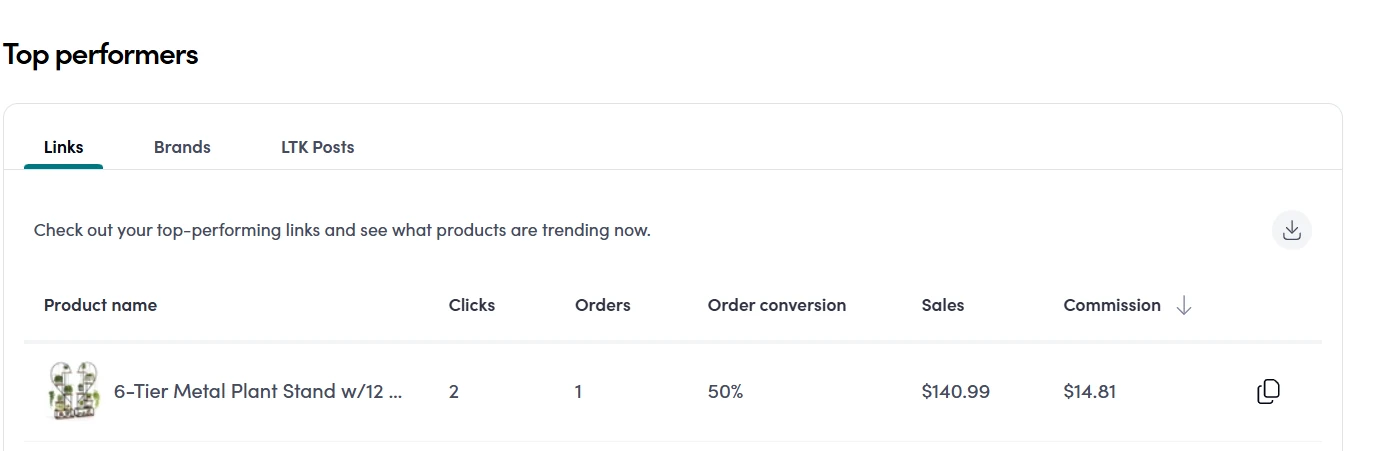
One of my orders shows why I prefer it. A reader bought a plant stand for about $141 and my commission was about $15.
• Cost: $0, but you must apply and be approved.
• Best for: fashion, home, beauty and lifestyle content.
• First step: build a small body of content and an audience, then apply.
7. Amazon Associates
Amazon Associates is the easiest affiliate program to start with, because readers already trust Amazon. The weakness is the rate, which is only a few percent in most categories.
In 2025 my links helped ship about $17,000 of products. My commission for the year was about $555, roughly 3 cents on the dollar.

• Cost: $0.
• Best for: high-traffic sites, where small commissions add up.
• First step: add links to articles that already get visitors, and choose higher-priced products in better-paying categories.
8. Software and Hosting Affiliate Programs
Software, hosting and online tools often pay far more than physical products, commonly 20% to 50% of a sale. Some pay again every month the customer stays, which is as close to true passive income as affiliate marketing gets.
These programs suit tutorials. A step-by-step guide that shows a tool solving a problem will keep converting for as long as the tool exists.
• Cost: $0.
• Where to find them: the footer of a tool’s website, or networks such as Impact, CJ and Awin.
• First step: list the tools you already use and check which have a program.
9. Digital Product Marketplaces
Marketplaces such as ClickBank, Digistore24 and WarriorPlus list courses, ebooks and software from independent vendors. Vendors set the commission themselves, and it is usually much higher than retail programs offer.
Quality varies a great deal. Read the sales page as a customer would, check the refund rate where it is shown, and promote only products you would be comfortable having your name next to.
• Cost: $0.
• Best for: niche blogs and email lists with a clear problem to solve.
• First step: pick one product that matches an article you have already written.
Part 3: Printables and Planners
This is the part I know best after blogging. I started selling digital products this year with about $90 invested, and planners and kits were the first things I made.
The files are easy to create. AI tools such as ChatGPT, Claude and Google Gemini help with outlines and wording, and Canva handles the layout. Selling them is the hard part.
10. Printable Planners
Daily, weekly and seasonal planners sell all year. Seasonal ones are a good entry point because buyers search for them at a predictable time.
I use a free planner to build my email list before I sell anything. My free Christmas baking planner went live on Gumroad at the start of November and had its first five downloads within nine days.

Five downloads is not income. It is five people who may buy a paid planner later, and it cost me nothing but time.
• Cost: $0 with Canva’s free plan and Gumroad, which has no monthly fee.
• Sell on: Gumroad, Etsy or your own blog.
• First step: make one planner for one occasion, and offer a free version first.
11. Budget Trackers
Money planners are practical products with steady demand, especially in January and before the holidays. A fillable PDF or a simple spreadsheet is enough.
I make these for this site because they match what I write about. A tracker works best when it does one job well, such as a 30-day spending reset or a holiday budget.
• Cost: $0.
• Sell on: Gumroad or Etsy.
• First step: build the tracker you would use yourself this month.
12. Wedding and Event Planning Kits
My first digital product was a wedding planning kit: guides, checklists and a budget tracker in one bundle. Bundles feel more valuable than single files, and one event creates many planning needs.
I sell this kit through SuperProfile using Facebook ads. So far it has brought 42 sales across my payment pages. Converted to US dollars, the revenue is just under $100, and the ad spend comes out of that.

• Cost: $0 to create. Paid ads are optional and risky for beginners.
• Sell on: Gumroad, Etsy or a payment page.
• First step: choose one event and list every checklist a planner would need.
13. Study Notes and Guides
Clear notes on a difficult subject are worth money to the next group of students. Exam summaries, formula sheets and revision guides can all be sold as PDFs.
Sell only your own original notes. Scanned textbook pages and copied course materials belong to someone else.
• Cost: $0.
• Sell on: Gumroad, Etsy or student note marketplaces.
• First step: turn the notes from your strongest subject into a clean, well-organized PDF.
14. Worksheets for Kids and Teachers
Teachers and parents buy ready-made worksheets to save preparation time. Handwriting practice, math drills and holiday activity packs are common sellers.
Teachers Pay Teachers is the main marketplace. Its Basic membership costs a one-time $29, pays 55% of each sale and deducts 30 cents per resource. A $5 pack leaves you about $2.45.
• Cost: $29 on Teachers Pay Teachers, or $0 if you start on Gumroad.
• Best for: teachers, tutors and parents who already make their own materials.
• First step: package five worksheets on one skill for one grade level.
15. Recipe Ebooks
A recipe collection with a clear theme sells better than a general cookbook. Think 30 vegetarian dinners, festive baking or budget meal prep.
Recipes must be your own and tested. Add cooking times and simple photos, and keep the design easy to read on a phone, because that is where most buyers will open it.
• Cost: $0 beyond the ingredients you would cook anyway.
• Sell on: Gumroad, Etsy or Kindle.
• First step: write down the ten recipes people ask you for most often.
Part 4: Templates
Templates save buyers time, and people pay for that. You design once and deliver a link or a file. Etsy is the usual marketplace, and it charges a 20 cent listing fee plus a 6.5% transaction fee and payment processing.
16. Canva Templates
You design in Canva, create a template link and deliver it inside a PDF. Buyers edit the design in their own account.
Keep each template easy to edit: use free fonts and elements so buyers on the free plan can open it, group related items, and include a one-page guide that explains how to change colors and text. Clear instructions cut refund requests more than anything else.
• Cost: 20 cents per Etsy listing.
• Popular types: planners, media kits, menus and business cards.
• First step: study the best sellers in one category and design a cleaner version in your own style.
17. Social Media Template Packs
Small businesses need a steady supply of posts and rarely have a designer. A pack of 30 matching templates for one industry solves a month of work for them.
Build the pack around what that business posts in a normal month: tips, quotes, offers, testimonials and announcements. Write sample captions inside the designs so the buyer can see how each one is used, and show the full grid in your listing photos.
• Cost: 20 cents per listing.
• Best niches: real estate, salons, coaches, restaurants and fitness trainers.
• First step: choose one industry and design ten posts it could use this week.
18. Resume Templates
Job seekers want a resume that looks professional and is easy to edit. Templates with a matching cover letter and reference page sell best.
Fancy layouts with columns, icons and graphics can confuse the software many employers use to scan applications. A clean single-column design with standard headings is safer for the buyer and easier for you to support. Offer two or three color versions in the same file.
• Cost: 20 cents per listing.
• Formats: Canva, Google Docs and Word.
• First step: design one clean, simple layout that hiring software can read.
19. Notion Templates
Notion users buy ready-made systems for budgets, habits, content plans and study schedules. You build the page once and share a duplicate link.
Fill the template with realistic sample data, so buyers understand it in the first minute, and add a short start-here page. A free lite version works well as a lead magnet for the full paid system.
• Cost: $0. Notion has a free personal plan.
• Sell on: Gumroad or Notion’s own marketplace.
• First step: clean up a system you already use and write short instructions for it.
20. Invitation Templates
Weddings, baby showers and birthdays all need invitations, and many hosts prefer to edit a template themselves. Matching sets with thank-you cards and signs raise the order value.
Design for the common print sizes and include a phone-sized version for sharing by message. Buyers search by theme and season, so name each listing after its style and occasion, such as a rustic autumn wedding or a pastel baby shower.
• Cost: 20 cents per listing.
• Best for: designers who enjoy typography and color.
• First step: create one invitation in three color options.
21. Spreadsheet Templates
A well-built spreadsheet does calculations a PDF cannot. Budget sheets, debt payoff trackers, small business bookkeeping and inventory lists are steady sellers.
Test every formula with unusual numbers before you sell, and protect the formula cells so buyers cannot break them by accident. A short video or a notes tab that shows where to type is worth the extra hour.
• Cost: $0 with Google Sheets.
• Sell on: Etsy or Gumroad.
• First step: build one sheet with clear instructions and locked formulas.
Part 5: Creative Assets
These suit people who like to draw or design. Prices are low, so income depends on building a shop with many listings in one recognizable style.
22. Printable Wall Art
Buyers download a file and print it at home or at a print shop. Offer each design in several common sizes and show it in a room mockup.
Export at high resolution so the print stays sharp at large sizes, and tell buyers which paper works best. Sets sell better than single prints, because people decorate a whole wall and want pieces that match.
• Cost: 20 cents per listing.
• Steady sellers: quotes, botanical prints, nursery art and seasonal sets.
• First step: design a matching set of three prints.
23. Digital Stickers
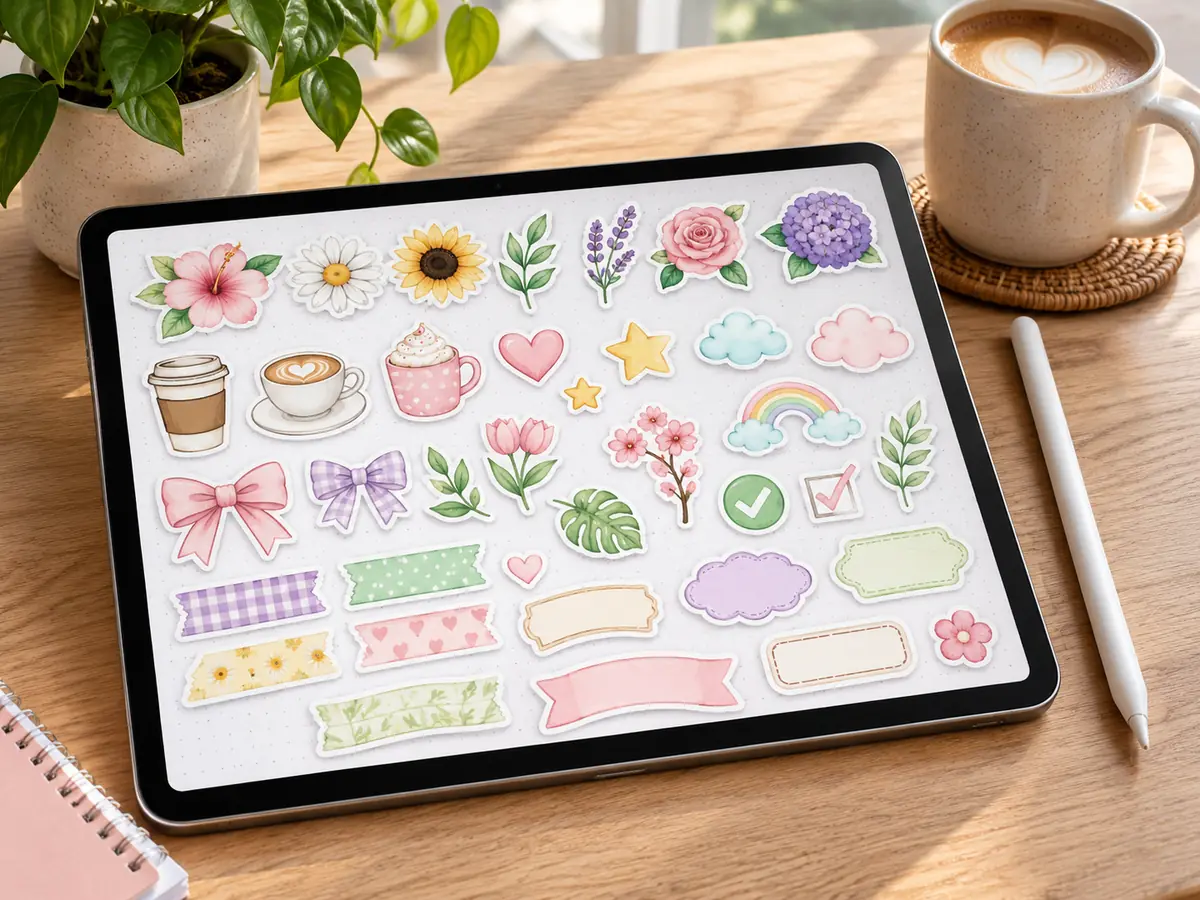
People who plan on tablets decorate their pages with digital stickers. They are sold as image packs that work in note-taking apps.
Save each sticker as a separate image with a transparent background, and include one sheet that shows the whole pack. Pick a theme buyers already plan around, such as seasons, study, fitness or self-care, and keep one drawing style across the pack.
• Cost: 20 cents per listing.
• Tools: any drawing app or Canva.
• First step: create one themed pack of 30 to 50 stickers.
24. Phone Wallpapers

Wallpaper packs are simple to make and simple to price low. Matching sets with lock screen, home screen and widget designs sell better than single images.
Make the designs tall enough for current phone screens and leave calm space where the clock and icons sit. Seasonal and aesthetic themes do well on Pinterest, which is the natural place to promote them.
• Cost: 20 cents per listing.
• Best for: illustrators and pattern designers.
• First step: design a set of ten in one color palette.
25. Print on Demand
You upload a design and a supplier prints it on a shirt, mug or tote bag only when someone orders. You hold no stock and ship nothing.
Suppliers such as Printify and Printful connect to Etsy and other stores. Margins are thinner than with digital files, because the supplier’s base cost comes out of every sale.
• Cost: listing fees, plus one sample order to check quality.
• Best for: designs aimed at one hobby, profession or pet breed.
• First step: order a sample before you promote anything.
Part 6: Knowledge Products
If you know something other people are trying to learn, you can package it. These products take more effort to create than a template, and each sale is worth more.
26. Kindle Ebooks
Kindle Direct Publishing lets you publish an ebook for free. Amazon handles the store and delivery, and you receive a royalty of 35% or 70% depending on your price.
• Cost: $0. A good cover is the main optional expense.
• Pricing note: the 70% option starts at a $2.99 list price.
• First step: outline a short, practical guide on one problem you have solved.
27. Mini Course or Paid Workshop
You do not need a 40-lesson course. A focused one-hour workshop or a five-lesson mini course is quicker to make and easier to sell.
Record it once, sell the replay, and let the questions buyers ask tell you whether a bigger course is worth building.
• Cost: $0 with free screen recording software.
• Sell on: Gumroad, Udemy or Teachable.
• First step: teach the workshop live once to a small group.
28. Email List Built With a Free Product
An email list does not pay by itself, but it makes every other idea here work better. Subscribers see your new products first, and no algorithm stands between you and them.
This is the plan behind my free planner in Part 3. Give away something useful, earn the email, then recommend paid products and affiliate offers over time.
• Cost: $0. Several email tools have free plans for small lists.
• Tools: an email service and one free product.
• First step: create a one-page checklist your ideal reader would want today.
29. Resource Library Membership
Once you have ten or more digital products, you can bundle them into a library that members pay to access. New files added each month give people a reason to stay.
Leave this one until last. A membership needs an existing audience and enough products to feel worth a recurring fee.
• Cost: membership tools start at a small monthly fee.
• Best for: creators with an email list and a product catalog.
• First step: ask your subscribers what they would want inside it.
The Free Tool Stack I Would Use
You can run most of this list with four free tools:
• Canva for designing products and pins.
• Gumroad for selling and delivering files. It charges 10% plus 50 cents per sale and nothing monthly.
• An AI assistant for outlines, drafts and proofreading.
• Pinterest for free traffic.
Add a domain when you are ready to look professional, and hosting when you start a blog. Nothing else is required at the beginning.
The 3 Ideas I Would Start With on a $0 Budget
If I had to begin again with only a laptop, I would pick these three and run them together:
1. One free digital product. A planner or checklist that collects emails from the first day.
2. Pinterest. Pins that send people to that free product and later to a blog.
3. A niche blog. Started on a free or low-cost setup, with affiliate links added once traffic arrives.
Each one feeds the others. The product builds the list, Pinterest brings the visitors, and the blog turns them into ad and affiliate income.
Mistakes That Cost Money
Paying for ads too early
Ads only multiply what already works. If your product page does not convert free visitors, paid visitors will not save it. Prove the offer with free traffic first.
Starting too many ideas at once
Twenty-nine ideas is a menu, not a to-do list. One idea worked on for six months beats six ideas worked on for one month each.
Buying tools before you need them
Premium design tools, schedulers and courses can wait. Start with the free versions and upgrade only when a tool is clearly holding you back. My blog ran for years on a single $9.06 purchase.
Copying instead of creating
Marketplaces remove copied designs, and buyers recognize generic work. Use best sellers for research, then make something that is clearly your own.
Frequently Asked Questions
Can I really start with no money?
Yes. Pinterest, Facebook, Canva’s free plan, Gumroad and free blogging platforms cost nothing. You will invest time instead, usually several months before the first income.
Can I start from a phone instead of a laptop?
Yes. I wrote my first blog posts on a smartphone. Writing, pinning and posting all work on a phone, though designing products and managing a website are much faster on a laptop, which is where I do most of my work now.
Which idea earns the fastest?
Digital products and templates can sell within weeks if you already have traffic or list on a marketplace with its own buyers. Ad-based ideas such as blogging and YouTube take the longest.
Do I need a blog to sell digital products?
No. You can sell through Gumroad or Etsy and send traffic from Pinterest. A blog helps later because it adds ad income and gives your products a permanent home.
Can I use AI to make these products?
Yes, as a helper for outlines, wording and ideas. Edit everything, add your own knowledge and check each marketplace’s rules about AI-made designs.
How many products do I need before I earn?
There is no fixed number. One strong product with good traffic can outsell a shop of fifty weak ones, but most sellers see steadier income once they have ten or more related listings.
Final Thoughts
A smartphone and patience were enough for me to start, and getting a laptop is what let me grow into most of the income sources I use today. All of them grew from free tools and a lot of trial and error.
Pick one idea from this list, give it six months and track what happens. For more guides like this, follow Trek Pelican on Pinterest.
Sources
• YouTube Help: YouTube Partner Program overview and eligibility
• Meta for Creators: How you earn on Facebook Content Monetization
• Digiday: LTK commission rates, as stated by the company
• Lasso: Amazon affiliate commission rates
• Teachers Pay Teachers: Become a seller, fees and payout rates